/images/avatar.png

Xiaopeng Xu, Ph.D.

Research Scientist @ KAUST · Agentic AI for scientific discovery, protein design & synthetic biology

Recent News

Recent Notes

Hello world to my new personal website!

“Hello World!” Welcome to my new personal website.

This site was previously hosted on Google Sites, and now all content has been migrated to GitHub Pages with Hugo.

A new “Notes” sections is supported in this website. So I hope to share more updates about my research and explorations here.
AI 助理配置

Claude code 使用

https://github.com/anthropics/claude-code

https://deepwiki.com/anthropics/claude-code

https://xux-zotero-img.oss-cn-beijing.aliyuncs.com/img/20260613005331682.png
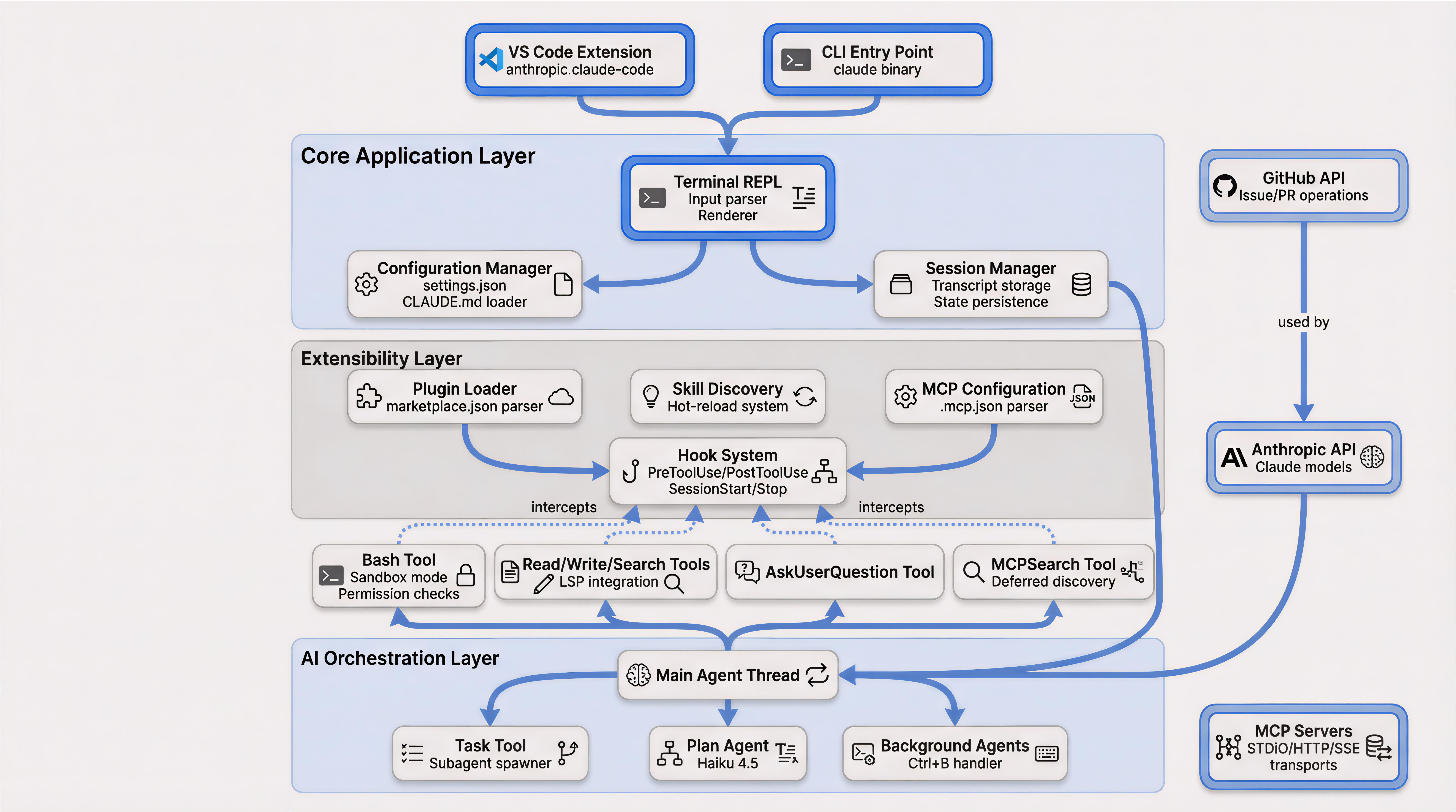
Claude Code Architecture

安装

# Install
curl -fsSL https://claude.ai/install.sh | bash

# Uninstall
npm uninstall -g @anthropic-ai/claude-code

# Regular usage
claude
claude --resume

# Use without frequent responds
claude  --dangerously-skip-permissions

# Use resume previous sessions
claude  --dangerously-skip-permissions --resume

常用命令

# !直接运行命令输入,结果直接进上下文,不用来回切终端
!git status 
!npm test

# 双击Esc后悔药        
# 代码改乱了?按两下Esc, 直接回到上一个检查点,后悔来得及

#Ctrl+R翻旧账        
# 昨天的提示词忘了?按Ctrl+R秒速搜索历史对话,比翻记事本快

# @召唤文件
# 想引用某个文件?打@就行,像微信@人一样,再也不用复制粘贴
@results/file.fasta

# Remote 随时随地接力
# 网页版开始写代码,回家接着写用 claude--teleport 把云端会话"拉"到本地,无缝切换设备

# /export留下证据
# 重要对话输 /export 导出自动生成Markdown文档.写文档,复盘都超方便

# claude RD steps
/plan implement rate limiting on the /api/upload endpoint   # plan first, confirm
# ... approve plan ...
/prp-implement                                              # build w/ validation loops
/code-review --fix                                          # review + auto-apply cleanups
/security-review                                            # since it's an endpoint
/verify                                                     # run it, confirm behavior
/pr                                                         # push + open PR

Claude.md 命令

Claude.md 是一个很重要的 claude 功能,能够让 claude 对项目结构有比较好的记忆,减少每次反复开发。在开发过程中,很好的维护他,会让开发效率大大提升。

Amber 分子动力学模拟

MD simulation(Amber)

批量运行

for i in *.pdb; do mkdir -p "${i%.*}"; mv $i "${i%.*}"/complex.pdb ; done

for i in `ls -d */`; do cp ace_capt1/*.in  $i; done
for i in `ls -d */`; do cp ace_capt1/*.sbatch  $i; done

for i in `ls -d */`; do echo $i; cd $i; sbatch prepare_md.sbatch; cd ..;  done
for i in `ls -d */`; do echo $i; cd $i; sbatch run_md.sbatch; cd ..;  done

for i in {2..3}; do echo run$i; cp -r run1 run$i; done
for i in `ls -d run*/*/`; do echo $i; cd $i; sbatch run_md.sbatch; cd ../..;  done

整体说明

Amber作为最常用的分子动力学模拟软件之一,适用于许多生物体系的分子动力学模拟,功能全面。Amber软件包本身实际上分为AmberTools与Amber两部分。前者是免费的,且包含做一个完整的分子动力学模拟的所有功能。Amber是付费的,支持多CPU并行运算与GPU加速。

Jupyterlab 使用

本地命令行打开 JupyterLab

jupyter lab # 基础命令
nohup  jupyter-lab --no-browser --ip="0.0.0.0" 2>&1 & # 后台运行命令

Slurm 运行 Jupyter lab 交互分析

sbatch 脚本示例: run-jupyter-server.sbatch

#!/bin/bash
#SBATCH --time=2:00:00
#SBATCH --cpus-per-task=1
#SBATCH --gres=gpu:1
#SBATCH --mem=16G
#SBATCH --partition=debug
#SBATCH --constraint=intel
#SBATCH --job-name=jupyterlab
#SBATCH --mail-type=ALL
#SBATCH --output=./%x-%j.out
#SBATCH --error=./%x-%j.err

# use srun to launch Jupyter server in order to reserve a port
srun --resv-ports=1 ./run-jupyter-server.srun

srun 脚本: run-jupyter-server.srun

参考:https://github.com/kaust-vislab/sklearn-data-science-project/blob/master/bin/launch-jupyter-server.srun

MCP 开发说明

MCP 由 Claude 提出,其 Claude Code 对 MCP 的支持较好。开始研发 MCP 服务器时,建议先以 Claude Code 作为基础,后续再扩展到 Gemini CLI 和 OpenAI Codex。

DFT 有机反应建模

密度泛函理论 (DFT) 简介

密度泛函理论 (DFT) 是一种计算量子力学建模方法,用于物理学、化学和材料科学,研究多体系统(特别是原子、分子和凝聚相)的电子结构(或核结构)(主要是基态)。利用该理论,可以通过使用泛函来确定多电子系统的属性 - 即接受函数作为输入并输出单个实数的函数。对于 DFT,这些是空间相关电子密度的泛函。DFT 是凝聚态物理学、计算物理学和计算化学中最流行和用途最广泛的方法之一。