 Xiaopeng Xu
三维结构分析
Rdkit 使用
小技巧
禁用 log
from rdkit import RDLogger
RDLogger.DisableLog('rdApp.*')
PyMol 使用
参考:http://pymol.chenzhaoqiang.com/index.html
3D 模型操作
模型的对齐(align)
和 PDB 中已有模型做对齐
pymol grafting/model-0.relaxed.pdb

# Input in pymol command line
fetch 4m5y  # fetch 4m5y as framework to compare
alignto  # alignto 4m5y for close comparison
和本地模型做对齐
将已有的两个模型同时打开,并比较其结构的相似性。
# 使用 PyMol 来对齐结构
pymol 3gbm_native.pdb 3gbm_HA_repacked.pdb 3gbn_Ab_repacked.pdb
align 3gbn_Ab_repacked, 3gbm_native # 比对
# align 后,通常需要点击 action -> zoom 来放大显示某个模型
模型局部对齐
pymol 6m17/6m0j.cif.gz 6vw1.cif.gz # 打开待比对的文件
# 通过序列选择共同区域,并重命名为 ACE2_6m0j
save ACE2_6m0j.pdb, ACE2_6m0j

pymol 6m17/6m0j.cif.gz 6vw1.cif.gz ACE2_6m0j.pdb # 重新打开待比对的文件
align 6m0j, ACE2_6m0j # 比对
align 6vw1, ACE2_6m0j # 比对
# align 后,点击 action -> zoom 来放大显示 ACE2_6m0j 更清晰展示结果
裁剪模型
删除模型内容
pymol 3gbm_native.pdb # 使用 PyMol 来对齐结构
sele to_delete, resi 121-160+268-311 # 选择并删除氨基酸残基
# 右键选择 remove atoms
保存模型的一部分为另一 pdb 文件
pymol 3gbm_native.pdb # 使用 PyMol 来对齐结构
sele resi 121-160+268-311 # 选择氨基酸残基
# 重命名选择项目名字为 sele_123
save sele_123.pdb, sele_123
保存模型
保存模型到文件
save 3gbm_HA_3gbn_Ab.pdb, 3gbm_HA_repacked # 保存模型到文件
save 3gbm_HA_3gbn_Ab.pdb, 3gbm_HA_repacked + 3gbn_Ab_repacked # 保存两个模型到同一文件
残基操作
为 AA 添加 label
选择 AA,并在右键菜单中选择 label。
设置 label 大小为 18: set label_size, 18。
调整 label 位置。选择 Mouse -> 2 Button editing 开启编辑模式;单击 command 并选择 label,移动 label 位置;选择 Mouse -> 3 Button all modes 关闭 编辑模式。
水分子操作
选择配体周围的水分子
select ligand_water, ((ligands) around 3.2) and (resn HOH) # 3.2 是距离,单位是 A设置水分子大小为 0.5
alter active_water, vdw=0.5 # 设置水分子大小为 0.5
rebuild
Scene 操作
创建 scene
scene 001, store # 保存单个 scene更新 scene
scene 001, update # 更新 scene切换 scene
scene 保存好后,在左下角会有切换入口。点击即可切换。
删除 scene
在左下角 scene 上,右键 delete 即可删除。
用场景制作动画
mset 1x700 # 设置影片长度 1s = 30

# 主要是通过 view store 来设置视频内容
mview store, 1  # 选择 scene 并用 mview store 设置 scene 及其展示时间
mview store,  1, scene=001. # scene 来定义展示的 scene
mview store, 30, scene=002
mplay # 播放视频
mstop # 停止播放视频
# 导出 movie: 在 File > Export Movie as .. > MPEG.. > 选择 Draw(fast) 并选择导出文件位置
展示复合物结构
此处以抗体抗原结合 pose 为例子。
为各链染色
选择抗原,并展示为绿色 green > forest。
选择抗体重链,展示为紫色 blue > purpleblue。
选择抗体轻链,展示为浅黄色 yellow > paleyellow。
显示链间氢键
选择目标链,选择 find > polar contacts > to any atoms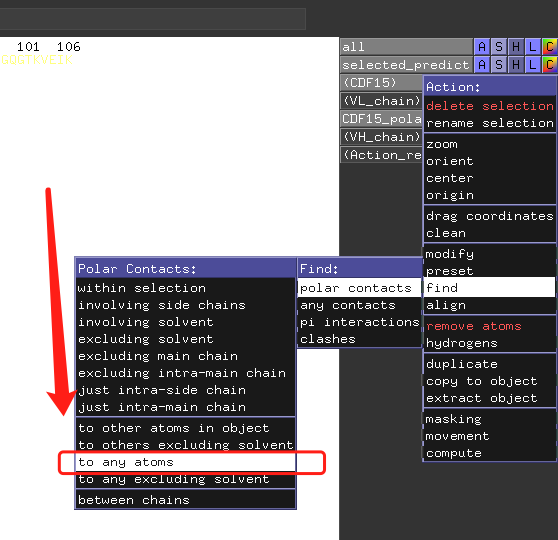
展示 Docking 结果
参考:YouTube 视频 和 PyMOL Wiki!
为受体/靶点着色,以创建用户友好的视图
bg_color white
set antialias=1
set orthoscopic=1
set gamma=1.15
set cartoon_fancy_helices, 1
set cartoon_fancy_sheets, 1
set_color wred, [0.788,0.000,0.140]
set_color wblue, [0.31,0.506,0.686]
set_color wgold, [0.855,0.647,0.125]
set_color wgreen, [0.134,0.545,0.134]
set_color wgray, [0.800,0.800,0.800]
set_color wrose, [0.65,0.47,0.55]
set_color wpurple, [0.37,0.31,0.62]
set_color mpurple, [0.75,0.57,0.80]
set_color mpgrey, [0.73,0.68,0.82]
set ray_shadows, 0
set ray_trace_fog, 1
为配体/小分子着色
# 取其一即可,推荐 yellow
util.cbay ligand # yellow
# 其他
util.cbag ligand # green
util.cbac ligand # cyan
util.cbam ligand # light magenta
util.cbas ligand # salmon
util.cbaw ligand # white/grey
util.cbab ligand # slate
util.cbao ligand # bright orange
util.cbap ligand # purple
util.cbak ligand # pink
显示距离已有配体 5A 之内的氨基酸残基
# 选择模型中的已有配体,并保存为 ligand
show sticks, byres all within 5 of ligand
显示极性键并着色
显示极性键
选择 配体,并选择 A -> find -> polar contacts -> to any atoms
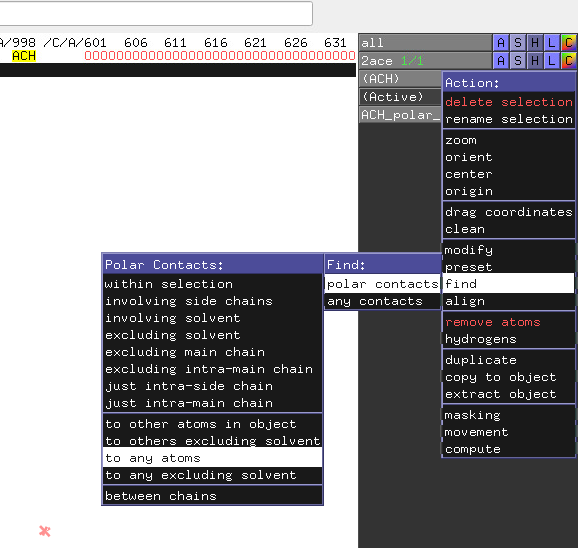
为极性键上色
显示键后,会出现一个单独的分组。对此分组可以上色以更好显示键。
显示极性键上的水分子
show nonbond # 显示未 bond 的分子,包括水分子
# 选择极性水分子,并保存为 active_water
# 显示 active_water 为 spheres
hide nonbond # 隐藏未 bond 的分子
show sticks, byres all within 5 of active_water # show nearby molecules
# measure distance using Wizard->Measurement->Distances->
# Merge with Previous->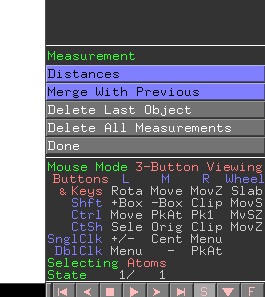
将水分子显示小一些
alter active_water, vdw=0.5
rebuild
修改模型
修改 Label
在 Mouse 下拉列表中,选择 Edit mode (2/3 button)。然后按住 Ctrl + 鼠标左键拖动 label。
AutoDock Vina 使用 (2010, 2021,2022)
安装 AutoDock Vina
https://autodock-vina.readthedocs.io/en/latest/installation.html
需要安装 binary component 和 python 组件。binary component 下载后修改权限即可使用。
./vina_1.2.0_linux_x86_64 --help使用 pip 安装 python 组件
pip install vina其他依赖:
ADFR software suite: 用于准备受体 https://ccsb.scripps.edu/adfr/。默认安装在 ~/ADFRsuite-1.0 目录。不安装会报错。
Meeko:用 pip 安装,用于准备配体
Basic Docking
受体预处理
用 PyMol 预处理
用 PyMol 打开受体模型,高亮显示 ligand,并展示距离 ligand 5A 之内的氨基酸。
展示 ligand 相连的极性键,看看是否有水分子,无水分子则可删除模型中的水分子。select 并 remove atoms。
删除与模型无关的 unkonwn 链。以及其他与 docking 无关的分子。
方法一:使用MGLtools
下载并安装 MGLtools:https://ccsb.scripps.edu/mgltools/downloads/。安装好后,运行 ./mgltools_1.5.7/bin/adt 打开 MGLtools 的界面。
将PDB文件用AutoDockTools读取,依次点击工具栏“Edit”→“Hydrogens”→“Add”→“Polar only”→“OK”,完成蛋白质加氢,
对蛋白质加电荷,依次点击“Edit”→“Charges”→“Add Kollman Charges”→“确定”
最后依次点击“Grid”→“Macromolecule”→“Choose”→“Select Molecule”,保存为“1iep_receptor.pdbqt“即可。
方法二:使用 ADFRsuite
需下载并安装 ADFRsuite:https://ccsb.scripps.edu/adfr/downloads/。注意可能需要切换/单独创建环境。(效果不如 MGLtools。)
~/ADFRsuite-1.0/bin/prepare_receptor -r 1iep_receptorH.pdb -o 1iep_receptor.pdbqt设定受体内的 binding pocket,即 docking grid
方法一:使用 MGLtools
参考:https://vina.scripps.edu/tutorial/
下载并安装 MGLtools:https://ccsb.scripps.edu/mgltools/downloads/。安装好后,运行 ./mgltools_1.5.7/bin/adt 打开 MGLtools 的界面。其他常用工具包括 pmv,vision 和 pythonsh 等。
先打开 receptor 并,在 Grid-> Macromolecule -> Choose 中选中受体。
然后打开配体 ligand。
只显示 ligand,不显示 receptor 情况下。打开 Grid Box -> 设置 Center Grid Box 到 ligand 的中心位置。然后以 cartoon 显示 receptor,检查位置是否正确。

保存此 grid box 信息,包括 x,y,z center 信息。
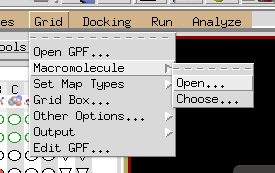
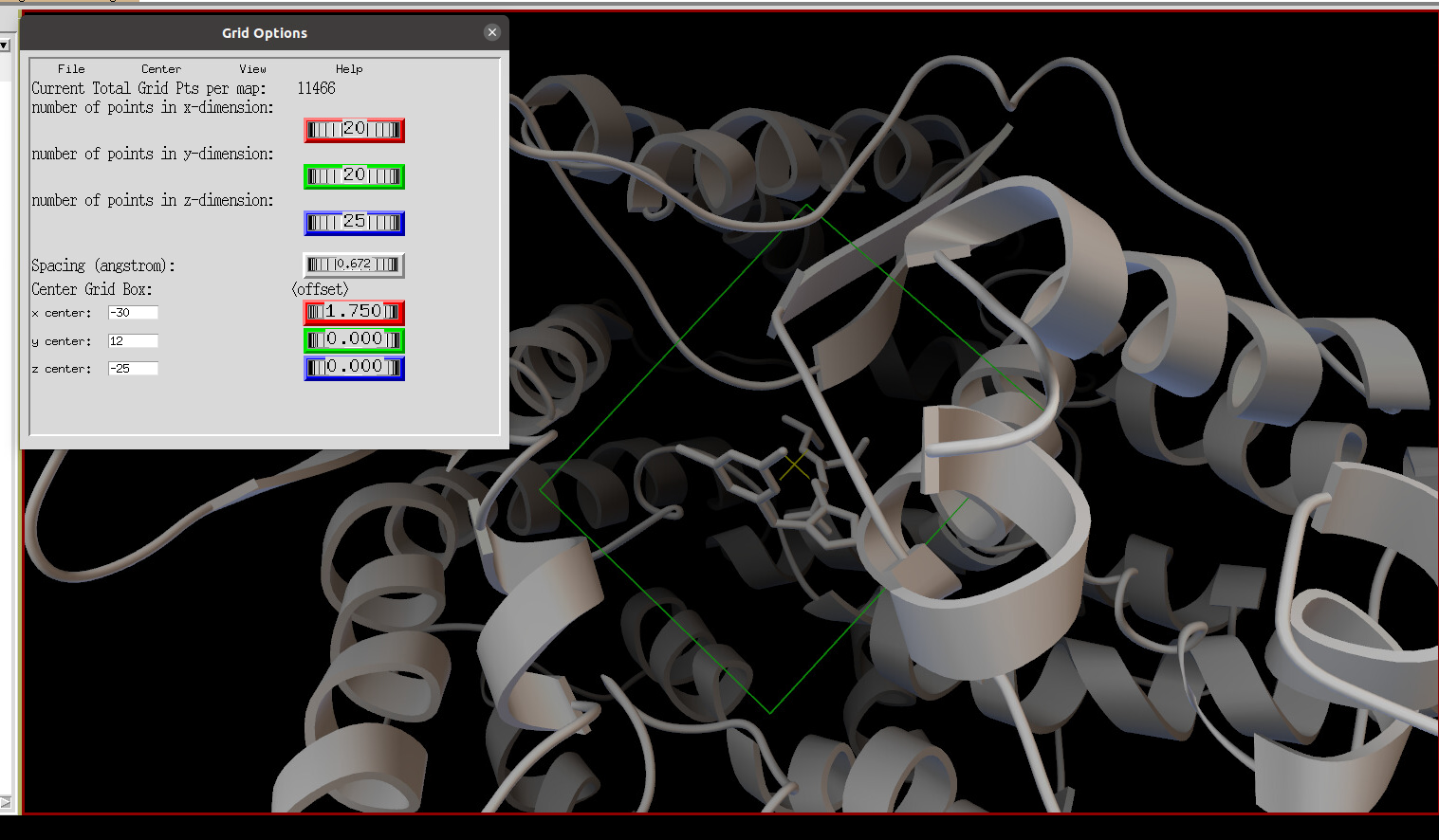
方法二:使用 PyMol
需安装 pymol 插件 https://github.com/Pymol-Scripts/Pymol-script-repo,安装说明见 https://pymolwiki.org/index.php/Git_install_scripts。
- 选择 ligand 附近 5A 的分子,并重命名。展示此区域的 grid
show sticks, byres all within 5 of ligand # 显示附近 5 A 的分子
# 选择并重命名为 ligand_5a_nearby
import drawgridbox # 需先安装 pymol 插件 https://github.com/Pymol-Scripts/Pymol-script-repo, 安装说明见:https://pymolwiki.org/index.php/Git_install_scripts
drawgridbox ligand_5a_nearby, nx=5, ny=5, nz=5,  lw=1, g=0, b=0
# Box dimensions (19.95, 24.35, 23.36),
# 问题:如何从 pymol 中读取坐标信息
配体预处理
方法一:使用 openbabel
sgpt 中使用的方法,注意默认 conda 中的 openbabel 版本不对,需要装系统中的版本。
obabel -ipdb ligand.pdb -opdbqt -O ligand.pdbqt --partialcharge gasteiger方法二:使用 vina 官方示例中的代码
mk_prepare_ligand.py -i 1iep_ligand.sdf -o 1iep_ligand.pdbqt --pH 7.4方法三:使用 MGLtools
参考:https://vina.scripps.edu/tutorial/
主要是让整个分子骨架为 rotatable。
Docking
vina --receptor 1iep_receptor.pdbqt --ligand 1iep_ligand.pdbqt --exhaustiveness 32 --out 1iep_ligand_ad4_out.pdbqt --config 1iep_receptor_vina_box.txt 其中,vina_box.txt 的定义如下:
center_x = -28.25
center_y = 12
center_z = -25
size_x = 30.0
size_y = 30.0
size_z = 30.0
计算时间约 35 s。Vina 自动支持的并行,用了26个核,耗核时881s。结果如下:
mode |   affinity | dist from best mode
     | (kcal/mol) | rmsd l.b.| rmsd u.b.
-----+------------+----------+----------
   1        -13.9      0.000      0.000
   2        -11.1      1.304      1.902
Flexible docking
受体预处理
发现 vina 是基于 python2 需要单独创建环境。
~/ADFRsuite-1.0/bin/prepare_receptor -r 1fpu_receptorH.pdb -o 1fpu_receptor.pdbqt

python2 ~/Desktop/drug_design/AutoDock-Vina/example/autodock_scripts/prepare_flexreceptor.py -r 1fpu_receptor.pdbqt -s THR315
配体预处理
同 basic docking。
Docking
vina --receptor 1fpu_receptor_rigid.pdbqt --flex 1fpu_receptor_flex.pdbqt --ligand 1iep_ligand.pdbqt --config 1fpu_receptor_rigid_vina_box.txt --exhaustiveness 32 --out 1fpu_ligand_flex_vina_out.pdbqt其中,vina_box.txt 的定义如下:
center_x = 15.190
center_y = 53.903
center_z = 16.917
size_x = 20.0
size_y = 20.0
size_z = 20.0
总时间约 45 s。Vina 自动支持的并行,用了28个核,耗核时1246.5s。 结果在 1fpu_ligand_flex_vina_out.pdbqt 文件中,包含打分。这时候会生辰过一个打分列表。
ADCP (AutoDock CracPep) 使用 (2019)
最近调研 Peptide docking 方法,看到 2020年的一篇benchmark文章https://doi.org/10.1021/acs.jctc.9b01208中提到,HPepDock2.0 和 ADCP 效果最好。由于 HPepDock 2.0 只能是server 使用,所以用 ACDP。
ADCP 在ADFRsuite 中,需要安装。参见:
基础操作流程与 Vina 相似,包括
用 reduce 来加 H
准备 receptor 和 ligand ,转化为 PDBQT 文件格式
准备 docking 的 grid,或者称为 affinity map
案例一:线性 7 肽的 docking
加氢原子
reduce 3Q47_rec.pdb > 3Q47_recH.pdb
reduce 3Q47_pep.pdb > 3Q47_pepH.pdb
转化为 PDBQT 文件格式
prepare_receptor -r 3Q47_recH.pdb
prepare_ligand -l 3Q47_pepH.pdb
创建 docking 的目标文件,即 affinity map
agfr -r 3Q47_recH.pdbqt -l 3Q47_pepH.pdbqt -asv 1.1 -o 3Q47By default, a padding of 4 Å is added to every side of the bounding box. The padding value can be modified using the -P/–padding option. The padding is added on every side.
运行 docking
adcp -t 3Q47.trg -s npisdvd -N 20 -n 1000000 -o 3Q47_redocking -ref 3Q47_pepH.pdbDetails: adcp detects the number of cores available and by default will use them all to perform 20 independent searches (-N, –nbRuns 20) each using up to 2,500,000 evaluations of the scoring function (-n, –numSteps 2500000). By default adcp performs 50 searches, each allotted 2.5 million evaluations.
Typically, more complex docking problems require more searches to be performed to increase the chances to find the best possible docked pose (i.e. global minimum of the scoring function).
This calculation generates the following files:
3Q47_redocking_ranked_{num}.pdb # the final solutions with ranking after clustering
3Q47_redocking_{num}.pdb # the MC trajectory for each replica
3Q47_redocking_{num}.out # detailed output file for each replica
In general, we suggest running 100 replicas with 1 million steps per amino acid and starting from a mixture of extended and helical conformation.
案例二:环肽的 docking
前面的预处理过程和案例一一样。
创建 docking 的目标文件,即 affinity map
agfr -r 5GRD_recH.pdbqt -l 5GRD_pepH.pdbqt -o 5GRD运行 docking
adcp -t 5GRD.trg -s sscsscplsk -N 20 -n 500000 -cys -o 5GRD_redocking -ref 5GRD_pepH.pdbqt -nc 0.8Note we added two options compared with redocking the linear peptide.
-cys enables the potential for disulfide bond.
-nc 0.8 use native contacts as clustering criteria. We recommend using native contacts for larger peptides.
This calculation generates the following files:
5GRD_redocking_ranked_{num}.pdb # the final solutions with ranking after clustering
5GRD_redocking_{num}.pdb # the MC trajectory for each replica
5GRD_redocking_{num}.out # detailed output file for each replica