 Xiaopeng Xu
扩展GPT
LoRA 轻量 finetune
https://github.com/microsoft/LoRA
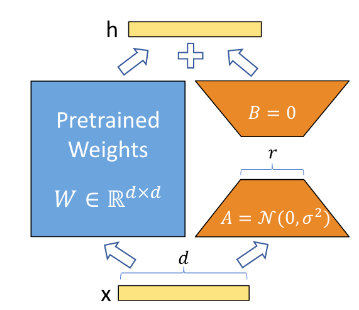
LoRA 在预训练大模型,如 GPT, 的主结构外,增加了 adaptor 层,可以用较小的 memory 来 finetune 大模型。如下图,只训练 A 和 B 的参数。
安装
pip install loralib使用
定义模型
LoRA 目前只支持几种类型的 layer:nn.Linear, nn.Embedding 和 nn.Conv2d。同时,支持MergedLinear 来替换 nn.Linear 表示多层 MLP 的情况。
# ===== Before =====
layer = nn.Linear(in_features, out_features)


# ===== After ======
# Add a pair of low-rank adaptation matrices with rank r=16
import loralib as lora
layer = lora.Linear(in_features, out_features, r=16)
训练模型
在训练开始前,需要标记只训练 LoRA 参数。
import loralib as lora


model = BigModel()
lora.mark_only_lora_as_trainable(model)


# Training loop
for batch in dataloader:
   ...
保存ckpt
在保存 checkpoint 时候,可以选择只保存 LoRA 参数。
# ===== Before =====
torch.save(model.state_dict(), checkpoint_path)


# ===== After =====
torch.save(lora.lora_state_dict(model), checkpoint_path)
导入 ckpt
在导入 checkpoint 时候,需要设置 strict 为 False。
# Load the pretrained checkpoint first
model.load_state_dict(torch.load('ckpt_pretrained.pt'), strict=False)


# Then load the LoRA checkpoint
model.load_state_dict(torch.load('ckpt_lora.pt'), strict=False)
问题
试图直接调用 LoRA 中定义的 GPT2,但发现不太好用,其中的 GPT 和我原来以 minGPT 为蓝本做的GPT 不同。
单独以 LoRA定义的 GPT2 跑实验,只在 Agent 中训练 LoRA 层,但发现 memory 还是不够用!可能是我本来的 GPT 模型就比较小。加 LoRA层后,LoRA层导致的额外开销与其带来的内存优化相比,抵消掉了!如果要验证这个,需要自己从头实现一个 LoRA 版本 的 GPT,与我原来的 GPT 相比。会花费一定时间,但目前看来大概率还是不行。所以只能跳过。
看来只用 LoRA 不够!需要看看 SOTA方法。调研中看到 Lit-GPT。以此为基础,看看能否实现我要的功能。
FlashAttention 加速
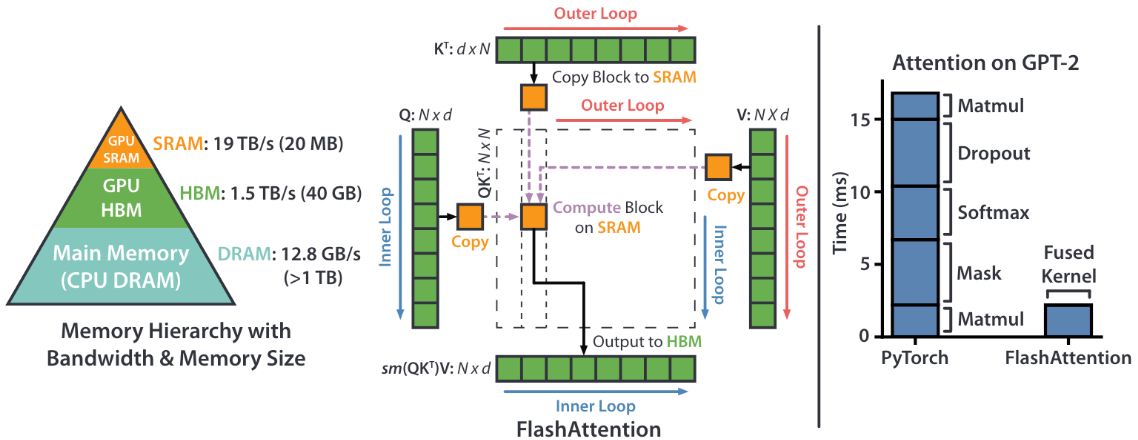
FlashAttention 通过减少GPU 的 HBM 和 SRAM 之间的 IO消耗,提升 attention 的计算效率。
FlashAttention-2 通过优化 work partition 来减少不必要的 shared memory IO.
https://github.com/Dao-AILab/flash-attention
安装
pip install flash-attn --no-build-isolation # Cuda 11.8 is required使用
核心是通过如下函数替代原来 attention 中的 QKV attention 函数。
from flash_attn import flash_attn_qkvpacked_func, flash_attn_func


flash_attn_qkvpacked_func(qkv, dropout_p=0.0, softmax_scale=None,
        causal=False, window_size=(-1, -1), alibi_slopes=None,
        deterministic=False)

flash_attn_func(q, k, v, dropout_p=0.0, softmax_scale=None,
        causal=False, window_size=(-1, -1), alibi_slopes=None,
        deterministic=False)

def flash_attn_with_kvcache(
    q,
    k_cache,
    v_cache,
    k=None,
    v=None,
    rotary_cos=None,
    rotary_sin=None,
    cache_seqlens: Optional[Union[(int, torch.Tensor)]] = None,
    cache_batch_idx: Optional[torch.Tensor] = None,
    softmax_scale=None,
    causal=False,
    window_size=(-1, -1),  # -1 means infinite context window
    rotary_interleaved=True,
    alibi_slopes=None,
):
MHA 的示例见:
https://github.com/Dao-AILab/flash-attention/blob/main/flash_attn/modules/mha.py
Lit-GPT
基于 nanoGPT 做了很多优化的 GPT库。由 PyTorch lightning 推出的组织开发。
支持 Flash Attention、4 位和 8 位量化quantization、LoRA 和 LLaMA-Adapter 微调、预训练。
https://github.com/Lightning-AI/lit-gpt
安装
git clone https://github.com/Lightning-AI/lit-gpt
cd lit-gpt

pip install -r requirements.txt
可选用 Flash Attention 2,需要 PyTorch 2.2 以上,并安装 PyTorch nightly。
pip uninstall -y torch torchvision torchaudio torchtext
pip install --pre torch --index-url https://download.pytorch.org/whl/nightly/cu121

pip install huggingface_hub # For downloading LLM models
pip install tokenizers  # For using tokenizers
使用
下载模型 weights
下载已有模型 weights。目前支持很多不同大小的模型,见 https://github.com/microsoft/LoRA 列表,可用如下命令查看。
python scripts/download.py 例如,要下载 stablelm-base-alpha-3b 模型。
python scripts/download.py | grep stablelm根据 repo_id,下载并转为 checkpoint:
python scripts/download.py --repo_id stabilityai/stablelm-base-alpha-3b
python scripts/convert_hf_checkpoint.py --checkpoint_dir checkpoints/stabilityai/stablelm-base-alpha-3b
inference生成示例
python generate/base.py --prompt "Hello, my name is" --checkpoint_dir checkpoints/stabilityai/stablelm-base-alpha-3bchat聊天示例
python chat/base.py --checkpoint_dir checkpoints/stabilityai/stablelm-base-alpha-3bFinetune 模型
# prepare data
python scripts/prepare_alpaca.py

# finetune with LLaMA-Adapter
python finetune/adapter.py

# finetune with LLaMA-Adapter-2
python finetune/adapter_v2.py

# finetune with lora
python finetune/lora.py
Lightning Fabric
Fabric 是 Lightning AI 推出的一个工具,在 PyTorch 和 PyTorch Lightning 之间的一层较易用的抽象层,方便做代码的并行和规模化。
核心功能包括:分布式数据并行 DDP,完全分片数据并行FSDP, DeepSpeed 和混合精度等,可扩展十亿级别的模型。
快速使用
import torch
from lightning.pytorch.demos import WikiText2, Transformer
import lightning as L

# device = torch.device("cuda" if torch.cuda.is_available() else "cpu")
fabric = L.Fabric(accelerator="cuda", devices=8, strategy="ddp")
fabric.launch()
dataset = WikiText2()
dataloader = torch.utils.data.DataLoader(dataset)
model = Transformer(vocab_size=dataset.vocab_size)
optimizer = torch.optim.SGD(model.parameters(), lr=0.1)
#model = model.to(device)
model, optimizer = fabric.setup(model, optimizer)
dataloader = fabric.setup_dataloaders(dataloader)
model.train()

for epoch in range(20):
    for batch in dataloader:
        input, target = batch
#        input, target = input.to(device), target.to(device)
        optimizer.zero_grad()
        output = model(input, target)
        loss = torch.nn.functional.nll_loss(output, target.view(-1))
#        loss.backward()
        fabric.backward(loss)
        optimizer.step()
分布式训练
单节点运行
# train.py
...
# Configure accelerator, devices, num_nodes, etc.
fabric = Fabric(devices=4, ...)
# This launches itself into multiple processes
fabric.launch()
Slurm 多节点分布式运行
第一步:设置节点数和GPU 数目
from lightning.fabric import Fabric

# Train on 32 GPUs across 4 nodes, ddp by default
fabric = Fabric(accelerator="gpu", devices=8, num_nodes=4)
# DeepSpeed
fabric = Fabric(accelerator="gpu", devices=8, num_nodes=4, strategy="deepspeed")
# Fully Sharded Data Parallel (FSDP)
fabric = Fabric(accelerator="gpu", devices=8, num_nodes=4, strategy="fsdp")
第二步:launch() 来初始化设备和节点之间的沟通
fabric = Fabric(...)
fabric.launch()
第三步:创建合适的 SLURM 任务脚本,并运行
#!/bin/bash -l
# SLURM SUBMIT SCRIPT
#SBATCH --nodes=4               # This needs to match Fabric(num_nodes=...)
#SBATCH --ntasks-per-node=8     # This needs to match Fabric(devices=...)
#SBATCH --gres=gpu:8            # Request N GPUs per machine
#SBATCH --mem=0
#SBATCH --time=0-02:00:00

# Activate conda environment
source activate $1

# Debugging flags (optional)
export NCCL_DEBUG=INFO
export PYTHONFAULTHANDLER=1

# On your cluster you might need this:
# export NCCL_SOCKET_IFNAME=^docker0,lo

# Run your training script
srun python train.py
混合精度
混合精度可以加速程序运行效率,同时可以降低内存消耗。
简单的混合精度
from lightning.fabric import Fabric

# This is the default
fabric = Fabric(precision="32-true")
# Float16 mixed precision
fabric = Fabric(precision="16-mixed")
# BFloat16 true half precision (Volta GPUs and later), maintains more of the “dynamic range” that FP32 offers and improves numerical stability than FP16 mixed precision.
fabric = Fabric(precision="bf16-mixed")

# 8-bit mixed precision via TransformerEngine (Hopper GPUs and later)
fabric = Fabric(precision="transformer-engine")
采用Nvidia的 TransformerEngine中的 Float8 混合精度
NVIDIA Transformer Engine (TE) 是一个用于在 Hopper GPU 上使用 8 位浮点 (FP8) 精度来加速最新模型的库,从而在训练和推理中以更低的内存利用率提供更好的性能。 它提供了超过半精度的改进性能,且accuracy没有降低。
# Select 8bit mixed precision via TransformerEngine, with model weights in bfloat16
fabric = Fabric(precision="transformer-engine")

# Select 8bit mixed precision via TransformerEngine, with model weights in float16
fabric = Fabric(precision="transformer-engine-float16")

# Customize the fp8 recipe or set a different base precision:
from lightning.fabric.plugins import TransformerEnginePrecision

recipe = {"fp8_format": "HYBRID", "amax_history_len": 16, "amax_compute_algo": "max"}

precision = TransformerEnginePrecision(dtype=torch.bfloat16, recipe=recipe)
fabric = Fabric(plugins=precision)
保存checkpoint
使用Fabric 在保存 checkpoint 时候,需要做特殊处理,否则会出现异常,导致计算值为nan。
最常用的方法是
if fabric.global_rank == 0:
    torch.save(state, filename)
fabric.barrier()但是实际测试发现,在fabric.barrier() 之后会卡住,不能继续运行。目前找不到合适的解决方法。
于是退而求其次的解法,直接用 fabric 来 save 和 load。
state = {"model": model}
fabric.save(get_path(base_dir, base_name, '.pt'), state)

*# later on in the same script, load state dict in-place:*
fabric.load(path, state)

*# Alternatively:*
checkpoint = torch.load(path)
model.load_state_dict(checkpoint["model"])
发现用 fabric.save 还是会卡住!