 Xiaopeng Xu
Huggingface Transformer
什么是 Huggingface?
一个专门 AI 公司,维护了 python 的 transformer 库。
Transformer 介绍
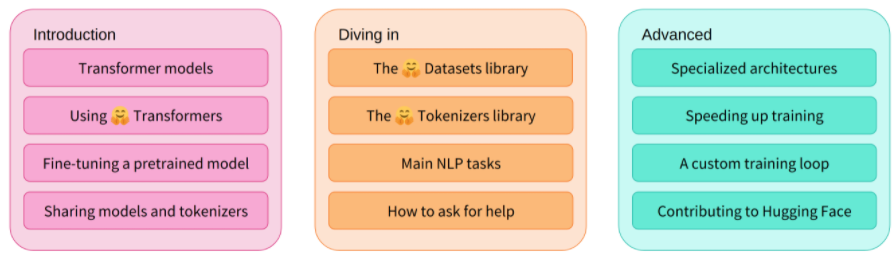
什么是 NLP?
以下是常见 NLP 任务的列表,每个任务都有一些示例:
对整个句子进行分类:获取评论的情绪,检测电子邮件是否为垃圾邮件,确定句子在语法上是否正确或两个句子在逻辑上是否相关
对句子中的每个词进行分类:识别句子的语法成分(名词、动词、形容词)或命名实体(人、地点、组织)
生成文本内容:用自动生成的文本完成提示,用屏蔽词填充文本中的空白
从文本中提取答案:给定问题和上下文,根据上下文中提供的信息提取问题的答案
从输入文本生成新句子:将文本翻译成另一种语言,总结文本
不过,NLP 不仅限于书面文本。它还解决了语音识别和计算机视觉中的复杂挑战,例如生成音频样本的转录或图像描述。
如何使用 transformer
已有 pipeline
特征提取,获取文本的向量表示 (feature-extraction)
填充遮罩 (fill-mask)
命名实体识别 (ner)
问答 (question-answering)
情感分析 (sentiment-analysis)
总结 (summarization)
文本生成 (text-generation)
翻译 (translation)
零样本分类 (zero-shot-classification)
使用已有 pipeline
The most basic object in the 🤗 Transformers library is the pipeline
Text Classification
from transformers import pipeline

classifier = pipeline("sentiment-analysis")
classifier("I've been waiting for a HuggingFace course my whole life.")
#[{'label': 'POSITIVE', 'score': 0.9598047137260437}]
Text Generation
rom transformers import pipeline
generator = pipeline("text-generation")
generator("In this course, we will teach you how to")
#[{'generated_text': 'In this course, we will teach you how to understand and use '
#                    'data flow and data interchange when handling user data. We '
#                    'will be working with one or more of the most commonly used '
#                    'data flows — data flows of various types, as seen by the '
#                    'HTTP'}]
预训练好的模型
Transformer 是怎样实现的?
历史
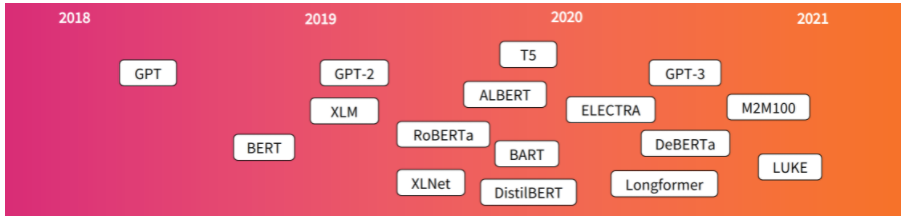
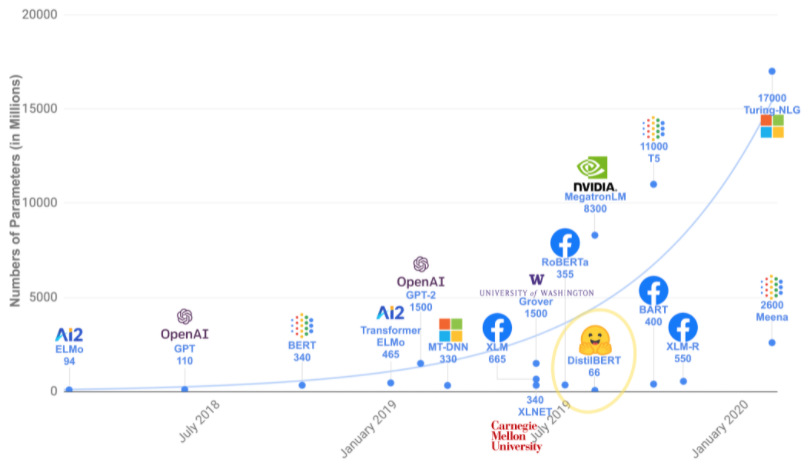
演进趋势-越来越大
分类
GPT 类型(也称为自回归 Transformer 模型,Decoder models)
BERT 类型(也称为自动编码 Transformer 模型,Encoder models)
BART/T5 类型(也称为 Seq2seq 的 Transformer 模型)
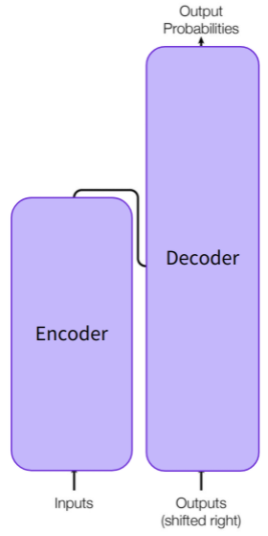
通用架构
两个部分:
编码器(左):编码器接收输入并构建其表示(其特征)。 这意味着模型经过优化以从输入中获取理解。
解码器(右):解码器使用编码器的表示(特征)和其他输入来生成目标序列。 这意味着模型针对生成输出进行了优化。
衍生模型
仅编码器模型:适用于需要理解输入的任务,例如句子分类和命名实体识别。
仅解码器模型:适用于生成任务,例如文本生成。
编码器-解码器模型或序列到序列模型:适用于需要输入的生成任务,例如翻译或摘要。
注意力层
- Transformer 的核心功能是增加了一个特殊层,叫注意力层。 详情见:Attention is All You Need
最初的架构
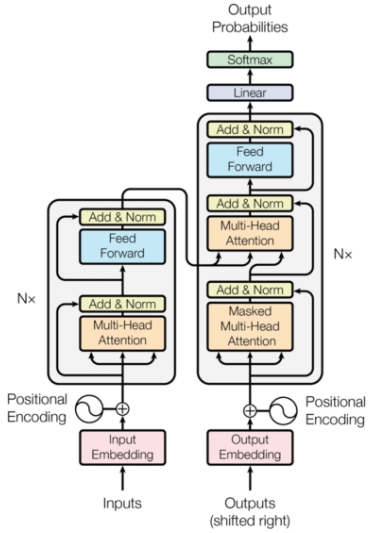
模型示例及应用
| 模型 | 示例 | 任务/应用 |
|---|---|---|
| Encoder | ALBERT, BERT, DistilBERT, ELECTRA, RoBERTa | Sentence classification, named entity recognition, extractive question answering |
| Decoder | CTRL, GPT, GPT-2, Transformer XL | Text generation |
| Encoder-decoder | BART, mBART, Marian, T5 | Summarization, translation, generative question answering |
Transformer 使用
安装
conda install -c huggingface transformers或
pip install transformersPipeline 背后的过程
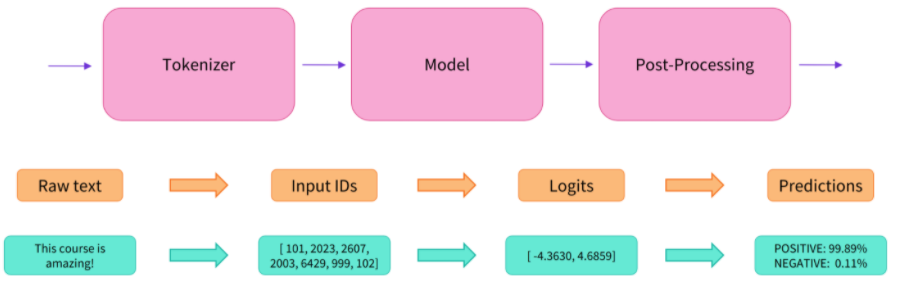
Tokenizer 预处理
初始化
from transformers import AutoTokenizer

checkpoint = "distilbert-base-uncased-finetuned-sst-2-english"
tokenizer = AutoTokenizer.from_pretrained(checkpoint)
输入输出
raw_inputs = [
    "I've been waiting for a HuggingFace course my whole life.",
    "I hate this so much!",
]
inputs = tokenizer(raw_inputs, padding=True, truncation=True, return_tensors="pt")
print(inputs)
# {'input_ids': tensor([[  101,  1045,  1005,  2310,  2042,  3403,  2005,  1037, 17662, 12172,
#          2607,  2026,  2878,  2166,  1012,   102],
#        [  101,  1045,  5223,  2023,  2061,  2172,   999,   102,     0,     0,
#             0,     0,     0,     0,     0,     0]]), 'attention_mask': tensor([[1, 1, 1, 1, 1, 1, 1, 1, 1, 1, 1, 1, 1, 1, 1, 1],
#        [1, 1, 1, 1, 1, 1, 1, 1, 0, 0, 0, 0, 0, 0, 0, 0]])}
使用 AutoModel
from transformers import AutoModel

checkpoint = "distilbert-base-uncased-finetuned-sst-2-english"
model = AutoModel.from_pretrained(checkpoint)

outputs = model(**inputs)
print(outputs.last_hidden_state.shape)
# torch.Size([2, 16, 768])
Model heads:解释模型输出的数字
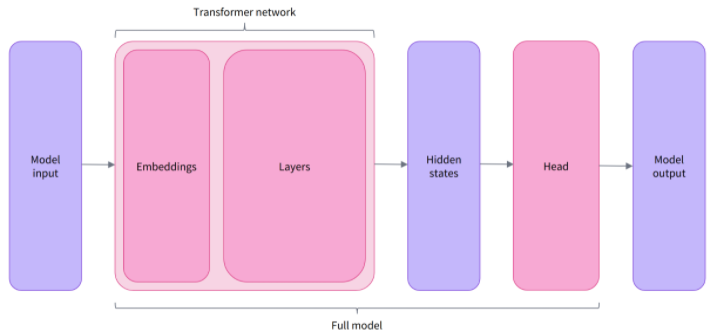 Transformer 库中不同的架构:
*Model (获取 hidden states)
*ForCausalLM
*ForMaskedLM
*ForMultipleChoice
*ForQuestionAnswering
*ForSequenceClassification
*ForTokenClassification
其他
使用 AutoModelForSequenceClassification
from transformers import AutoModelForSequenceClassification

checkpoint = "distilbert-base-uncased-finetuned-sst-2-english"
model = AutoModelForSequenceClassification.from_pretrained(checkpoint)
outputs = model(**inputs)

print(outputs.logits.shape)
# torch.Size([2, 2])
print(outputs.logits)
# tensor([[4.0195e-02, 9.5980e-01],
#        [9.9946e-01, 5.4418e-04]], grad_fn=<SoftmaxBackward>)
model.config.id2label
# {0: 'NEGATIVE', 1: 'POSITIVE'}
结果后处理
print(outputs.logits)
# tensor([[4.0195e-02, 9.5980e-01],
#        [9.9946e-01, 5.4418e-04]], grad_fn=<SoftmaxBackward>)

import torch

predictions = torch.nn.functional.softmax(outputs.logits, dim=-1)
print(predictions)
# tensor([[4.0195e-02, 9.5980e-01],
#         [9.9946e-01, 5.4418e-04]], grad_fn=<SoftmaxBackward>)

model.config.id2label
# {0: 'NEGATIVE', 1: 'POSITIVE'}
Models
创建一个 Transformer 模型
from transformers import BertConfig, BertModel

# Building the config
config = BertConfig()

# Building the model from the config
model = BertModel(config)

# Model is randomly initialized!

print(config)
# BertConfig {
#  "attention_probs_dropout_prob": 0.1,
#  "gradient_checkpointing": false,
#  "hidden_act": "gelu",
#  "hidden_dropout_prob": 0.1,
#  "hidden_size": 768,
#  "initializer_range": 0.02,
#  "intermediate_size": 3072,
#  "layer_norm_eps": 1e-12,
#  "max_position_embeddings": 512,
#  "model_type": "bert",
#  "num_attention_heads": 12,
#  "num_hidden_layers": 12,
#  "pad_token_id": 0,
#  "position_embedding_type": "absolute",
#  "transformers_version": "4.7.0",
#  "type_vocab_size": 2,
#  "use_cache": true,
#  "vocab_size": 30522
# }
不同的加载方式
使用 from_pretrained 方法加载
from transformers import BertModel

model = BertModel.from_pretrained("bert-base-cased")
可以用 AutoModel 来代替 BertModel
保存方法
model.save_pretrained("./bert_model")
! ls -alh ./bert_model
# total 414M
# drwxrwxr-x 2 xiaopengxu xiaopengxu 4.0K Jul  7 23:49 .
# drwxrwxr-x 4 xiaopengxu xiaopengxu 4.0K Jul  7 23:49 ..
# -rw-rw-r-- 1 xiaopengxu xiaopengxu  597 Jul  7 23:49 config.json
# -rw-rw-r-- 1 xiaopengxu xiaopengxu 414M Jul  7 23:49 pytorch_model.bin
通过 Transformer 模型进行推理
sequences = [
  "Hello!",
  "Cool.",
  "Nice!"
]

encoded_sequences = [
  [ 101, 7592,  999,  102],
  [ 101, 4658, 1012,  102],
  [ 101, 3835,  999,  102]
]

import torch
model_inputs = torch.tensor(encoded_sequences)

output = model(model_inputs) # not working with the later two cases, problem? # AutoModelForSequenceClassification works
Tokenizers
类型
Word-based

tokenized_text = "Jim Henson was a puppeteer".split()
print(tokenized_text)
Character-based

Subword-based

更多
Byte-level BPE, as used in GPT-2
WordPiece, as used in BERT
SentencePiece or Unigram, as used in several multilingual models
加载和保存
加载 from_pretrained
from transformers import AutoTokenizer

tokenizer = AutoTokenizer.from_pretrained("bert-base-cased")

tokenizer("Using a Transformer network is simple")
# {'input_ids': [101, 7993, 170, 13809, 23763, 2443, 1110, 3014, 102], 'token_type_ids': [0, 0, 0, 0, 0, 0, 0, 0, 0], 'attention_mask': [1, 1, 1, 1, 1, 1, 1, 1, 1]}
保存 save_pretrained
tokenizer.save_pretrained("./tokenizer")
# ('./tokenizer/tokenizer_config.json',
#  './tokenizer/special_tokens_map.json',
#  './tokenizer/vocab.txt',
#  './tokenizer/added_tokens.json',
#  './tokenizer/tokenizer.json')
加密 Encoding
from transformers import AutoTokenizer
tokenizer = AutoTokenizer.from_pretrained("bert-base-cased")

sequence = "Using a Transformer network is simple"
tokens = tokenizer.tokenize(sequence)

print(tokens)
# ['Using', 'a', 'Trans', '##former', 'network', 'is', 'simple']

ids = tokenizer.convert_tokens_to_ids(tokens)

print(ids)
# [7993, 170, 13809, 23763, 2443, 1110, 3014
解密 Decoding
decoded_string = tokenizer.decode([7993, 170, 11303, 1200, 2443, 1110, 3014])
print(decoded_string)
# Using a transformer network is simple
处理多条序列 sequence
模型需要批次输入 batch of inputs
import torch
from transformers import AutoTokenizer, AutoModelForSequenceClassification

checkpoint = "distilbert-base-uncased-finetuned-sst-2-english"
tokenizer = AutoTokenizer.from_pretrained(checkpoint)
model = AutoModelForSequenceClassification.from_pretrained(checkpoint)

sequence = "I've been waiting for a HuggingFace course my whole life."

tokens = tokenizer.tokenize(sequence)
ids = tokenizer.convert_tokens_to_ids(tokens)

input_ids = torch.tensor([ids]) # [] is needed here
print("Input IDs:", input_ids)
# Input IDs: tensor([[ 1045,  1005,  2310,  2042,  3403,  2005,  1037, 17662, 12172,  2607,
#          2026,  2878,  2166,  1012]])

output = model(input_ids)
print("Logits:", output.logits)
# Logits: tensor([[-2.7276,  2.8789]], grad_fn=<AddmmBackward>)

batched_ids = [ids, ids]
输入补全
文本长度不同时,需要进行补全。包括两部分,词汇补全和注意力 mask 补全。
batched_ids = [
  [200, 200, 200],
  [200, 200]
]
特定词汇补全
padding_id = 100

batched_ids = [
  [200, 200, 200],
  [200, 200, padding_id]
]
实际中,padding_id 使用 tokenizer.pad_token_id
model = AutoModelForSequenceClassification.from_pretrained(checkpoint)

sequence1_ids = [[200, 200, 200]]
sequence2_ids = [[200, 200]]
batched_ids = [[200, 200, 200], [200, 200, tokenizer.pad_token_id]]

print(model(torch.tensor(sequence1_ids)).logits)
print(model(torch.tensor(sequence2_ids)).logits)
print(model(torch.tensor(batched_ids)).logits)
输出
tensor([[ 1.5694, -1.3895]], grad_fn=<AddmmBackward>)
tensor([[ 0.5803, -0.4125]], grad_fn=<AddmmBackward>)
tensor([[ 1.5694, -1.3895],
        [ 1.3373, -1.2163]], grad_fn=<AddmmBackward>)
注意力 mask 补全
batched_ids = [
    [200, 200, 200],
    [200, 200, tokenizer.pad_token_id]
]

attention_mask = [
  [1, 1, 1],
  [1, 1, 0]
]

outputs = model(torch.tensor(batched_ids), attention_mask=torch.tensor(attention_mask))
print(outputs.logits)
# tensor([[ 1.5694, -1.3895],
#         [ 0.5803, -0.4125]], grad_fn=<AddmmBackward>)
长序列处理
两种方式:
使用支持长序列的模型,例如 Longformer 和 LED 模型
对长序列进行截断,代码如下:
max_sequence_length = 1000
sequence = sequence[:max_sequence_length]
把所有这些放在一起
from transformers import AutoTokenizer

checkpoint = "distilbert-base-uncased-finetuned-sst-2-english"
tokenizer = AutoTokenizer.from_pretrained(checkpoint)

sequence = "I've been waiting for a HuggingFace course my whole life."

model_inputs = tokenizer(sequence)
Tokenizer
支持单条或多条序列
sequence = "I've been waiting for a HuggingFace course my whole life."
model_inputs = tokenizer(sequence)

sequences = [
  "I've been waiting for a HuggingFace course my whole life.",
  "So have I!"
]
model_inputs = tokenizer(sequence)
对序列做补全
# Will pad the sequences up to the maximum sequence length
model_inputs = tokenizer(sequences, padding="longest")

# Will pad the sequences up to the model max length
# (512 for BERT or DistilBERT)
model_inputs = tokenizer(sequences, padding="max_length")

# Will pad the sequences up to the specified max length
model_inputs = tokenizer(sequences, padding="max_length", max_length=8)
对序列做截断
sequences = [
  "I've been waiting for a HuggingFace course my whole life.",
  "So have I!"
]

# Will truncate the sequences that are longer than the model max length
# (512 for BERT or DistilBERT)
model_inputs = tokenizer(sequences, truncation=True)

# Will truncate the sequences that are longer than the specified max length
model_inputs = tokenizer(sequences, max_length=8, truncation=True)
返回结果类型
sequences = [
  "I've been waiting for a HuggingFace course my whole life.",
  "So have I!"
]

# Returns PyTorch tensors
model_inputs = tokenizer(sequences, padding=True, return_tensors="pt")
# Returns TensorFlow tensors
model_inputs = tokenizer(sequences, padding=True, return_tensors="tf")
# Returns NumPy arrays
model_inputs = tokenizer(sequences, padding=True, return_tensors="np")
特殊 token
sequence = "I've been waiting for a HuggingFace course my whole life."
model_inputs = tokenizer(sequence)
print(model_inputs["input_ids"])
# [101, 1045, 1005, 2310, 2042, 3403, 2005, 1037, 17662, 12172, 2607, 2026, 2878, 2166, 1012, 102]
print(tokenizer.decode(model_inputs["input_ids"]))
# "[CLS] i've been waiting for a huggingface course my whole life. [SEP]"

tokens = tokenizer.tokenize(sequence)
ids = tokenizer.convert_tokens_to_ids(tokens)
print(ids)
# [1045, 1005, 2310, 2042, 3403, 2005, 1037, 17662, 12172, 2607, 2026, 2878, 2166, 1012]
# "i've been waiting for a huggingface course my whole life."
从 tokenizer 到模型
import torch
from transformers import AutoTokenizer, AutoModelForSequenceClassification
checkpoint = "distilbert-base-uncased-finetuned-sst-2-english"
tokenizer = AutoTokenizer.from_pretrained(checkpoint)
model = AutoModelForSequenceClassification.from_pretrained(checkpoint)
sequences = [
  "I've been waiting for a HuggingFace course my whole life.",
  "So have I!"
]
tokens = tokenizer(sequences, padding=True, truncation=True, return_tensors="pt")
output = model(**tokens)
print(output)
# SequenceClassifierOutput(loss=None, logits=tensor([[-1.5607,  1.6123],
#         [-3.6183,  3.9137]], grad_fn=<AddmmBackward>), hidden_states=None, attentions=None)
Fine-tuning 预训练模型
数据处理
import torch
from transformers import AdamW, AutoTokenizer, AutoModelForSequenceClassification
# Same as before
checkpoint = "bert-base-uncased"
tokenizer = AutoTokenizer.from_pretrained(checkpoint)
model = AutoModelForSequenceClassification.from_pretrained(checkpoint)
sequences = [
    "I've been waiting for a HuggingFace course my whole life.",
    "This course is amazing!",
]
batch = tokenizer(sequences, padding=True, truncation=True, return_tensors="pt")
# This is new
batch["labels"] = torch.tensor([1, 1])
optimizer = AdamW(model.parameters())
loss = model(**batch).loss
loss.backward()
optimizer.step()
从 Hub 加载数据
from datasets import load_dataset
raw_datasets = load_dataset("glue", "mrpc")
raw_datasets
输出:
DatasetDict({
    train: Dataset({
        features: ['sentence1', 'sentence2', 'label', 'idx'],
        num_rows: 3668
    })
    validation: Dataset({
        features: ['sentence1', 'sentence2', 'label', 'idx'],
        num_rows: 408
    })
    test: Dataset({
        features: ['sentence1', 'sentence2', 'label', 'idx'],
        num_rows: 1725
    })
})
数据默认目录: ~/.cache/huggingface/dataset
raw_train_dataset = raw_datasets["train"]
raw_train_dataset.features
# {'sentence1': Value(dtype='string', id=None),
#  'sentence2': Value(dtype='string', id=None),
#  'label': ClassLabel(num_classes=2, names=['not_equivalent', 'equivalent'], names_file=None, id=None),
#  'idx': Value(dtype='int32', id=None)}
预处理数据集
用 Tokenizer
from transformers import AutoTokenizer
checkpoint = "bert-base-uncased"
tokenizer = AutoTokenizer.from_pretrained(checkpoint)
tokenized_sentences_1 = tokenizer(raw_datasets["train"]["sentence1"])
tokenized_sentences_2 = tokenizer(raw_datasets["train"]["sentence2"])
预处理示例
inputs = tokenizer("This is the first sentence.", "This is the second one.")
inputs
# {
#   'input_ids': [101, 2023, 2003, 1996, 2034, 6251, 1012, 102, 2023, 2003, 1996, 2117, 2028, 1012, 102],
#   'token_type_ids': [0, 0, 0, 0, 0, 0, 0, 0, 1, 1, 1, 1, 1, 1, 1],
#   'attention_mask': [1, 1, 1, 1, 1, 1, 1, 1, 1, 1, 1, 1, 1, 1, 1]
# }

tokenizer.convert_ids_to_tokens(inputs["input_ids"])
# ['[CLS]', 'this', 'is', 'the', 'first', 'sentence', '.', '[SEP]', 'this', 'is', 'the', 'second', 'one', '.', '[SEP]']
对数据集做预处理
# 全部预处理
tokenized_dataset = tokenizer(
    raw_datasets["train"]["sentence1"],
    raw_datasets["train"]["sentence2"],
    padding=True,
    truncation=True,
)

# 分批预处理
def tokenize_function(example):
    return tokenizer(example["sentence1"], example["sentence2"], truncation=True)

tokenized_datasets = raw_datasets.map(tokenize_function, batched=True)
tokenized_datasets
# DatasetDict({
#     train: Dataset({
#         features: ['attention_mask', 'idx', 'input_ids', 'label', 'sentence1', 'sentence2', 'token_type_ids'],
#         num_rows: 3668
#     })
#     validation: Dataset({
#         features: ['attention_mask', 'idx', 'input_ids', 'label', 'sentence1', 'sentence2', 'token_type_ids'],
#         num_rows: 408
#     })
#     test: Dataset({
#         features: ['attention_mask', 'idx', 'input_ids', 'label', 'sentence1', 'sentence2', 'token_type_ids'],
#         num_rows: 1725
#     })
# })
动态 padding
from transformers import DataCollatorWithPadding
data_collator = DataCollatorWithPadding(tokenizer=tokenizer)

samples = tokenized_datasets["train"][:8]
samples = {
    k: v for k, v in samples.items() if k not in ["idx", "sentence1", "sentence2"]
}
[len(x) for x in samples["input_ids"]]
# [50, 59, 47, 67, 59, 50, 62, 32]

batch = data_collator(samples)
{k: v.shape for k, v in batch.items()}
# {'attention_mask': torch.Size([8, 67]),
#  'input_ids': torch.Size([8, 67]),
#  'token_type_ids': torch.Size([8, 67]),
#  'labels': torch.Size([8])}
使用 Trainer API 来 fine-tuning 模型
from datasets import load_dataset
from transformers import AutoTokenizer, DataCollatorWithPadding

raw_datasets = load_dataset("glue", "mrpc")
checkpoint = "bert-base-uncased"
tokenizer = AutoTokenizer.from_pretrained(checkpoint)

def tokenize_function(example):
    return tokenizer(example["sentence1"], example["sentence2"], truncation=True)

tokenized_datasets = raw_datasets.map(tokenize_function, batched=True)
data_collator = DataCollatorWithPadding(tokenizer=tokenizer)
训练
使用 AutoModelForSequenceClassification 类定义模型
from transformers import TrainingArguments
training_args = TrainingArguments("test-trainer")
使用 AutoModelForSequenceClassification 类定义模型
from transformers import AutoModelForSequenceClassification
model = AutoModelForSequenceClassification.from_pretrained( checkpoint, num_labels=2)
Huggingface 小技巧
如何降低内存使用
减小
per_device_train_batch_size参数如果不想显著降低,可以减小
max_seq_length。从 128 减小到一个适合你所输入文本长度的数值。使用一个小的模型,例如
Albert v2、distilBERT等。