 Xiaopeng Xu
Ibex 使用说明
基本介绍
操作步骤
外网需先连接 KAUST VPN:Cisco anyconnect
登录 iBex:
ssh -X xux@glogin.ibex.kaust.edu.sa申请计算资源:1 GPU,4 CPU,16G 内存,24 小时
salloc -p batch -t 24:00:00 --gres gpu:1 --cpus-per-task 4 --mem 16 -n 1设置为交互式的 shell 命令行
srun --pty bash -i调度器 SLURM
Manages more work than the resource by scheduling queues of work.
SLURM path:
/opt/slurm/cluster/ibex/install/bin/常用命令
sinfo - A concise view of the system resources and their state/availability
ginfo - An in-house tool developed to query the status of GPU resources on Ibex cluster
squeue - Shows the list of jobs in the queue along with information about the request and its current state
- squeue –job
- You can query the state of your job using squeue
- squeue –job
sbatch - Command to submit your jobscript to SLURM:
scancel - SLURM command to cancel a queued job:
salloc - Command to request allocation of resource for interactive use:
srun - Once allocated,srun command can be used to launch your applicationon to the compute resources
scontrol - scontrol command, among other things, allows user to show parameters of request and allocated resource for a job in queue (in any state i.e running, pending, etc)
sacct - Displays accounting command which tells about the resources used by the job and its job steps.
资源申请内容
CPUs
GPUs
Memory
Wall time
任务脚本(iBex)
Cuda Helloworld on iBex
--------- jobscirpt.slurm ------
#!/bin/bash -l

#SBATCH --job-name=myfirstjob
#SBATCH --time=01:00:00
#SBATCH --partition=batch
#SBATCH --ntasks=1

#SBATCH --gres=gpu:1
#SBATCH --constraint=v100
module load cuda
srun ./helloworld
------------------------------
提交脚本示例:
> sbatch jobscript.slurm Common Constraints on Ibex
For CPU only jobs, use jobscript generator: https://www.hpc.kaust.edu.sa/ibex/job
You may use sinfo -o %N,%f to list constraints for each node in Ibex
For advice on templates for GPU jobs (DL training) please attend the afternoon session on Deep Learning Best Practices
Any Intel Architecture: #SBATCH –constraint=intel
Intel Skylake: #SBATCH –constraint=cpu_intel_gold_6148
Intel IvyBridge: #SBATCH –constraint=cpu_intel_e5_2680_v2|cpu_intel_e5_2670_v2
Any GPU Architecture: #SBATCH –gres=gpu:1 #SBATCH –constraint=gpu
Volta V100, 8 GPUs per node: #SBATCH –gres=gpu:8 #SBATCH –constraint=v100
Large Memory: #SBATCH –mem=2T
Local storage: #SBATCH –constraint=local_500G
Deep Learning on Ibex
快速介绍 Quick Intro
Prerequisites: Ibex, Slurm, Conda, …
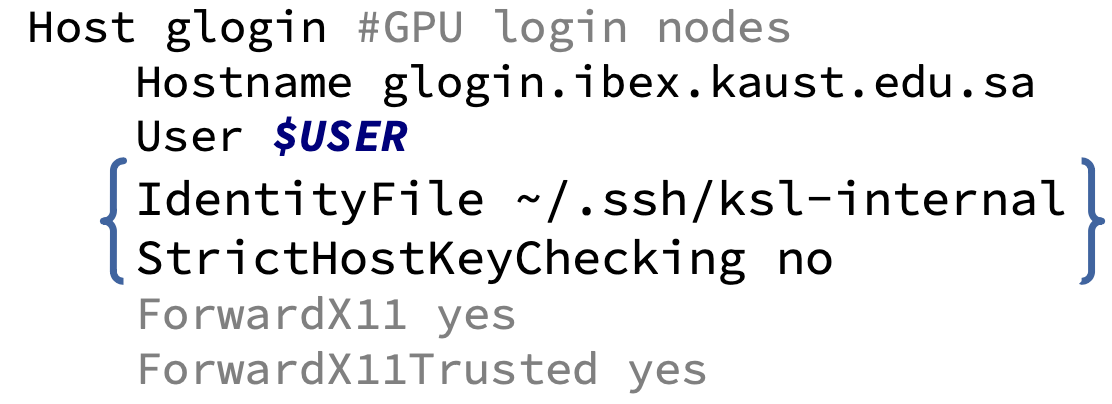
登录 Login
ssh glogin.ibex.kaust.edu.saFirst login auto-generates keys & ssh config
- .ssh/config

- .ssh/config
批量训练: Workstation vs Ibex
WS: Parameterize train.py
import argparse
parser = argparse.ArgumentParser(description="training")
parser.add_argument("--batch-size", type=int, default=32,
                        help="training batch size")
args = parser.parse_args()

tf.data.Dataset. ... .batch(args.batch_size). ...
WS: Write shell script to perform training
#!/bin/bash --login
conda activate ./env
python train.py "$@"
./run_train.sh --batch-size=64
Ibex: Add #SBATCH resource specs
#!/bin/bash
#SBATCH --nodes=1
#SBATCH --gpus-per-node=1
#SBATCH --cpus-per-gpu=4
#SBATCH --mem-per-gpu=45G
#SBATCH --constraint="[p100|gtx1080ti]&intel"
#SBATCH --time=24:00:00
#SBATCH --partition=batch
#SBATCH --output=log-%x-slurm-%j.out
#SBATCH --error=log-%x-slurm-%j.err
...
环境: Workstation vs Ibex
Ibex: Ibex specific modules
module load machine_learningWorkstation & Ibex: Conda
Use conda to create and activate environments Introduction to Conda for (Data) Scientists
Example templates:
环境卫生 (Environment Hygiene) – 重要 (Essential)
Don’t manually edit paths (PATH; LD_LIBRARY_PATH; PYTHONPATH; etc.)
- Raise a ticket: ibex@hpc.kaust.edu.sa
Build a coherent environment; don’t mix and match modules / envs / system
conda where possible; pip where necessary
Install pip into the conda environment
python -m pip install …
Don’t need
module load cudafor conda binaries (pre-built)For pip / source compilation, either use cuda module or cudatoolkit-dev:
module load cuda/10.1.243
conda install –channel conda-forge cudatoolkit-dev
Ibex: Run training job via Slurm
sbatch run_train.sh --batch-size=64
sbatch --time=15:00 --constraint=[p6000] --partition=debug run_train.sh --batch-size=16
Ibex: Slurm job management
squeue -u $USER
scancel <jobid>
ginfo
sinfo -o "%20N %10c %10m %25G %f" | grep -E '(FEATURES|gpu:)'
scontrol show job <jobid>
Ibex: Don’t salloc production jobs
Wastes resources; doesn’t support added introspection job steps.
Use: sbatch
Ibex: Debug for interactive exploration
salloc --partition=debug --time=60:00 \
       --gpus-per-node=1 --cpus-per-gpu=4 --mem-per-gpu=45G \
       --constraint=[p6000]
srun run_train.sh –batch-size=16
srun --pty -u bash -i- Note: salloc sessions do not support srun –jobid=
introspection.
Deep Learning 最佳实践
尽可能用已有资源做更多的事情
Allocate Sufficient
Allocate Sufficient CPUs
CPU_PER_GPU
Depends on node configuration (Ibex hardware chart)
Specify 4, or proportional fair share (from chart)
–cpus-per-gpu=${CPU_PER_GPU}
Allocate Sufficient Memory
MEM_PER_GPU in GB
Depends on node configuration (Ibex hardware chart)
Specify 45, or a little less than proportional fair share (from chart)
–mem-per-gpu=${MEM_PER_GPU}G
加载数据 Local Data…
Load Training Data from Local Storage
/tmp
- Local, unique, per-job, temporary directory
AI GPU nodes have very large and fast local storage:
Less IO contention with other users; fast SSD
Only visible on the compute node it is attached to (per node + job)
- Each job has it’s own /tmp
Local storage is temporary — only lasts as long as the job
Use Reference Datasets
Eliminates initial dataset copy time
Faster local storage
Use sinfo command to find nodes with reference data:
sinfo -o "%20N %10c %10m %25G %f" | \
  grep -E '(AVAIL_FEATURES|ref_)'
Ensure GPU, CPU, Memory, and GRES match job spec; then add constraint:
- –constraint=[ref_32T]
Provided reference data is available on node local storage:
- /local/reference/
- /local/reference/
Request to provide dataset: ibex@hpc.kaust.edu.sa
- /ibex/reference/{CV/COCO,CV/GQA,CV/ILSVR}
Copy Training Data to Local Storage
Ensure requested nodes have sufficient local storage (Ibex hardware chart)
For single node allocation:
cp -r /ibex/scratch/${USER}/data/set /tmp/data
cp /ibex/scratch/${USER}/data/set.tgz /tmp/data
cd /tmp/data ; tar xvpf set.tgz
For single or multi-node allocations:
sbcast /ibex/scratch/${USER}/data/set.tgz /tmp/data
cd /tmp/data ; srun -N $N -n $N tar xvpf set.tgz
Broadcast copy operation to all nodes
Filesystem Guidance
For improved copy performance, prefer source data with fewer, larger files
Avoid using large directories with many (e.g., thousands of) small files, especially on /ibex/scratch/
Archive source data in *.tar or *.zip files (and un-compress on the compute
node after the copy)
Or, place individual files inside containers, like an HDF5 file, and work with these files via the container API
Avoid using /home for data files (read or write)
Maximize data loading performance
Use framework provided data loading and processing tools:
- E.g., tf.io., tf.image., tf.data.Dataset., tf.data..AUTOTUNE
Load and process data in parallel
TFRecordDataset(filenames, num_parallel_reads=AUTOTUNE)
.interleave(TFRecordDataset, num_parallel_calls=AUTOTUNE)
.map(preprocess, num_parallel_calls=AUTOTUNE)
Ensure that data buffers are sufficiently large (for hiding IO latency and caching)
.shuffle(args.shuffle_buffer_size, reshuffle_each_iteration=True)
.prefetch(buffer_size=AUTOTUNE)
GPU 利用 Utilization
Maximize utilization of large-mem GPUs
E.g., Ibex V100 has 32GB (2x standard 16GB V100) — use it
Double batch size, double learning rate, half number of GPUs per job
Job performance stays the same (similar)
Double number of simultaneous jobs
Deep Learning at Scale
Linear Scaling Rule: lr’ = lr * k (for k time batch size increase)
Warmup Strategies: lr → lr’, gradual constant increase from small lr over 5 epochs
Batch Normalization: Variety of techniques… subtle pitfalls*
Best Practices for Distributed Deep Learning on Ibex:
Monitor GPU utilization
- Even basic GPU and CPU monitoring can diagnose common performance issues
Interactively monitor running job
show running jobs and find
squeue -u $USERexamples of interactive session GPU / system monitoring
> srun --jobid=<jobid> -u --pty bash -i
> srun --jobid=<jobid> -u --pty nvidia-smi dmon
> srun --jobid=<jobid> -u --pty top -H -u $USER
DCGM GPU Monitoring
NVIDIA Data Center GPU Manager solution
Automatically enabled; generates a post-job profile
DCGM profile logs
log files: dcgm-gpu-stats-${HOSTNAME}-${SLURM_JOBID}.out
- Review all (multiple) log files for job: less dcgm-gpu-stats*-###.out
Focus on device statistics: SM Utilization and Memory Utilization
- Verify all GPUs have utilization
Max GPU Memory Used is less informative (frameworks tend to pre-allocate max)
Ignore device PCIe Bandwidth and per-PID statistics (for now)
GPU compute utilization can exhibit:
Consistent (e.g., > 90%) compute utilization — this is good
Consistent middling (e.g., < 70%) utilization — let’s improve
- Small batch size? Low profile sampling rates (hidden oscillation)?
Multi-GPU request; some GPUs have 0% utilization — let’s improve
GPU device not bound process in nvidia-smi pmon?
- Initialization issue
GPU devices are bound to process, but show 0% utilization?
Framework need explicit multi-gpu support added to code
See Utilize all allocated GPUs
Oscillation between high (e.g., 100%) and low (e.g., 10%) utilization — let’s improve
Insufficient CPUs to load / process batch data?
Ensure sufficient CPUs per GPU, and framework data loader uses them
Data load is not in parallel with training operation?
- Use framework data loader utilities with sufficient CPUs
GPU isn’t busy for long enough?
- Increase batch size and buffer sizes to help hide latency
Slow filesystem IO performance?
- Load data from local storage
Checkpointing pauses?
- Save checkpoint to local storage; copy to /ibex/scratch concurrently
多 GPU 利用 Multi-GPU Utilization
Utilize all allocated GPUs
Multi-GPU support requires support in / changes to training code…
TensorFlow: Multi-GPU aware; use tf.distribute.*Strategy
strategy = tf.distribute.MirroredStrategy()
BATCH_SIZE = 64
BATCH_SIZE = BATCH_SIZE * strategy.num_replicas_in_sync

with strategy.scope():
  model = create_model()
PyTorch: Tensors are assigned to GPU devices manually
Horovod: More efficient multi-GPU TensorFlow / PyTorch training over MPI
Best Practices for Distributed Deep Learning on Ibex: https://www.hpc.kaust.edu.sa/GPU-2020
定期保存模型 Writing Models
Checkpoint to local storage
Local storage (/tmp) is fast…
Local storage is temporary!
Write (rsync) to persistent storage (/ibex/scratch) in background
Copy in background…
# configuration
RSYNC_DELAY_SECONDS=3600
PID_CHECK_DELAY_SECONDS=60
RSYNC_DELAY_LOOP=$((RSYNC_DELAY_SECONDS / PID_CHECK_DELAY_SECONDS))
# launch training command in background, get process ID on next line
python train.py "${LOCAL_CKPNT_DIR}" ${TRAINING_ARGS} &
RUN_PID=$!
# asynchronous rsync of training logs to persistent storage
RUN_DONE=false
while [ "${RUN_DONE}" != true ] ; do
for i in $(seq 1 ${RSYNC_DELAY_LOOP}) ; do
 sleep ${PID_CHECK_DELAY_SECONDS}
 if [[ "$(ps -h --pid $RUN_PID -o state | head -n 1)" = "" ]] ; then
   RUN_DONE=true ; break
 fi
done
rsync -a "${LOCAL_CKPNT_DIR}/" "${PERSISTENT_CKPNT_DIR}"
done
更快速的获取更多资源 Get Faster Access to More Resources
- Good things come in small job steps
按小时做 partition 24 hour partitions
gpu_wide24 partition
Note: Coming: simple ‘gpu_24’ partition for 24 hour jobs
For short (< 24 hrs) jobs; wide (>= 4 GPUs)
Benefits:
Faster turn-around for early results
Interleaved jobs make regular progress
Access extra resources
Satisfying jobs are automatically eligible to run in the partition
- E.g., –time=24:00:00 –gpus-per-node=v100:4
支持 Checkpoint
Add checkpoint / restore support
Checkpoints are written / read by single task – usually root rank – restored to all
For single-task multi-GPU,
and are sufficient - E.g., For Horovod
if hvd.rank() == 0:
    <checkpoint>
if hvd.rank() == 0:
    <restore>
    <broadcast>
Checkpoint to local storage (/tmp); copy to persistent storage in parallel
Restore from persistent storage
Checkpoint at reasonable intervals — regular, but not too frequently
- checkpoint delay should be small fraction of epoch training time
Write checkpoint to local storage
- E.g., Keras / TensorFlow
chkpnt_dir = pathlib.Path(args.write_checkpoints_to)
chkpnt_dir.mkdir(parents=True, exist_ok=True)
_checkpoints = (keras.callbacks.ModelCheckpoint( \
                  chkpnt_dir / f"checkpnt-epoch-{{epoch:02d}}.h5", \
                  save_best_only=False, \
                  save_freq="epoch"))

callbacks.extend([_checkpoints])- Note: If save_freq = int, it is the number of samples (not batches) to process before saving
Restore checkpoint from /ibex/scratch
- E.g., Keras / TensorFlow
chkpnt_dir = pathlib.Path(args.read_checkpoint_from)
chkpnt_filepath = None
initial_epoch = 0
for _epoch in range(args.epochs, 0, -1):
    _chkpnt_filepath = chkpnt_dir / f"checkpnt-epoch-{_epoch:02d}.h5"
    if _chkpnt_filepath.exists():
        chkpnt_filepath = str(_chkpnt_filepath)
        initial_epoch = _epoch
         break
if chkpnt_filepath is not None:
   model_fn.load_weights(chkpnt_filepath)
顺序任务 Sequence Jobs – Split training over multiple jobs
Shorter job runtime means more jobs to run; each job does a fraction of the work
Modify training code
Restore from latest checkpoint file
Process a fixed number of epochs / fixed time limit…
Exit cleanly (before job terminates).
Use reference data on local storage
Launch multiple jobs at once
Jobs must run in sequence
- i.e., Next job depends upon previous job successfully completing
Automate (script) launches via Slurm sbatch
Future: Use workflow management tools (e.g., decimate) — support in development…
- Improved: error retry, early exit, management tools
提交工作 Launch Jobs – Create launch_jobs.sh script
#!/bin/bash
# configs
    TOTAL_EPOCHS=${1:-100}             # 1st argument (default 100)
    EPOCHS_PER_JOB=${2:-10}            # 2nd argument (default 10)
    ## Note: TOTAL_JOBS = ceil(TOTAL_EPOCHS / EPOCHS_PER_JOB)
    TOTAL_JOBS=$(((TOTAL_EPOCHS + (EPOCHS_PER_JOB - 1)) / EPOCHS_PER_JOB))
    PARAMETERS="--lr=0.001 --bsz=32 --exp=3"
    ## Note: Remove invalid characters from PARAMETERS
    PARAMETER_SPACE="${PARAMETERS//[-=\ .]/}"
    PROJECT_VERSION=$(git rev-parse --short HEAD 2> /dev/null || \
                      echo 'unver')
    ## Note: Create a unique JOB_NAME for --dependency=singleton
    JOB_NAME=train_job-${PROJECT_VERSION}-${PARAMETER_SPACE}
Launch all jobs at once; each job depends upon the previous job completing successfully
–kill-on-invalid-dep=yes ensures that a failed or canceled job also terminates all the follow-on jobs
launch
_DEPENDENCY_ARG="--dependency=singleton"
for i in $(seq 1 ${TOTAL_JOBS}) ; do
      _JOB_ID=$(sbatch --parsable --job-name="${JOB_NAME}" \
                       --kill-on-invalid-dep=yes ${_DEPENDENCY_ARG} \
                         train_job.sbat ${PARAMETERS} \
                       --total_epochs=${TOTAL_EPOCHS} \
                       --num_epochs=${EPOCHS_PER_JOB})
      _DEPENDENCY_ARG="--dependency=afterok:${_JOB_ID}"
done
手动管理 job Manage jobs manually
view running and pending jobs for $USER
- squeue -u $USER
interactively cancel jobs for $USER
- scancel -u $USER -i
cancel specific job; dependencies can now run, unless
–kill-on-invalid-dep=yes specified via sbatch job launch
- scancel
- scancel
cancel all jobs with given name
- scancel –jobname=
- scancel –jobname=
Clean exit
Exit cleanly prior to job termination
Do not wait until job gets killed
- Termination can cause checkpoint corruption (if it interrupts the copy operation)
Ensure ample time provided to job to complete work given (e.g., number of epochs) Notify yourself in cases where jobs fail, timeout, or come close to running out of time:
#SBATCH –mailtype=FAIL,TIMEOUT,TIMEOUT_90
#SBATCH –mailuser=username@kaust.edu.sa
Use reference datasets
- Eliminate dataset copy times — important for shorter jobs
Best practices review:
DO – Automate Batch Training
- Embrace batch mode via sbatch; Capture hyperparameters as job parameters; Enable scaling between debug and production
DO – Fairly Allocate Sufficient Resources Get sufficient CPU / Memory per GPU; but, only request a fair share
DO – Access Filesystems Efficiently
- Use reference training data; Use local training data in /tmp; Use fewer, but larger files
DO – Parallelize GPU / CPU / IO
- Overlap data loading / preprocessing concurrently with GPU compute; Use multiple workers
DO – Fully Utilize GPU and Verify
- Scale up batch size and learning rate on larger GPUs; Check compute and memory utilization of all allocated GPUs
DO – Split Training into 24 Hr Blocks Good Citizen; More resources
One-on-One Assistance — By Request
Engage Us
Distributed training — best practices may change as Ibex evolves (scheduler upgrade improved how per-GPU resource are requested; improvements to network performance are coming).
Provide feedback, ask questions: Queue wait times? Job overhead? Experience? Scaling?
Contact us:
Email: ibex@hpc.kaust.edu.sa
Slack: https://kaust-ibex.slack.com — #general, #gpu, #conda
Example Projects
https://github.com/kaust-vislab/tensorflow-gpu-data-science-project
https://github.com/kaust-vislab/pytorch-gpu-data-science-project
https://github.com/kaust-vislab/horovod-gpu-data-science-project
Distributed Deep Learning on iBex
Request for more resources
#!/bin/bash
#SBATCH --nodes=2
#SBATCH --gpus-per-node=8
#SBATCH --cpus-per-gpu=2
#SBATCH --mem=64G
#SBATCH --constraint="v100"
#SBATCH --time=24:00:00
#SBATCH --partition=batch
#SBATCH --output=log-%x-slurm-%j.out
#SBATCH --error=log-%x-slurm-%j.err
Enable distributed deep learning in pytorch
Reference:
Pytorch distributed: https://pytorch.org/tutorials/beginner/dist_overview.html
Pytorch lightning: https://pytorch-lightning.readthedocs.io/en/latest/