 Xiaopeng Xu
MCP 开发说明
MCP 由 Claude 提出,其 Claude Code 对 MCP 的支持较好。开始研发 MCP 服务器时,建议先以 Claude Code 作为基础,后续再扩展到 Gemini CLI 和 OpenAI Codex。
FastMCP 使用
fastmcp 是使用最广的 MCP 服务构建工具。构建 MCP 时候,推荐使用它来做。
安装
pip install fastmcp创建 MCP 服务
from fastmcp import FastMCP

# Import statements (alphabetical order)
from tools.basic_scrna_tutorial import basic_scrna_tutorial_mcp

# Server definition and mounting
mcp = FastMCP(name="scanpy_agent")
mcp.mount(basic_scrna_tutorial_mcp)

if __name__ == "__main__":
    mcp.run()
核心的工具代码在 tools.basic_scrna_tutorial 里面
"""
Basic scRNA-seq preprocessing and clustering tutorial tools.

This MCP Server provides 8 tools for single-cell RNA-seq analysis:
1. scanpy_quality_control: Calculate QC metrics, filter cells/genes, detect doublets
2. scanpy_normalize_data: Perform count depth scaling and log1p transformation
3. scanpy_select_features: Identify highly variable genes for downstream analysis
4. scanpy_reduce_dimensions: Compute PCA and visualize variance and components
5. scanpy_compute_neighbors_and_umap: Build neighbor graph and compute UMAP embedding
6. scanpy_cluster_cells: Perform Leiden clustering and visualize results
7. scanpy_visualize_qc_on_clusters: Visualize QC metrics overlaid on UMAP clusters
8. scanpy_annotate_cell_types: Multi-resolution clustering, marker gene analysis, differential expression

All tools extracted from scanpy basic preprocessing and clustering tutorial.
"""

# Standard imports
from typing import Annotated, Literal, Any
import pandas as pd
import numpy as np
from pathlib import Path
import os
from fastmcp import FastMCP
from datetime import datetime

# Analysis libraries
import anndata as ad
import scanpy as sc
import matplotlib.pyplot as plt

# Project structure
PROJECT_ROOT = Path(__file__).parent.parent.parent.resolve()
DEFAULT_INPUT_DIR = PROJECT_ROOT / "tmp" / "inputs"
DEFAULT_OUTPUT_DIR = PROJECT_ROOT / "tmp" / "outputs"

INPUT_DIR = Path(os.environ.get("BASIC_SCRNA_TUTORIAL_INPUT_DIR", DEFAULT_INPUT_DIR))
OUTPUT_DIR = Path(os.environ.get("BASIC_SCRNA_TUTORIAL_OUTPUT_DIR", DEFAULT_OUTPUT_DIR))

# Ensure directories exist
INPUT_DIR.mkdir(parents=True, exist_ok=True)
OUTPUT_DIR.mkdir(parents=True, exist_ok=True)

# Timestamp for unique outputs
timestamp = datetime.now().strftime("%Y%m%d_%H%M%S")

# Configure matplotlib for high-resolution figures
plt.rcParams['figure.dpi'] = 300
plt.rcParams['savefig.dpi'] = 300
sc.settings.set_figure_params(dpi=300, facecolor="white")

# MCP server instance
basic_scrna_tutorial_mcp = FastMCP(name="basic_scrna_tutorial")

@basic_scrna_tutorial_mcp.tool
def scanpy_quality_control(
    adata_path: Annotated[str | None, "Path to input AnnData file in .h5ad format"] = None,
    mt_prefix: Annotated[str, "Gene name prefix for mitochondrial genes"] = "MT-",
    ribo_prefixes: Annotated[tuple[str, str], "Gene name prefixes for ribosomal genes"] = ("RPS", "RPL"),
    hb_pattern: Annotated[str, "Regex pattern for hemoglobin genes"] = "^HB[^(P)]",
    min_genes: Annotated[int, "Minimum number of genes expressed required for a cell to pass filtering"] = 100,
    min_cells: Annotated[int, "Minimum number of cells required for a gene to pass filtering"] = 3,
    batch_key: Annotated[str, "Column name in .obs for batch information used in doublet detection"] = "sample",
    out_prefix: Annotated[str | None, "Output file prefix"] = None,
) -> dict:
    """
    Perform quality control on single-cell RNA-seq data including QC metrics calculation, filtering, and doublet detection.
    Input is AnnData object in .h5ad format and output is filtered AnnData with QC visualizations.
    """
    # Input file validation
    if adata_path is None:
        raise ValueError("Path to input AnnData file must be provided")

    adata_file = Path(adata_path)
    if not adata_file.exists():
        raise FileNotFoundError(f"Input file not found: {adata_path}")

    # Load data
    adata = ad.read_h5ad(adata_path)

    # Set output prefix
    if out_prefix is None:
        out_prefix = f"qc_{timestamp}"

    # Identify gene populations
    adata.var["mt"] = adata.var_names.str.startswith(mt_prefix)
    adata.var["ribo"] = adata.var_names.str.startswith(ribo_prefixes)
    adata.var["hb"] = adata.var_names.str.contains(hb_pattern)

    # Calculate QC metrics
    sc.pp.calculate_qc_metrics(adata, qc_vars=["mt", "ribo", "hb"], inplace=True, log1p=True)

    # Visualize QC metrics - violin plot
    fig1_path = OUTPUT_DIR / f"{out_prefix}_qc_violin.png"
    sc.pl.violin(
        adata,
        ["n_genes_by_counts", "total_counts", "pct_counts_mt"],
        jitter=0.4,
        multi_panel=True,
        save=False
    )
    plt.savefig(fig1_path, dpi=300, bbox_inches='tight')
    plt.close()

    # Visualize QC metrics - scatter plot
    fig2_path = OUTPUT_DIR / f"{out_prefix}_qc_scatter.png"
    sc.pl.scatter(adata, "total_counts", "n_genes_by_counts", color="pct_counts_mt", save=False)
    plt.savefig(fig2_path, dpi=300, bbox_inches='tight')
    plt.close()

    # Filter cells and genes
    sc.pp.filter_cells(adata, min_genes=min_genes)
    sc.pp.filter_genes(adata, min_cells=min_cells)

    # Doublet detection
    sc.pp.scrublet(adata, batch_key=batch_key)

    # Save filtered AnnData
    output_h5ad = OUTPUT_DIR / f"{out_prefix}_filtered.h5ad"
    adata.write_h5ad(output_h5ad)

    # Save QC summary
    qc_summary = pd.DataFrame({
        'n_cells_after_filtering': [adata.n_obs],
        'n_genes_after_filtering': [adata.n_vars],
        'mean_genes_per_cell': [adata.obs['n_genes_by_counts'].mean()],
        'mean_counts_per_cell': [adata.obs['total_counts'].mean()],
        'mean_pct_counts_mt': [adata.obs['pct_counts_mt'].mean()],
        'n_predicted_doublets': [adata.obs['predicted_doublet'].sum()],
    })
    qc_summary_path = OUTPUT_DIR / f"{out_prefix}_qc_summary.csv"
    qc_summary.to_csv(qc_summary_path, index=False)

    return {
        "message": f"Quality control completed: {adata.n_obs} cells, {adata.n_vars} genes retained",
        "reference": "https://github.com/scverse/scanpy-tutorials/blob/main/basic-scrna-tutorial.ipynb",
        "artifacts": [
            {"description": "Filtered AnnData object", "path": str(output_h5ad.resolve())},
            {"description": "QC violin plots", "path": str(fig1_path.resolve())},
            {"description": "QC scatter plot", "path": str(fig2_path.resolve())},
            {"description": "QC summary statistics", "path": str(qc_summary_path.resolve())},
        ]
    }

@basic_scrna_tutorial_mcp.tool
def scanpy_normalize_data(
    adata_path: Annotated[str | None, "Path to input AnnData file in .h5ad format"] = None,
    out_prefix: Annotated[str | None, "Output file prefix"] = None,
) -> dict:
    """
    Normalize single-cell RNA-seq data using count depth scaling and log1p transformation.
    Input is filtered AnnData object and output is normalized AnnData with raw counts preserved in layers.
    """
    # Input file validation
    if adata_path is None:
        raise ValueError("Path to input AnnData file must be provided")

    adata_file = Path(adata_path)
    if not adata_file.exists():
        raise FileNotFoundError(f"Input file not found: {adata_path}")

    # Load data
    adata = ad.read_h5ad(adata_path)

    # Set output prefix
    if out_prefix is None:
        out_prefix = f"normalized_{timestamp}"

    # Save raw counts to layers
    adata.layers["counts"] = adata.X.copy()

    # Normalize to median total counts
    sc.pp.normalize_total(adata)

    # Logarithmize the data
    sc.pp.log1p(adata)

    # Save normalized AnnData
    output_h5ad = OUTPUT_DIR / f"{out_prefix}.h5ad"
    adata.write_h5ad(output_h5ad)

    return {
        "message": "Normalization completed with median count depth scaling and log1p transformation",
        "reference": "https://github.com/scverse/scanpy-tutorials/blob/main/basic-scrna-tutorial.ipynb",
        "artifacts": [
            {"description": "Normalized AnnData object", "path": str(output_h5ad.resolve())},
        ]
    }

@basic_scrna_tutorial_mcp.tool
def scanpy_select_features(
    adata_path: Annotated[str | None, "Path to input AnnData file in .h5ad format"] = None,
    n_top_genes: Annotated[int, "Number of highly variable genes to select"] = 2000,
    batch_key: Annotated[str, "Column name in .obs for batch-aware feature selection"] = "sample",
    out_prefix: Annotated[str | None, "Output file prefix"] = None,
) -> dict:
    """
    Identify highly variable genes for feature selection in single-cell RNA-seq analysis.
    Input is normalized AnnData object and output is AnnData with highly variable genes annotated and visualization.
    """
    # Input file validation
    if adata_path is None:
        raise ValueError("Path to input AnnData file must be provided")

    adata_file = Path(adata_path)
    if not adata_file.exists():
        raise FileNotFoundError(f"Input file not found: {adata_path}")

    # Load data
    adata = ad.read_h5ad(adata_path)

    # Set output prefix
    if out_prefix is None:
        out_prefix = f"hvg_{timestamp}"

    # Identify highly variable genes
    sc.pp.highly_variable_genes(adata, n_top_genes=n_top_genes, batch_key=batch_key)

    # Visualize highly variable genes
    fig_path = OUTPUT_DIR / f"{out_prefix}_highly_variable_genes.png"
    sc.pl.highly_variable_genes(adata, save=False)
    plt.savefig(fig_path, dpi=300, bbox_inches='tight')
    plt.close()

    # Save AnnData with HVG annotation
    output_h5ad = OUTPUT_DIR / f"{out_prefix}.h5ad"
    adata.write_h5ad(output_h5ad)

    # Save HVG list
    hvg_df = adata.var[adata.var['highly_variable']].copy()
    hvg_df = hvg_df.sort_values('dispersions_norm', ascending=False)
    hvg_list_path = OUTPUT_DIR / f"{out_prefix}_gene_list.csv"
    hvg_df.to_csv(hvg_list_path)

    return {
        "message": f"Feature selection completed: {hvg_df.shape[0]} highly variable genes identified",
        "reference": "https://github.com/scverse/scanpy-tutorials/blob/main/basic-scrna-tutorial.ipynb",
        "artifacts": [
            {"description": "AnnData with HVG annotation", "path": str(output_h5ad.resolve())},
            {"description": "HVG visualization", "path": str(fig_path.resolve())},
            {"description": "HVG list with statistics", "path": str(hvg_list_path.resolve())},
        ]
    }

@basic_scrna_tutorial_mcp.tool
def scanpy_reduce_dimensions(
    adata_path: Annotated[str | None, "Path to input AnnData file in .h5ad format"] = None,
    color_vars: Annotated[list, "Variables to color PCA plots"] = ["sample", "sample", "pct_counts_mt", "pct_counts_mt"],
    dimensions_list: Annotated[list, "List of PC dimension tuples to plot"] = [(0, 1), (2, 3), (0, 1), (2, 3)],
    n_pcs_variance: Annotated[int, "Number of PCs to show in variance ratio plot"] = 50,
    out_prefix: Annotated[str | None, "Output file prefix"] = None,
) -> dict:
    """
    Perform PCA dimensionality reduction and visualize principal components and variance.
    Input is AnnData with feature selection and output is AnnData with PCA results and visualizations.
    """
    # Input file validation
    if adata_path is None:
        raise ValueError("Path to input AnnData file must be provided")

    adata_file = Path(adata_path)
    if not adata_file.exists():
        raise FileNotFoundError(f"Input file not found: {adata_path}")

    # Load data
    adata = ad.read_h5ad(adata_path)

    # Set output prefix
    if out_prefix is None:
        out_prefix = f"pca_{timestamp}"

    # Compute PCA
    sc.tl.pca(adata)

    # Visualize PCA variance ratio
    fig1_path = OUTPUT_DIR / f"{out_prefix}_variance_ratio.png"
    sc.pl.pca_variance_ratio(adata, n_pcs=n_pcs_variance, log=True, save=False)
    plt.savefig(fig1_path, dpi=300, bbox_inches='tight')
    plt.close()

    # Visualize PCA components
    fig2_path = OUTPUT_DIR / f"{out_prefix}_components.png"
    sc.pl.pca(
        adata,
        color=color_vars,
        dimensions=dimensions_list,
        ncols=2,
        size=2,
        save=False
    )
    plt.savefig(fig2_path, dpi=300, bbox_inches='tight')
    plt.close()

    # Save AnnData with PCA
    output_h5ad = OUTPUT_DIR / f"{out_prefix}.h5ad"
    adata.write_h5ad(output_h5ad)

    # Save PCA variance explained
    variance_df = pd.DataFrame({
        'PC': [f'PC{i+1}' for i in range(len(adata.uns['pca']['variance_ratio']))],
        'variance_ratio': adata.uns['pca']['variance_ratio'],
        'variance': adata.uns['pca']['variance'],
    })
    variance_path = OUTPUT_DIR / f"{out_prefix}_variance_explained.csv"
    variance_df.to_csv(variance_path, index=False)

    return {
        "message": f"PCA completed: {adata.obsm['X_pca'].shape[1]} principal components computed",
        "reference": "https://github.com/scverse/scanpy-tutorials/blob/main/basic-scrna-tutorial.ipynb",
        "artifacts": [
            {"description": "AnnData with PCA results", "path": str(output_h5ad.resolve())},
            {"description": "PCA variance ratio plot", "path": str(fig1_path.resolve())},
            {"description": "PCA component plots", "path": str(fig2_path.resolve())},
            {"description": "Variance explained table", "path": str(variance_path.resolve())},
        ]
    }

@basic_scrna_tutorial_mcp.tool
def scanpy_compute_neighbors_and_umap(
    adata_path: Annotated[str | None, "Path to input AnnData file in .h5ad format"] = None,
    color_var: Annotated[str, "Variable to color UMAP plot"] = "sample",
    point_size: Annotated[int, "Point size for UMAP plot"] = 2,
    out_prefix: Annotated[str | None, "Output file prefix"] = None,
) -> dict:
    """
    Compute nearest neighbor graph and UMAP embedding for visualization.
    Input is AnnData with PCA and output is AnnData with neighbor graph and UMAP coordinates.
    """
    # Input file validation
    if adata_path is None:
        raise ValueError("Path to input AnnData file must be provided")

    adata_file = Path(adata_path)
    if not adata_file.exists():
        raise FileNotFoundError(f"Input file not found: {adata_path}")

    # Load data
    adata = ad.read_h5ad(adata_path)

    # Set output prefix
    if out_prefix is None:
        out_prefix = f"umap_{timestamp}"

    # Compute neighbor graph
    sc.pp.neighbors(adata)

    # Compute UMAP
    sc.tl.umap(adata)

    # Visualize UMAP
    fig_path = OUTPUT_DIR / f"{out_prefix}.png"
    sc.pl.umap(adata, color=color_var, size=point_size, save=False)
    plt.savefig(fig_path, dpi=300, bbox_inches='tight')
    plt.close()

    # Save AnnData with UMAP
    output_h5ad = OUTPUT_DIR / f"{out_prefix}.h5ad"
    adata.write_h5ad(output_h5ad)

    # Save UMAP coordinates
    umap_coords = pd.DataFrame(
        adata.obsm['X_umap'],
        columns=['UMAP1', 'UMAP2'],
        index=adata.obs_names
    )
    umap_coords[color_var] = adata.obs[color_var].values
    umap_coords_path = OUTPUT_DIR / f"{out_prefix}_coordinates.csv"
    umap_coords.to_csv(umap_coords_path)

    return {
        "message": "Neighbor graph and UMAP embedding computed successfully",
        "reference": "https://github.com/scverse/scanpy-tutorials/blob/main/basic-scrna-tutorial.ipynb",
        "artifacts": [
            {"description": "AnnData with UMAP", "path": str(output_h5ad.resolve())},
            {"description": "UMAP visualization", "path": str(fig_path.resolve())},
            {"description": "UMAP coordinates", "path": str(umap_coords_path.resolve())},
        ]
    }

@basic_scrna_tutorial_mcp.tool
def scanpy_cluster_cells(
    adata_path: Annotated[str | None, "Path to input AnnData file in .h5ad format"] = None,
    flavor: Annotated[Literal["vtraag", "igraph"], "Leiden algorithm implementation"] = "igraph",
    n_iterations: Annotated[int, "Number of iterations for Leiden clustering"] = 2,
    out_prefix: Annotated[str | None, "Output file prefix"] = None,
) -> dict:
    """
    Perform Leiden clustering on single-cell RNA-seq data and visualize clusters on UMAP.
    Input is AnnData with UMAP embedding and output is AnnData with cluster assignments and visualization.
    """
    # Input file validation
    if adata_path is None:
        raise ValueError("Path to input AnnData file must be provided")

    adata_file = Path(adata_path)
    if not adata_file.exists():
        raise FileNotFoundError(f"Input file not found: {adata_path}")

    # Load data
    adata = ad.read_h5ad(adata_path)

    # Set output prefix
    if out_prefix is None:
        out_prefix = f"leiden_{timestamp}"

    # Perform Leiden clustering
    sc.tl.leiden(adata, flavor=flavor, n_iterations=n_iterations)

    # Visualize clusters
    fig_path = OUTPUT_DIR / f"{out_prefix}_clusters.png"
    sc.pl.umap(adata, color=["leiden"], save=False)
    plt.savefig(fig_path, dpi=300, bbox_inches='tight')
    plt.close()

    # Save AnnData with clusters
    output_h5ad = OUTPUT_DIR / f"{out_prefix}.h5ad"
    adata.write_h5ad(output_h5ad)

    # Save cluster assignments
    cluster_assignments = adata.obs[['leiden']].copy()
    cluster_assignments_path = OUTPUT_DIR / f"{out_prefix}_assignments.csv"
    cluster_assignments.to_csv(cluster_assignments_path)

    # Save cluster summary
    cluster_summary = adata.obs['leiden'].value_counts().sort_index()
    cluster_summary_df = pd.DataFrame({
        'cluster': cluster_summary.index,
        'n_cells': cluster_summary.values
    })
    cluster_summary_path = OUTPUT_DIR / f"{out_prefix}_summary.csv"
    cluster_summary_df.to_csv(cluster_summary_path, index=False)

    return {
        "message": f"Leiden clustering completed: {len(cluster_summary)} clusters identified",
        "reference": "https://github.com/scverse/scanpy-tutorials/blob/main/basic-scrna-tutorial.ipynb",
        "artifacts": [
            {"description": "AnnData with clusters", "path": str(output_h5ad.resolve())},
            {"description": "Cluster visualization", "path": str(fig_path.resolve())},
            {"description": "Cluster assignments", "path": str(cluster_assignments_path.resolve())},
            {"description": "Cluster summary", "path": str(cluster_summary_path.resolve())},
        ]
    }

@basic_scrna_tutorial_mcp.tool
def scanpy_visualize_qc_on_clusters(
    adata_path: Annotated[str | None, "Path to input AnnData file in .h5ad format"] = None,
    color_vars_1: Annotated[list, "First set of variables to visualize on UMAP"] = ["leiden", "predicted_doublet", "doublet_score"],
    color_vars_2: Annotated[list, "Second set of variables to visualize on UMAP"] = ["leiden", "log1p_total_counts", "pct_counts_mt", "log1p_n_genes_by_counts"],
    point_size: Annotated[int, "Point size for first UMAP plot"] = 3,
    out_prefix: Annotated[str | None, "Output file prefix"] = None,
) -> dict:
    """
    Visualize quality control metrics overlaid on UMAP clusters to reassess filtering strategy.
    Input is AnnData with clustering and output is QC metric visualizations on UMAP.
    """
    # Input file validation
    if adata_path is None:
        raise ValueError("Path to input AnnData file must be provided")

    adata_file = Path(adata_path)
    if not adata_file.exists():
        raise FileNotFoundError(f"Input file not found: {adata_path}")

    # Load data
    adata = ad.read_h5ad(adata_path)

    # Set output prefix
    if out_prefix is None:
        out_prefix = f"qc_umap_{timestamp}"

    # Visualize doublet metrics on UMAP
    fig1_path = OUTPUT_DIR / f"{out_prefix}_doublets.png"
    sc.pl.umap(
        adata,
        color=color_vars_1,
        wspace=0.5,
        size=point_size,
        save=False
    )
    plt.savefig(fig1_path, dpi=300, bbox_inches='tight')
    plt.close()

    # Visualize QC metrics on UMAP
    fig2_path = OUTPUT_DIR / f"{out_prefix}_metrics.png"
    sc.pl.umap(
        adata,
        color=color_vars_2,
        wspace=0.5,
        ncols=2,
        save=False
    )
    plt.savefig(fig2_path, dpi=300, bbox_inches='tight')
    plt.close()

    return {
        "message": "QC metrics visualization on clusters completed",
        "reference": "https://github.com/scverse/scanpy-tutorials/blob/main/basic-scrna-tutorial.ipynb",
        "artifacts": [
            {"description": "Doublet metrics on UMAP", "path": str(fig1_path.resolve())},
            {"description": "QC metrics on UMAP", "path": str(fig2_path.resolve())},
        ]
    }

@basic_scrna_tutorial_mcp.tool
def scanpy_annotate_cell_types(
    adata_path: Annotated[str | None, "Path to input AnnData file in .h5ad format"] = None,
    resolutions: Annotated[list, "List of resolution parameters for multi-resolution clustering"] = [0.02, 0.5, 2.0],
    marker_genes: Annotated[dict | None, "Dictionary mapping cell types to marker gene lists"] = None,
    clustering_key_dotplot: Annotated[str, "Clustering resolution key for marker gene dotplot"] = "leiden_res_0.50",
    de_groupby: Annotated[str, "Clustering key for differential expression analysis"] = "leiden_res_0.50",
    de_method: Annotated[Literal["wilcoxon", "t-test", "logreg"], "Statistical method for differential expression"] = "wilcoxon",
    n_genes_dotplot: Annotated[int, "Number of top DE genes to show per cluster in dotplot"] = 5,
    out_prefix: Annotated[str | None, "Output file prefix"] = None,
) -> dict:
    """
    Perform multi-resolution clustering, marker gene visualization, and differential expression analysis for cell type annotation.
    Input is AnnData with clustering and output is multi-resolution clusters, marker gene plots, and DE gene results.
    """
    # Input file validation
    if adata_path is None:
        raise ValueError("Path to input AnnData file must be provided")

    adata_file = Path(adata_path)
    if not adata_file.exists():
        raise FileNotFoundError(f"Input file not found: {adata_path}")

    # Load data
    adata = ad.read_h5ad(adata_path)

    # Set output prefix
    if out_prefix is None:
        out_prefix = f"annotation_{timestamp}"

    # Define default marker genes if not provided
    if marker_genes is None:
        marker_genes = {
            "CD14+ Mono": ["FCN1", "CD14"],
            "CD16+ Mono": ["TCF7L2", "FCGR3A", "LYN"],
            "cDC2": ["CST3", "COTL1", "LYZ", "DMXL2", "CLEC10A", "FCER1A"],
            "Erythroblast": ["MKI67", "HBA1", "HBB"],
            "Proerythroblast": ["CDK6", "SYNGR1", "HBM", "GYPA"],
            "NK": ["GNLY", "NKG7", "CD247", "FCER1G", "TYROBP", "KLRG1", "FCGR3A"],
            "ILC": ["ID2", "PLCG2", "GNLY", "SYNE1"],
            "Naive CD20+ B": ["MS4A1", "IL4R", "IGHD", "FCRL1", "IGHM"],
            "B cells": ["MS4A1", "ITGB1", "COL4A4", "PRDM1", "IRF4", "PAX5", "BCL11A", "BLK", "IGHD", "IGHM"],
            "Plasma cells": ["MZB1", "HSP90B1", "FNDC3B", "PRDM1", "IGKC", "JCHAIN"],
            "Plasmablast": ["XBP1", "PRDM1", "PAX5"],
            "CD4+ T": ["CD4", "IL7R", "TRBC2"],
            "CD8+ T": ["CD8A", "CD8B", "GZMK", "GZMA", "CCL5", "GZMB", "GZMH", "GZMA"],
            "T naive": ["LEF1", "CCR7", "TCF7"],
            "pDC": ["GZMB", "IL3RA", "COBLL1", "TCF4"],
        }

    # Multi-resolution clustering
    for res in resolutions:
        sc.tl.leiden(adata, key_added=f"leiden_res_{res:4.2f}", resolution=res, flavor="igraph")

    # Visualize multi-resolution clustering
    fig1_path = OUTPUT_DIR / f"{out_prefix}_multi_resolution_umap.png"
    clustering_keys = [f"leiden_res_{res:4.2f}" for res in resolutions]
    sc.pl.umap(
        adata,
        color=clustering_keys,
        legend_loc="on data",
        save=False
    )
    plt.savefig(fig1_path, dpi=300, bbox_inches='tight')
    plt.close()

    # Marker gene dotplot
    fig2_path = OUTPUT_DIR / f"{out_prefix}_marker_genes_dotplot.png"
    sc.pl.dotplot(adata, marker_genes, groupby=clustering_key_dotplot, standard_scale="var", save=False)
    plt.savefig(fig2_path, dpi=300, bbox_inches='tight')
    plt.close()

    # Differential expression analysis
    sc.tl.rank_genes_groups(adata, groupby=de_groupby, method=de_method)

    # Visualize top DE genes
    fig3_path = OUTPUT_DIR / f"{out_prefix}_de_genes_dotplot.png"
    sc.pl.rank_genes_groups_dotplot(adata, groupby=de_groupby, standard_scale="var", n_genes=n_genes_dotplot, save=False)
    plt.savefig(fig3_path, dpi=300, bbox_inches='tight')
    plt.close()

    # Save AnnData with multi-resolution clustering and DE results
    output_h5ad = OUTPUT_DIR / f"{out_prefix}.h5ad"
    adata.write_h5ad(output_h5ad)

    # Extract and save DE genes for all clusters
    de_results = []
    for cluster in adata.obs[de_groupby].cat.categories:
        cluster_de = sc.get.rank_genes_groups_df(adata, group=cluster)
        cluster_de['cluster'] = cluster
        de_results.append(cluster_de)

    de_df = pd.concat(de_results, ignore_index=True)
    de_path = OUTPUT_DIR / f"{out_prefix}_de_genes.csv"
    de_df.to_csv(de_path, index=False)

    # Save clustering results
    clustering_df = adata.obs[clustering_keys].copy()
    clustering_path = OUTPUT_DIR / f"{out_prefix}_clustering_results.csv"
    clustering_df.to_csv(clustering_path)

    return {
        "message": f"Cell type annotation analysis completed: {len(resolutions)} resolutions, DE analysis for {len(adata.obs[de_groupby].cat.categories)} clusters",
        "reference": "https://github.com/scverse/scanpy-tutorials/blob/main/basic-scrna-tutorial.ipynb",
        "artifacts": [
            {"description": "AnnData with annotation results", "path": str(output_h5ad.resolve())},
            {"description": "Multi-resolution UMAP", "path": str(fig1_path.resolve())},
            {"description": "Marker genes dotplot", "path": str(fig2_path.resolve())},
            {"description": "DE genes dotplot", "path": str(fig3_path.resolve())},
            {"description": "DE genes table", "path": str(de_path.resolve())},
            {"description": "Clustering results", "path": str(clustering_path.resolve())},
        ]
    }
运行MCP 服务
# Install to claude code
fastmcp run src/scanpy_agent_mcp.py:mcp --transport http --port 8080
安装 MCP 服务
# Install to claude code
fastmcp install claude-code src/TISSUE_mcp.py --python ../TISSUE-env/bin/python --name tissue_agent

# Install to gemini-cli
fastmcp install gemini-cli src/TISSUE_mcp.py --python ../TISSUE-env/bin/python --name tissue_agent

# Currently supportted: claude-code, claude-desktop, gemini-cli, cursor, mcp-json
删除 MCP 服务
# Remove fromn claude code
claude mcp remove tissue_agent

# Remove fromn gemini-cli
gemini mcp remove tissue_agent
# Currently supportted: claude-code, claude-desktop, gemini-cli, cursor, mcp-json
部署 MCP 到 huggingface / host
MCP Inspector
https://github.com/modelcontextprotocol/inspector
Inspector 是标准的 MCP 服务调试工具,使用方便。对于 MCP 服务开发非常重要。
启动 Inspector
用如下命令启动。启动后会自动打开一个 web 页面,来配置需要测试的 MCP 服务。
npx @modelcontextprotocol/inspector配置 Inspector
通常 MCP 服务会启动为一个 URL 服务来做测试,可通过如下配置
fastmcp run src/scanpy_agent_mcp.py:mcp --transport http --port 8080选择 HTTP type,并输入服务的 URL,点击下面的运行即可。
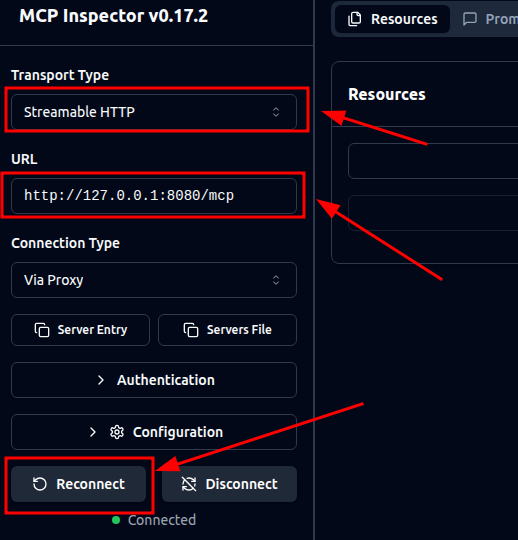
测试工具
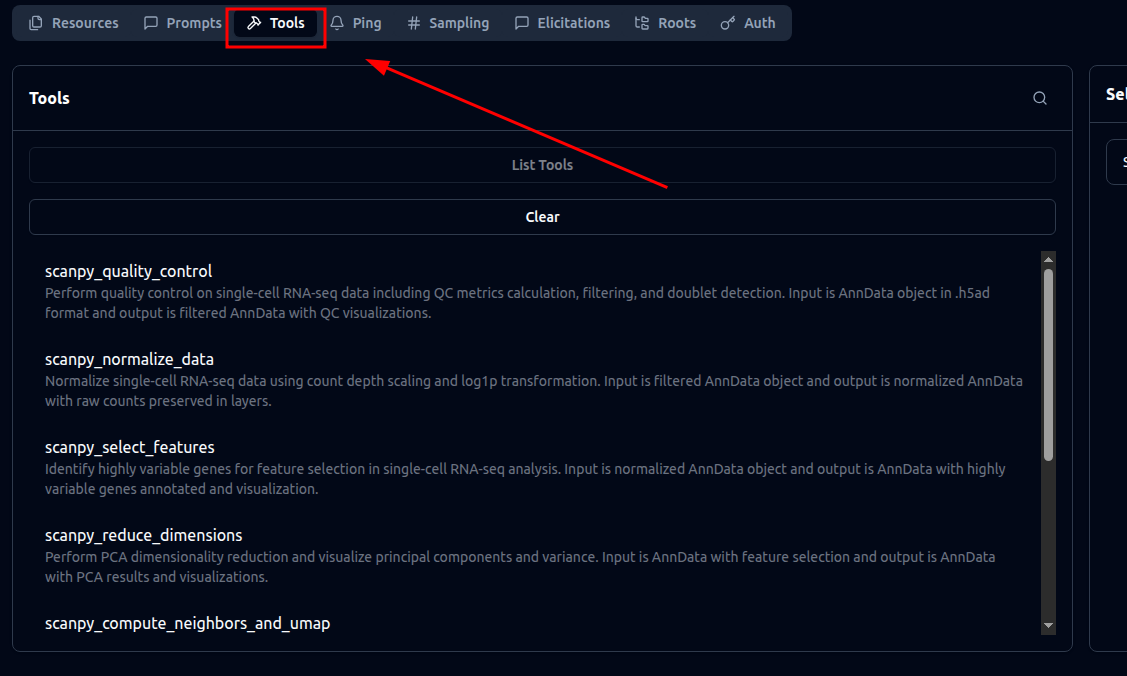
通常 MCP 服务是为了提供工具 tools,可以在 tools页面列举出所有可用的 tools。
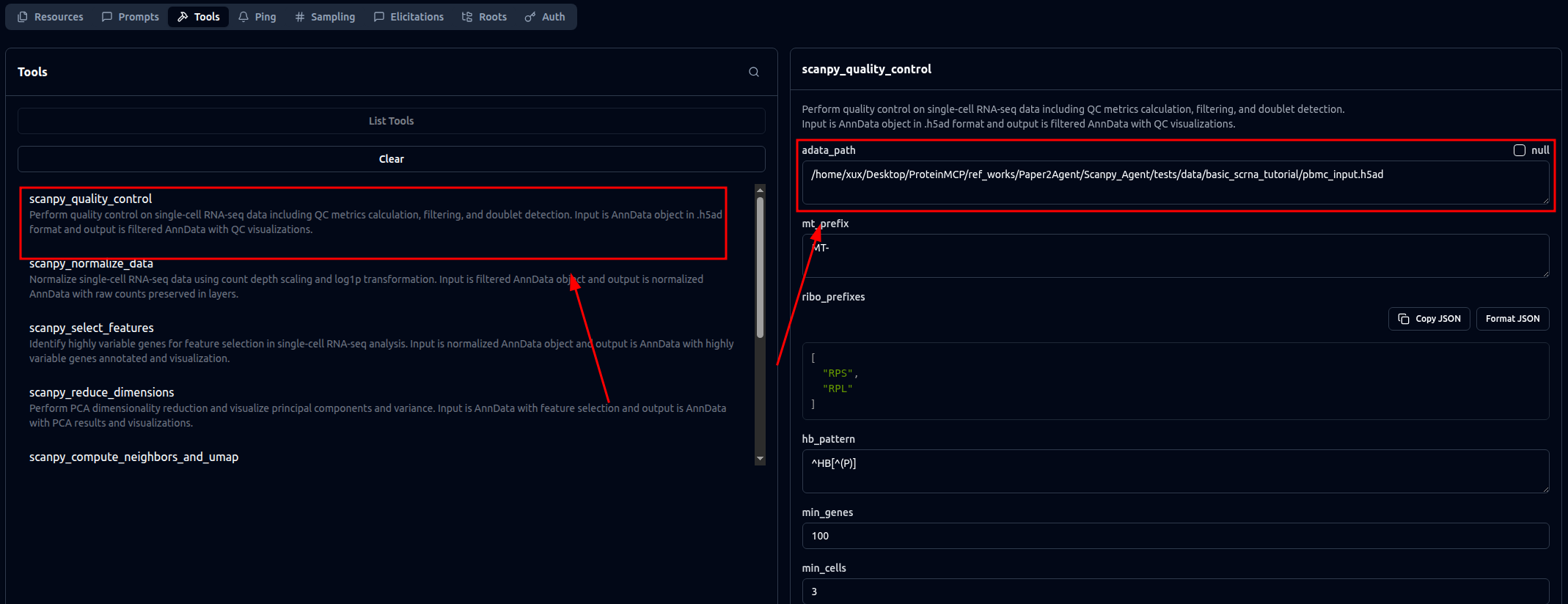
也可以选择一个工具,并选择它对应的参数来进行测试。
开发 MCP 服务器
MCP tool 是agent 能力的主要来源。MCP服务器开发非常重要。常见的开发策略是先在本地环境以特定目录调通,然后转成 MCP 的 API。最后通过智能体,如 Claude 调用 MCP 服务器,来测试调用过程的 prompt 如何撰写。
创建 MCP 服务器环境
建议先用 Conda 环境来开发,开完完善后,转成 Docker 方便便捷复用。
Conda 创建环境的命令
mamba env create -p ./env python=3.10 pip -y
mamba activate ./env
pip install torch==2.4.0 torchvision torchaudio --index-url https://download.pytorch.org/whl/cu118
pip install biotite==0.36.1
pip install pyg_lib torch_scatter torch_sparse torch_cluster torch_spline_conv \
    -f https://data.pyg.org/whl/torch-2.4.0+cu118.html
pip install torch_geometric

pip install git+https://github.com/facebookresearch/esm.git
pip install biotite pandas biopython numpy==1.26.4

# Install dependencies
pip install -r requirements.txt
pip install --ignore-installed fastmcp
创建本地运行的命令并测试
建议用 claude code 开发本地版本的程序。调试通过,再将其转换成 MCP 服务。
创建mcp 服务
建议用 claude code 将本地版本的程序直接转换成 MCP 服务。
测试 mcp 服务 API
用如下命令启动 mcp 服务器。
fastmcp run src/esm_mcp.py:mcp --transport http --port 8001 --python ./env/bin/python启动 mcp 服务后,在 MCP inspector 中来测试接口可用性
npx @modelcontextprotocol/inspector测试 mcp 服务 agent 可用性
API 测试完毕后,需要进一步在 agent 中测试 API 的可用性。有时候 API 虽然可以用,但agent 调用会出现一些奇奇怪怪的问题。
将 MCP 服务器安装到 Claude code 或 Gemini-cli
fastmcp install claude-code mcp-servers/esm_mcp/src/esm_mcp.py --python mcp-servers/esm_mcp/env/bin/python
fastmcp install gemini-cli mcp-servers/esm_mcp/src/esm_mcp.py --python mcp-servers/esm_mcp/env/bin/python
注意:在多线程子任务的MCP API 中,需要加上下面的功能,免得 Agent 无法获取 API 的返回内容。
import multiprocessing
multiprocessing.set_start_method('spawn', force=True)
安装完毕后,就可以在 claude code 或者 gemini-cli 中直接测试这个 MCP 服务了