 Xiaopeng Xu
Amber 分子动力学模拟
MD simulation(Amber)
批量运行
for i in *.pdb; do mkdir -p "${i%.*}"; mv $i "${i%.*}"/complex.pdb ; done

for i in `ls -d */`; do cp ace_capt1/*.in  $i; done
for i in `ls -d */`; do cp ace_capt1/*.sbatch  $i; done

for i in `ls -d */`; do echo $i; cd $i; sbatch prepare_md.sbatch; cd ..;  done
for i in `ls -d */`; do echo $i; cd $i; sbatch run_md.sbatch; cd ..;  done

for i in {2..3}; do echo run$i; cp -r run1 run$i; done
for i in `ls -d run*/*/`; do echo $i; cd $i; sbatch run_md.sbatch; cd ../..;  done
整体说明
Amber作为最常用的分子动力学模拟软件之一,适用于许多生物体系的分子动力学模拟,功能全面。Amber软件包本身实际上分为AmberTools与Amber两部分。前者是免费的,且包含做一个完整的分子动力学模拟的所有功能。Amber是付费的,支持多CPU并行运算与GPU加速。
Amber运行流程:
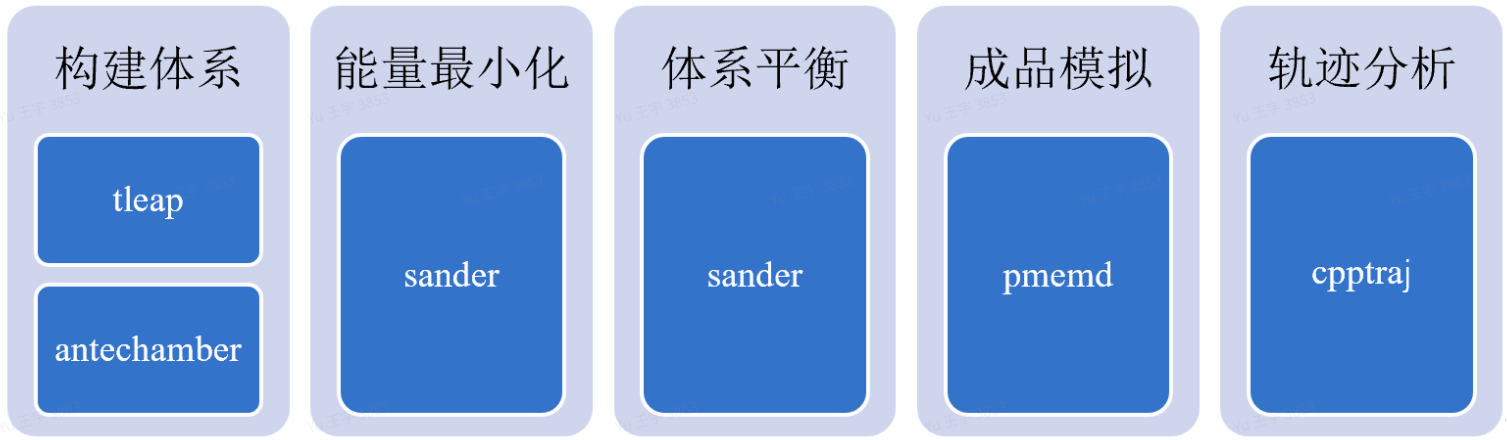
天然氨基酸的 protein和 peptide的复合物MD建模
MD 准备
由于体系比较简单,直接跑标准的 tleap 准备即可
tleap -f tleap_run.in > tleap.log配置文件 tleap_run.in
# 1. Load standard force fields
source leaprc.protein.ff14SB
source leaprc.water.tip3p

# 2. Load protein and peptide complex structure
com = loadpdb complex.pdb

# 5. Solvate the system with a TIP3P water box, 15 Angstrom buffer
solvateBOX com TIP3PBOX 15 iso

# 6. Neutralize the system with Cl- or Na+ ions
addions com Cl- 0

# 7. Save solvated and neutralized system files
saveamberparm com wat.prmtop wat.prmcrd
savepdb com wat_final.pdb

quit
MD 运行
其他run_md.sh 脚本、*.in文件和 下面的 ligand-receptor 分析一样。
Ligand 和 receptor 结合分析 (from AF3 output)
在使用tleap之前,记住要修改PDB文件,例如删除开头、connect信息,只保留ATOM、HETATM、TER,END行,修改NH2为NHE(Amber名称),修改成二硫键的CYS为CYX,删除水分子、蛋白质结构,删除ANISOU行。
MD 准备 Prepare_MD
Full script
#!/bin/bash

# prepare_md.sh - System Preparation for Amber MD
# Usage: ./prepare_md.sh
# Required files: complex.pdb, leap_lig.in, leap_run.in
# The ligand in the complex.pdb must be rename to 'LIG' in Pymol
mamba activate amber-md
module load ambertools/25/openmpi4.1.4_cuda12.1
# prepare ligand
grep "HETATM.* LIG" complex.pdb > LIG.pdb
obabel -i pdb LIG.pdb -o mol2 -O LIG_init.mol2

# create charged mol2 file
antechamber -i LIG_init.mol2 -fi mol2 -o LIG.mol2 -fo mol2 -c gas -nc 0 -rn LIG

# create frcmod file
parmchk2 -i LIG.mol2 -f mol2 -o LIG.frcmod

# create ligand.lib file
tleap -f leap_lig.in

# prepare protein
grep '^ATOM' complex.pdb > protein_cleaned.pdb
cat protein_cleaned.pdb LIG.pdb > protein_ligand.pdb

echo "Running tleap to build the system..."
# The tleap.in script will generate wat.prmtop and wat.prmcrd
tleap -f tleap_run.in > tleap.log

if [ $? -eq 0 ]; then
    echo "System preparation complete. Check tleap.log for details."
    echo "Generated files: wat.prmtop, wat.prmcrd, wat_final.pdb"
else
    echo "Error during tleap execution. Check tleap.log for errors."
fi
准备 Complex 文件
#  rename the ligand to LIG in pymol
maxit -o 2 -input fold_wt_model_0.cif -output fold_wt_model_0.pdb
alter sel, resn='LIG'
save complex.pdb, fold_wt_model_0,
准备 Ligand 文件
从 complex 文件创建(推荐)
# prepare ligand
grep "HETATM.* LIG" complex.pdb > LIG.pdb

#  mamba install -c conda-forge openbabel
obabel -i pdb LIG.pdb -o mol2 -O LIG_init.mol2

# create charged mol2 file
antechamber -i LIG_init.mol2 -fi mol2 -o LIG.mol2 -fo mol2 -c gas -nc 0 -rn LIG

# create frcmod file
parmchk2 -i LIG.mol2 -f mol2 -o LIG.frcmod

# create ligand.lib file
tleap -f leap_lig.in
配置文件 leap_lig.in
# leap_lig.in
# ----------------------------------------------------
# Load the General Amber Force Field (GAFF)
source leaprc.gaff

# Load the missing parameters generated by parmchk2
loadamberparams LIG.frcmod

# Load the charged molecule (with GAFF atom types)
LIG = loadmol2 LIG.mol2

# Save the molecule as an AMBER-readable library unit
saveoff LIG LIG.lib

quit
构建体系 Build System
首先,进行分子动力学模拟我们需要对蛋白质、核酸或小分子等初始PDB文件进行预先处理,即搭建模拟的体系,使得其能够成为Amb
er可识别可操作的形式,并解决其中的错误,包括结构缺失、氢原子缺失、二硫键问题等。
搭建模拟体系主要需要两个文件:prmtop和prmcrd,来识别一个分子。其中prmtop文件包含了原子名称,原子类型,残基名称,力场参数等信息,prmcrd包含了原子的所有坐标,以及模拟盒子的形状。搭建体系除了构建体系的输入文件,还需要加入溶剂盒子、加入离子平衡体系的电荷。
以上提到的构建体系将在Amber中的tleap准备模块完成,若有小分子配体、特殊的残基或者金属离子等则需要使用Antechmbaer模块预先准备文件。在tleap.in文件里包含常规蛋白与小分子体系常用命令,可用以下命令直接调用该文件:
module load ambertools/25/openmpi4.1.4_cuda12.1

tleap -f tleap_run.in # lack tleap.in file
配置文件 tleap_run.in
# 1. Load standard force fields
source leaprc.protein.ff14SB
source leaprc.water.tip3p

# 2. Load GAFF2 for small molecules/ligands
source leaprc.gaff2

# 3. Load ligand/non-natural residue parameters
loadamberparams LIG.frcmod
# loadamberprep ligand.prepc
loadoff LIG.lib

# 4. Load protein and ligand complex structure
com = loadpdb protein_ligand.pdb

# 5. Solvate the system with a TIP3P water box, 15 Angstrom buffer
solvateBOX com TIP3PBOX 15 iso

# 6. Neutralize the system with Cl- or Na+ ions
addions com Cl- 0

# 7. Save solvated and neutralized system files
saveamberparm com wat.prmtop wat.prmcrd
savepdb com wat_final.pdb

quit
# Load protein and ligand structures separately
# Ensure protein.pdb and ligand.pdb are pre-processed (e.g., disulfide bonds, atom names)
# Ensure your protein PDB is clean (no HETATMs, no waters, correct residue names)
rec = loadpdb protein.pdb
# Ensure your ligand PDB/MOL2 is saved with the correct residue name (CFN)# NOTE: The file loaded here (CFN.pdb) MUST match the residue name (CFN) in CFN.lib
LIG = loadpdb LIG.pdb
com = combine {rec LIG} # Combine protein and ligandMD 运行
Full script
#!/bin/bash

# run_md_binding.sh - Amber MD Simulation for Protein-Ligand Binding Dynamics
# This script runs a modified, gentle MD protocol suitable for AlphaFold3 predicted structures.
# It assumes the system files (wat.prmtop, wat.prmcrd) and input files (*.in) are in the current directory.

# Check for required files
if [ ! -f "wat.prmtop" ] || [ ! -f "wat.prmcrd" ]; then
    echo "Error: System files wat.prmtop and wat.prmcrd not found."
    echo "Please ensure tleap preparation is complete and files are present."
    exit 1
fi

module load amber/24/openmpi4.1.4_cuda12.1

# Use pmemd if available for GPU acceleration, otherwise use sander
MD_ENGINE="sander"
if command -v pmemd.cuda &> /dev/null
then
    MD_ENGINE="pmemd.cuda"
    echo "Using GPU-accelerated engine: pmemd.cuda"
elif command -v pmemd &> /dev/null
then
    MD_ENGINE="pmemd"
    echo "Using parallel engine: pmemd"
else
    echo "Using default engine: sander"
fi

echo "--- 1. Gentle Minimization (Solvent/Ions only) ---"
$MD_ENGINE -O -i gentle_em.in -o gentle_em.out -p wat.prmtop -c wat.prmcrd -r gentle_em.rst -ref wat.prmcrd

if [ $? -ne 0 ]; then echo "Gentle Minimization failed. Exiting."; exit 1; fi

echo "--- 2. Full Minimization (All atoms) ---"
$MD_ENGINE -O -i em.in -o em.out -p wat.prmtop -c gentle_em.rst -r em.rst -ref gentle_em.rst

if [ $? -ne 0 ]; then echo "Full Minimization failed. Exiting."; exit 1; fi

echo "--- 3. NVT Heating (Restrained, 0K to 310K) ---"
$MD_ENGINE -O -i nvt.in -o nvt.out -p wat.prmtop -c em.rst -r nvt.rst -ref em.rst -x nvt.mdcrd

if [ $? -ne 0 ]; then echo "NVT Heating failed. Exiting."; exit 1; fi

echo "--- 4. NPT Equilibration (Unrestrained, 1 ns) ---"
$MD_ENGINE -O -i npt.in -o npt.out -p wat.prmtop -c nvt.rst -r npt.rst -ref nvt.rst -x npt.mdcrd

if [ $? -ne 0 ]; then echo "NPT Equilibration failed. Exiting."; exit 1; fi

echo "--- 5. Production MD (Binding Dynamics, 100 ns) ---"
$MD_ENGINE -O -i md.in -o md.out -p wat.prmtop -c npt.rst -r md.rst -x npt.mdcrd

if [ $? -ne 0 ]; then echo "Production MD failed. Exiting."; exit 1; fi

echo "MD Simulation complete. Check *.out files for details."
能量最小化 Energy Minimization(EM)
溶剂能量最小化 Solvent Energy Minimization(Solvent EM)
# module load amber/24/openmpi4.1.4_cuda12.1
pmemd.cuda -O -i gentle_em.in -o gentle_em.out -p wat.prmtop -c wat.prmcrd -r gentle_em.rst -ref wat.prmcrd
# Use only if CUDA/GPU not available
pmemd -O -i gentle_em.in -o gentle_em.out -p wat.prmtop -c wat.prmcrd -r gentle_em.rst -ref wat.prmcrd
# You only need to switch back to sander if:
# 1) Encounter an unusual error in pmemd that requires debugging the core force field calculation.
# 2) Running advanced methods like MM/PBSA (often uses sander in the background), QM/MM, or certain new/experimental restraints or force field modifications that haven't been ported to pmemd yet.
sander -O -i gentle_em.in -o gentle_em.out -p wat.prmtop -c wat.prmcrd -r gentle_em.rst -ref wat.prmcrd配置文件 gentle_em.in
Gentle Minimization (Solvent/Ions only)
&cntrl
 imin=1,     ! Perform minimization
 ntx=1,      ! Read coordinates from input file
 irest=0,    ! Not a restart run
 ntwx=0,     ! Do not write trajectory
 maxcyc=5000, ! Total minimization steps
 ncyc=2500,  ! Steps using steepest descent, then switch to conjugate gradient
 ntb=1,      ! Constant volume (NVT) with periodic boundary conditions
 cut=10.0,   ! Non-bonded cutoff
 ntpr=500,   ! Print energy every 500 steps
 ntr=1,      ! Apply positional restraints
 RESTRAINT_WT=100.0, ! High force constant for restraints (100 kcal/mol/A^2)
 RESTRAINTMASK=':1-999 & !@H=', ! Restrain all non-hydrogen atoms of protein/ligand
&end
全局能量最小化 All Atoms Energy Minimization(All Atoms EM)
构建完体系之后,就要对体系进行能量最小化,正常是使用最速下降法,中途转为共轭梯度法,后者比前者耗时更长,但是在接近能量最低点时精度更高。
# module load amber/24/openmpi4.1.4_cuda12.1
pmemd.cuda -O -i em.in -o em.out -p wat.prmtop -c gentle_em.rst -r em.rst -ref gentle_em.rst -x em.mdcrd
配置文件 em.in
Full Minimization (All atoms)
&cntrl
 imin=1,     ! Perform minimization
 ntx=1,      ! Read coordinates from input file
 irest=0,    ! Not a restart run
 ntwx=0,     ! Do not write trajectory
 maxcyc=10000, ! Total minimization steps
 ncyc=5000,  ! Steps using steepest descent, then switch to conjugate gradient
 ntb=1,      ! Constant volume (NVT)
 cut=10.0,   ! Non-bonded cutoff
 ntpr=500,   ! Print energy every 500 steps
 ntr=0,      ! NO positional restraints
&end
体系平衡 NVT/NPT
能量最小化之后,需要对体系进行平衡,包括模拟退火过程。
平衡的时候正常需要先使用NVT系综再用NPT系综(蛋白小分子体系)。不同体系下系综的选择没有统一的规则,最好的方法是多读文献,相同的模拟环境下,看看文献中用的是哪种系综。
恒温恒容 Constant temperature, constant volume (NVT)
# module load amber/24/openmpi4.1.4_cuda12.1
pmemd.cuda -O -i nvt.in -o nvt.out -p wat.prmtop -c em.rst -r nvt.rst -ref em.rst -x nvt.mdcrd
配置文件 nvt.in
NVT Heating (Restrained)
&cntrl
 imin=0,     ! Run MD
 irest=0,    ! Not a restart run
 ntx=1,      ! Read coordinates, no velocities
 ntb=1,      ! Constant volume (NVT)
 cut=10.0,
 ntc=2,      ! SHAKE on H-bonds
 ntf=2,      ! No force calc for SHAKE bonds
 tempi=0.0,  ! Initial temperature (0 K)
 temp0=310.0, ! Target temperature (310 K)
 ntt=3,      ! Langevin dynamics
 gamma_ln=1.0, ! Collision frequency
 ig=-1,      ! Random seed
 nstlim=100000, ! 200 ps (100,000 steps * 0.002 ps/step)
 dt=0.002,   ! Time step (2 fs)
 ntpr=500,   ! Print energy every 500 steps
 ntwx=5000,  ! Write trajectory every 5000 steps
 ntwr=5000,  ! Write restart every 5000 steps
 ioutfm=1,   ! NetCDF trajectory format
 ntr=1,      ! Apply positional restraints
 RESTRAINT_WT=1.0, ! Weak force constant for restraints (1 kcal/mol/A^2)
 RESTRAINTMASK=':1-999 & !@H=', ! Restrain all non-hydrogen atoms of protein/ligand
 iwrap=1,    ! Wrap coordinates to the primary box
&end
恒温恒压 Constant temperature, constant pressure (NPT)
# module load amber/24/openmpi4.1.4_cuda12.1
pmemd.cuda -O -i npt.in -o npt.out -p wat.prmtop -c nvt.rst -r npt.rst -ref nvt.rst -x npt.mdcrd
配置文件 npt.in
NPT Equilibration (Unrestrained)
&cntrl
 imin=0,     ! Run MD
 irest=1,    ! Restart run
 ntx=7,      ! Read coordinates, velocities, and box info from restart file
 ntb=2,      ! Constant pressure (NPT)
 pres0=1.0,  ! Target pressure (1.0 atm)
 ntp=1,      ! Isotropic position scaling
 taup=2.0,   ! Pressure relaxation time (2 ps)
 cut=10.0,
 ntc=2,      ! SHAKE on H-bonds
 ntf=2,      ! No force calc for SHAKE bonds
 tempi=310.0,
 temp0=310.0,
 ntt=3,      ! Langevin dynamics
 gamma_ln=1.0,
 nstlim=500000, ! 1 ns (500,000 steps * 0.002 ps/step)
 dt=0.002,   ! Time step (2 fs)
 ntpr=500,
 ntwx=5000,
 ntwr=5000,
 ioutfm=1,
 ntr=0,      ! NO positional restraints
 iwrap=1,    ! Wrap coordinates to the primary box
&end
MD 成品模拟
# module load amber/24/openmpi4.1.4_cuda12.1
pmemd.cuda -O -i md.in -o md.out -p wat.prmtop -c npt.rst -r md.rst -x md.mdcrd
配置文件 md.in
Production MD (Binding Dynamics)
&cntrl
 imin=0,     ! Run MD
 irest=1,    ! Restart run
 ntx=5,      ! CORRECTED: Read coords, velocities, and box (for modern AMBER)
 ntb=2,      ! Constant pressure (NPT)
 pres0=1.0,  ! Target pressure (1.0 atm)
 ntp=2,      ! CORRECTED: Isotropic Berendsen Barostat (Standard NPT)
 taup=2.0,   ! Pressure relaxation time (2 ps)
 cut=10.0,
 ntc=2,      ! SHAKE on H-bonds
 ntf=2,      ! No force calc for SHAKE bonds
 tempi=310.0,
 temp0=310.0,
 ntt=3,      ! Langevin dynamics
 gamma_ln=1.0,
 nstlim=5000000, ! 10 ns (5,000,000 steps * 0.002 ps/step)
 dt=0.002,   ! Time step (2 fs)
 ntpr=10000, ! Change: Print energy less frequently (20 ps)
 ntwx=50000, ! Change: Write trajectory less frequently (100 ps per frame)
 ntwr=50000, ! Write restart every 50000 steps (Standard)
 ntr=0,      ! NO positional restraints
 ioutfm=1,   ! NetCDF trajectory format
 iwrap=1,    ! Wrap coordinates to the primary box
&end
轨迹分析
在模拟完成后,进行最后的轨迹分析,不同目的的模拟需要分析不同的结果,但通常体系的RMSD与蛋白RMSF都会分析。轨迹分析还可以包括距离监测、角度监测、氢键分析、结合自由能计算等等,根据目的的不同进行不同
类型的分析,以上提到的功能均可在Amber中的cpptraj模块完成,命令为:
cpptraj -i rmsd.inFull script
#!/bin/bash

# analysis.sh - Post-MD Trajectory Analysis Script
# This script performs basic RMSD and RMSF analysis using cpptraj.
#
module load ambertools/25/openmpi4.1.4_cuda12.1

echo "--- 1. Running RMSD Analysis ---"
cpptraj -i rmsd.in > rmsd.log

if [ $? -eq 0 ]; then
    echo "RMSD analysis complete. Results saved to RMSD_all_atoms.agr and RMSD_CA.agr"
else
    echo "Error during RMSD analysis. Check rmsd.log for errors."
fi

# --- 2. RMSF Analysis ---
echo "--- 2. Running RMSF Analysis ---"
cpptraj -i rmsf.in > rmsf.log

if [ $? -eq 0 ]; then
    echo "RMSF analysis complete. Results saved to RMSF_backbone.dat"
else
    echo "Error during RMSF analysis. Check RMSF.log for errors."
fi

echo "Trajectory analysis finished."
均方根偏差 (RMSD)
RMSD 是衡量两组原子坐标之间差异的指标。
测量内容:模拟过程中任意给定时间点的结构(通常是骨架或 Cα 原子)相对于参考结构(例如,最小化结构或起始晶体结构)的整体偏差。
公式(概念):在两个结构最佳叠加(拟合)后,轨迹框架中一组原子的坐标与参考框架中同一组原子的坐标之间的平均距离。
单位:长度(A˚或纳米)。
解释:
较低的 RMSD(例如,骨架为 1.0−3.0A˚)表示分子保持接近其原始折叠结构。
RMSD 值过高或快速增加表明蛋白质发生了较大的构象变化、去折叠或显著漂移。
用途:检查整体模拟的稳定性和收敛性。
均方根偏差 (RMSD) 和均方根波动 (RMSF) 的区别在于,RMSD 衡量的是整个分子相对于参考结构的结构变化,而 RMSF 衡量的是单个原子或残基随时间推移的局部柔韧性或位移。可以这样理解:RMSD 表示分子偏离起始位置的距离, 而 RMSF 表示分子特定部分的摆动程度。
module load ambertools/25/openmpi4.1.4_cuda12.1

cpptraj -i rmsd.in > rmsd.log
配置文件 rmsd.in
parm wat.prmtop
trajin md.mdcrd
# Remove water and ions for analysis
strip :WAT,Na+,Cl-
# Center the protein and image it
center :1-999
image center familiar

# Using first makes the first **processed** frame (after stripping) the reference.
#  Calculate RMSD of all non-hydrogen atoms of the protein/ligand
rms first :1-999&!@H= out rmsd_all_atoms.agr

# Calculate RMSD of C-alpha atoms of the protein
rms first :1-999&@CA out rmsd_protein.agr
run
均方根波动 (RMSF)
RMSF 是衡量原子围绕平均位置运动或灵活性的指标。
测量内容:模拟过程中每个原子或残基的时间平均位置波动。参考值是整个轨迹(或其稳定部分)计算的平均结构。
公式(概念):原子从其平均位置移动的均方距离的平方根。
单位:长度(A˚或纳米)。
解释:
低 RMSF(例如,核心中的原子或 α 螺旋等二级结构元素)表示刚性或稳定区域。
高 RMSF(例如,环区域、N/C 末端或暴露侧链中的原子)表示柔性或不稳定区域。
用途:识别对功能至关重要的蛋白质柔性或可移动部分(例如结合环或铰链区)。
module load ambertools/25/openmpi4.1.4_cuda12.1

cpptraj -i rmsf.in > rmsf.log
配置文件 rmsf.in
parm wat.prmtop
trajin md.mdcrd
# Remove water and ions for analysis
strip :WAT,Na+,Cl-
# Center the protein and image it
center :1-999
image center familiar
# Calculate RMSF of C-alpha, C, N, O atoms for each residue
atomicfluct :1-999&@CA,C,N,O out rmsf_backbone.dat byres
run
用泊松-玻尔兹曼表面积计算分子力学能量 Calculate molecular mechanics energies with Poisson-Boltzmann surface area (MM/PBSA)
cp ../../run1/ace_ac1/strip*.in .
cp ../../run1/ace_ac1/mmpbsa.in .
cpptraj -i strip.in > strip.log
cpptraj -i strip_traj.in > strip_traj.log
rm -f complex.prmtop receptor.prmtop ligand.prmtop
ante-MMPBSA.py -p strip.prmtop -c complex.prmtop -r receptor.prmtop -l ligand.prmtop -n ":628" # to be adapted according to wat_final.pdb
cp strip.prmtop complex.prmtop
nohup MMPBSA.py -O -i mmpbsa.in -o mmpbsa_results.dat -cp complex.prmtop -rp receptor.prmtop -lp ligand.prmtop -y strip.nc 2>&1 > nohup.out &
准备拓扑 (topology) 文件(strip.prmtop)
module load ambertools/25/openmpi4.1.4_cuda12.1

cpptraj -i strip.in > strip.log # strip topology and trajectory
配置文件 strip.in
parm wat.prmtop
parmstrip :WAT,:Cl-,:Na+
parmwrite out strip.prmtop
run
查看 topology 文件
cpptraj <<EOF
parm strip.prmtop
parminfo
quit
EOF
准备轨迹文件 (strip.nc)
module load ambertools/25/openmpi4.1.4_cuda12.1

cpptraj -i strip_traj.in > strip_traj.log # strip topology and trajectory
配置文件 strip_traj.in
parm wat.prmtop
trajin md.mdcrd
strip :WAT,:Cl-,:Na+
trajout strip.nc netcdf
run
查看 topology 文件
cpptraj strip.prmtop <<EOF
parm strip.prmtop
trajin strip.nc
run
EOF
定义系统拓扑
MMPBSA.py requires three stripped topology files:
Complex: (Protein + Ligand) →
complex.prmtop(This is thestrip.prmtopcreated above)Receptor: (Protein only) →
receptor.prmtopLigand: (Ligand only) →
ligand.prmtop
You can generate all three from the strip.prmtop file using the ante-MMPBSA.py utility. Assuming your protein is residues 1-658 and your ligand is residue 659:
rm -f complex.prmtop receptor.prmtop ligand.prmtop

# ac1
ante-MMPBSA.py -p strip.prmtop -c complex.prmtop -r receptor.prmtop -l ligand.prmtop -n ":628-637"
cp strip.prmtop complex.prmtop

# lpy
ante-MMPBSA.py -p strip.prmtop -c complex.prmtop -r receptor.prmtop -l ligand.prmtop -s ":1-627" -n ":628-637"

# capt
ante-MMPBSA.py -p strip.prmtop -c complex.prmtop -r receptor.prmtop -l ligand.prmtop -s ":1-627" -n ":628-637"-p: Input topology file (solvent-stripped).
-c, -r, -l: Output topology files for Complex, Receptor, and Ligand.
-s: Selection mask for the Receptor (protein residues).
-y: Selection mask for the Ligand (ligand residue name, e.g., :LIG or residue number, e.g., :659).
创建 MMPBSA.py 输入文件 mmpbsa.in
The input file (mmpbsa.in) tells the program which methods to use, how many frames to analyze, and which topology files belong to which component.
配置文件 mmpbsa.in
Estimation of Binding Free Energy (MM/PBSA)
&general
  startframe=100, endframe=5000, interval=10,
  keep_files=0,
  verbose=1,
/
&gb
  igb=5,
  saltcon=0.100,
/
&pb
  indi=1.0,
  exdi=80.0,
  scale=2.0,
/
&decomp
  idecomp=1,
/&general: Defines the range of the trajectory to analyze. Always skip the first few ns (e.g., 1 ns or 500 frames) to ensure system equilibration.&gb: The Generalized Born method. igb=5 (GB-OBC II) is the default and generally most robust.&pb: The Poisson-Boltzmann method (slower, but often more accurate for specific systems). You typically run either&gbOR `&pb}$, not both.&decomp: Enables per-residue energy decomposition, useful for identifying key residues for binding.
运行 MM/PBSA 计算
Finally, execute the MMPBSA.py program using the stripped trajectory and your input file.
MMPBSA.py -O -i mmpbsa.in -o mmpbsa_results.dat -cp complex.prmtop -rp receptor.prmtop -lp ligand.prmtop -y strip.nc-O: Overwrite existing files.-i: MMPBSA input file (mmpbsa.in).-o: Final summary output file (mmpbsa_results.dat).-cp,-rp,-lp: Topology files for Complex, Receptor, and Ligand.-y: Trajectory file (strip.nc).
The output file (FINAL_RESULTS.dat) will contain the final binding energy components: $ΔG_{bind}=ΔE_{MM}+ΔG_{solv}−TΔS$, where $ΔG_{solv}=ΔG_{PB/GB}+ΔG_{SA}$.
含非天然氨基酸的蛋白质MD建模
MD 准备
由于体系比较简单,直接跑标准的 tleap 准备即可
tleap -f tleap_run.in > tleap.log准备 UAA 文件
从 SMILES 创建
# obabel to generate mol2 file
obabel -i smi -:"O=C(C(C=CC=C1)=C1N2)C3=C2C=CC(C[C@H](N)C(O)=O)=C3" -o mol2 -O ACD_init.mol2 --partialcharge gasteiger --gen3d --forcefield gaff

# create charged mol2 file
antechamber -i ACD_init.mol2 -fi mol2 -o ACD.mol2 -fo mol2 -c gas -nc 0 -rn ACD

# create frcmod file
parmchk2 -i ACD.mol2 -f mol2 -o ACD.frcmod

# create ACD.lib file
tleap -f leap_uaa.in
配置文件 leap_uaa.in
# leap_uaa.in
# ----------------------------------------------------
# Load the General Amber Force Field (GAFF)
source leaprc.gaff

# Load the missing parameters generated by parmchk2
loadamberparams ACD.frcmod

# Load the charged molecule (with GAFF atom types)
ACD = loadmol2 ACD.mol2

# Save the molecule as an AMBER-readable library unit
saveoff ACD ACD.lib

quit
准备 YT3 文件
创建 YT3.mol2 文件
# create YT3.mol2 file
obabel -:'[Y]' -o mol2 -O YT3_init.mol2 --gen3d -c 3

antechamber -i YT3_init.mol2 -fi mol2 -o YT3.mol2 -fo mol2 -nc 0 -rn YT3 -j 4
创建 YT3.frcmod 文件
# create YT3.frcmod file
cat > YT3.frcmod << EOF
Yttrium(III) parameters
MASS
Y  88.905   0.000  Yttrium(III) ion

BOND

ANGLE

DIHE

IMPROPER

NONBON
  Y           1.650  0.3367   Yttrium(III) - 12-6 LJ parameters
EOF
创建 YT3.lib 文件
tleap -f - << EOF
source leaprc.gaff2
source leaprc.water.opc
loadamberparams YT3.frcmod
set default PBRadii mbondi3

# Load your Y3+ ion
YT3 = loadmol2 YT3.mol2

# Save as library file
saveoff YT3 YT3.lib

# Optional: also save prmtop and inpcrd
# saveamberparm YT3 YT3.prmtop YT3.inpcrd

quit
EOF
创建 leaprc.YT3 文件 (Optional)
cat > leaprc.YT3 << EOF
# Custom leaprc for Yttrium(III)
logFile leap.log

# Load force field modifications
addAtomTypes {
    { "Y" "Y" "sp3" }
}
loadamberparams YT3.frcmod

# Load library
loadoff YT3.lib
EOF
配置文件 tleap_run.in
# 1. Load standard force fields
source leaprc.protein.ff19SB
source leaprc.water.opc
# 2. Load GAFF2 for small molecules/ligands
source leaprc.gaff2
source leaprc.YT3 # Your custom YT3 parameters
# 3. Load ligand/non-natural residue parameters
loadamberparams ACD.frcmod
# loadamberprep ligand.prepc
loadoff ACD.lib
# 4. Load protein and peptide complex structure
com = loadpdb complex.pdb
# 5. Solvate the system with a OPCBOX water box, 15 Angstrom buffer
solvateBOX com OPCBOX 15.0
# 6. Neutralize the system with Cl- or Na+ ions
addions com Na+ 0
addions com Cl- 0
# Optional: add physiological salt
# addionsRand com Na+ 20
# addionsRand com Cl- 20
# 7. Save solvated and neutralized system files
saveamberparm com wat.prmtop wat.prmcrd
savepdb com wat_final.pdb
quitMD 运行
其他run_md.sh 脚本、*.in文件和 下面的 ligand-receptor 分析一样。
含非天然氨基酸的多肽MD建模
这里包含了三个例子:二硫键成环多肽、非标准氨基酸多肽和 复杂 linker 成环多肽。
这里使用了PDB库的两个多肽晶体进行MD测试,第一个是5XCO晶体为一个用二硫键成环的22肽。
在tleap中,也可以用以下命令创建一条多肽:
$ tleap
source leaprc.protein.ff14SB
peptide = sequence { ACE ALA MET LYS LEU GLU NME }
desc peptide
savepdb peptide my_peptide.pdb
quit
tleap运行之后会自动生成tleap.log文件,可以在此查看体系构建时的信息。
log started: Fri Oct 24 21:12:23 2025

Log file: ./leap.log
>> #
>> # ----- leaprc for loading the ff14SB force field
>> # ----- NOTE: this is designed for PDB format 3!
>> #
>> #    load atom type hybridizations
>> #
>> addAtomTypes {
>>      { "H"   "H" "sp3" }
>>      { "HO"  "H" "sp3" }
>>      { "HS"  "H" "sp3" }
>>      { "H1"  "H" "sp3" }
>>      { "H2"  "H" "sp3" }
>>      { "H3"  "H" "sp3" }
>>      { "H4"  "H" "sp3" }
>>      { "H5"  "H" "sp3" }
>>      { "HW"  "H" "sp3" }
>>      { "HC"  "H" "sp3" }
>>      { "HA"  "H" "sp3" }
>>      { "HP"  "H" "sp3" }
>>      { "HZ"  "H" "sp3" }
>>      { "OH"  "O" "sp3" }
>>      { "OS"  "O" "sp3" }
>>      { "O"   "O" "sp2" }
>>      { "O2"  "O" "sp2" }
>>      { "OP"  "O" "sp2" }
>>      { "OW"  "O" "sp3" }
>>      { "CT"  "C" "sp3" }
>>      { "CX"  "C" "sp3" }
>>      { "C8"  "C" "sp3" }
>>      { "2C"  "C" "sp3" }
>>      { "3C"  "C" "sp3" }
>>      { "CH"  "C" "sp3" }
>>      { "CS"  "C" "sp2" }
>>      { "C"   "C" "sp2" }
>>      { "CO"   "C" "sp2" }
>>      { "C*"  "C" "sp2" }
>>      { "CA"  "C" "sp2" }
>>      { "CB"  "C" "sp2" }
>>      { "CC"  "C" "sp2" }
>>      { "CN"  "C" "sp2" }
>>      { "CM"  "C" "sp2" }
>>      { "CK"  "C" "sp2" }
>>      { "CQ"  "C" "sp2" }
>>      { "CD"  "C" "sp2" }
>>      { "C5"  "C" "sp2" }
>>      { "C4"  "C" "sp2" }
>>      { "CP"  "C" "sp2" }
>>      { "CI"  "C" "sp3" }
>>      { "CJ"  "C" "sp2" }
>>      { "CW"  "C" "sp2" }
>>      { "CV"  "C" "sp2" }
>>      { "CR"  "C" "sp2" }
>>      { "CA"  "C" "sp2" }
>>      { "CY"  "C" "sp2" }
>>      { "C0"  "Ca" "sp3" }
>>      { "MG"  "Mg" "sp3" }
>>      { "N"   "N" "sp2" }
>>      { "NA"  "N" "sp2" }
>>      { "N2"  "N" "sp2" }
>>      { "N*"  "N" "sp2" }
>>      { "NP"  "N" "sp2" }
>>      { "NQ"  "N" "sp2" }
>>      { "NB"  "N" "sp2" }
>>      { "NC"  "N" "sp2" }
>>      { "NT"  "N" "sp3" }
>>      { "NY"  "N" "sp2" }
>>      { "N3"  "N" "sp3" }
>>      { "S"   "S" "sp3" }
>>      { "SH"  "S" "sp3" }
>>      { "P"   "P" "sp3" }
>>      { "LP"  ""  "sp3" }
>>      { "EP"  ""  "sp3" }
>>      { "F"   "F" "sp3" }
>>      { "Cl"  "Cl" "sp3" }
>>      { "Br"  "Br" "sp3" }
>>      { "I"   "I"  "sp3" }
>> }
>> #
>> #    Load the main parameter set.
>> #
>> parm10 = loadamberparams parm10.dat
Loading parameters: /sw/rl9g/ambertools/25/rl9_openmpi4.1.4_cuda12.1/install/dat/leap/parm/parm10.dat
Reading title:
PARM99 + frcmod.ff99SB + frcmod.parmbsc0 + OL3 for RNA
>> frcmod14SB = loadamberparams frcmod.ff14SB
Loading parameters: /sw/rl9g/ambertools/25/rl9_openmpi4.1.4_cuda12.1/install/dat/leap/parm/frcmod.ff14SB
Reading force field modification type file (frcmod)
Reading title:
ff14SB protein backbone and sidechain parameters
>> #
>> #    Load main chain and terminating amino acid libraries
>> #
>> loadOff amino12.lib
Loading library: /sw/rl9g/ambertools/25/rl9_openmpi4.1.4_cuda12.1/install/dat/leap/lib/amino12.lib
Loading: ALA
Loading: ARG
Loading: ASH
Loading: ASN
Loading: ASP
Loading: CYM
Loading: CYS
Loading: CYX
Loading: GLH
Loading: GLN
Loading: GLU
Loading: GLY
Loading: HID
Loading: HIE
Loading: HIP
Loading: HYP
Loading: ILE
Loading: LEU
Loading: LYN
Loading: LYS
Loading: MET
Loading: PHE
Loading: PRO
Loading: SER
Loading: THR
Loading: TRP
Loading: TYR
Loading: VAL
>> loadOff aminoct12.lib
Loading library: /sw/rl9g/ambertools/25/rl9_openmpi4.1.4_cuda12.1/install/dat/leap/lib/aminoct12.lib
Loading: CALA
Loading: CARG
Loading: CASN
Loading: CASP
Loading: CCYS
Loading: CCYX
Loading: CGLN
Loading: CGLU
Loading: CGLY
Loading: CHID
Loading: CHIE
Loading: CHIP
Loading: CHYP
Loading: CILE
Loading: CLEU
Loading: CLYS
Loading: CMET
Loading: CPHE
Loading: CPRO
Loading: CSER
Loading: CTHR
Loading: CTRP
Loading: CTYR
Loading: CVAL
Loading: NHE
Loading: NME
>> loadOff aminont12.lib
Loading library: /sw/rl9g/ambertools/25/rl9_openmpi4.1.4_cuda12.1/install/dat/leap/lib/aminont12.lib
Loading: ACE
Loading: NALA
Loading: NARG
Loading: NASN
Loading: NASP
Loading: NCYS
Loading: NCYX
Loading: NGLN
Loading: NGLU
Loading: NGLY
Loading: NHID
Loading: NHIE
Loading: NHIP
Loading: NILE
Loading: NLEU
Loading: NLYS
Loading: NMET
Loading: NPHE
Loading: NPRO
Loading: NSER
Loading: NTHR
Loading: NTRP
Loading: NTYR
Loading: NVAL
>>
>> #
>> #    Define the PDB name map for the amino acids
>> #
>> addPdbResMap {
>>   { 0 "HYP" "HYP" } { 1 "HYP" "CHYP" }
>>   { 0 "ALA" "NALA" } { 1 "ALA" "CALA" }
>>   { 0 "ARG" "NARG" } { 1 "ARG" "CARG" }
>>   { 0 "ASN" "NASN" } { 1 "ASN" "CASN" }
>>   { 0 "ASP" "NASP" } { 1 "ASP" "CASP" }
>>   { 0 "CYS" "NCYS" } { 1 "CYS" "CCYS" }
>>   { 0 "CYX" "NCYX" } { 1 "CYX" "CCYX" }
>>   { 0 "GLN" "NGLN" } { 1 "GLN" "CGLN" }
>>   { 0 "GLU" "NGLU" } { 1 "GLU" "CGLU" }
>>   { 0 "GLY" "NGLY" } { 1 "GLY" "CGLY" }
>>   { 0 "HID" "NHID" } { 1 "HID" "CHID" }
>>   { 0 "HIE" "NHIE" } { 1 "HIE" "CHIE" }
>>   { 0 "HIP" "NHIP" } { 1 "HIP" "CHIP" }
>>   { 0 "ILE" "NILE" } { 1 "ILE" "CILE" }
>>   { 0 "LEU" "NLEU" } { 1 "LEU" "CLEU" }
>>   { 0 "LYS" "NLYS" } { 1 "LYS" "CLYS" }
>>   { 0 "MET" "NMET" } { 1 "MET" "CMET" }
>>   { 0 "PHE" "NPHE" } { 1 "PHE" "CPHE" }
>>   { 0 "PRO" "NPRO" } { 1 "PRO" "CPRO" }
>>   { 0 "SER" "NSER" } { 1 "SER" "CSER" }
>>   { 0 "THR" "NTHR" } { 1 "THR" "CTHR" }
>>   { 0 "TRP" "NTRP" } { 1 "TRP" "CTRP" }
>>   { 0 "TYR" "NTYR" } { 1 "TYR" "CTYR" }
>>   { 0 "VAL" "NVAL" } { 1 "VAL" "CVAL" }
>>   { 0 "HIS" "NHIS" } { 1 "HIS" "CHIS" }
>> }
>>
>> #
>> # assume that most often proteins use HIE
>> #
>> NHIS = NHIE
>> HIS = HIE
>> CHIS = CHIE
>
> peptide = sequence { ACE ALA MET LYS LEU GLU NME }
Sequence: ACE
Sequence: ALA
Sequence: MET
Sequence: LYS
Sequence: LEU
Sequence: GLU
Sequence: NME
> desc peptide
UNIT name: ACE
Head atom: null
Tail atom: null
Contents:
R<ACE 1>
R<ALA 2>
R<MET 3>
R<LYS 4>
R<LEU 5>
R<GLU 6>
R<NME 7>
> savepdb peptide my_peptide.pdb
Writing pdb file: my_peptide.pdb
> quit
        Quit

Exiting LEaP: Errors = 0; Warnings = 0; Notes = 0.
例1 二硫键成环的22肽晶体
这里使用了PDB库的两个多肽晶体进行MD测试,第一个是5XCO晶体为一个用二硫键成环的22肽。
搭建体系
在使用tleap之前,记住要修改PDB文件,例如删除开头、connect信息,只保留ATOM、HETATM、TER,END行,修改NH2为NHE(Amber名称),修改成二硫键的CYS为CYX,删除水分子、蛋白质结构,删除ANISOU行。
接着打开tleap,输入以下参数:
source leaprc.protein.ff19SB
source leaprc.water.tip3p
rec = loadpdb peptide.pdb
bond rec.5.SG rec.15.SG
saveamberparm rec rec.prmtop rec.prmcrd
savepdb rec rec.pdb
solvateBOX rec TIP3PBOX 10 iso
charge rec
addions rec Cl- 0
saveamberparm rec wat.prmtop wat.prmcrd
savepdb rec wat.pdb
quit
得到以下输出为文件:
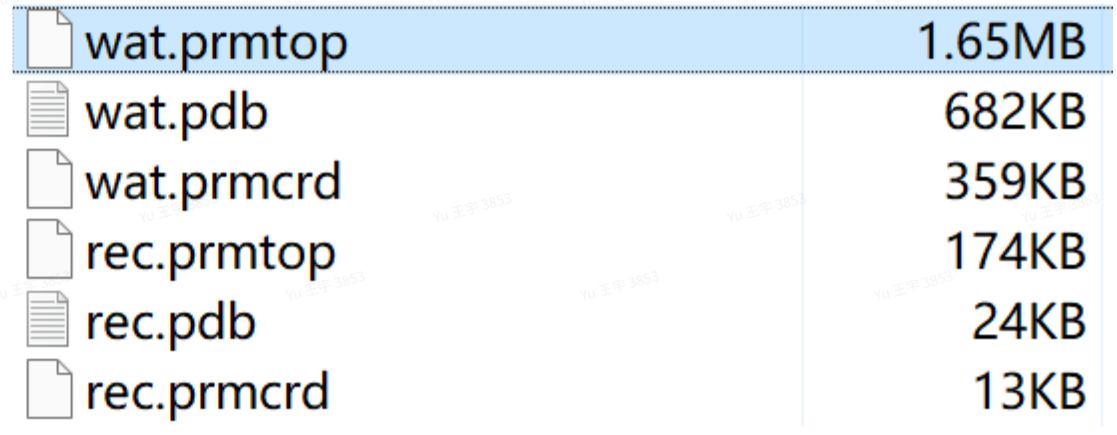
能量最小化
命令为:
sander -O -i min.in -o min.out -p wat.prmtop -c wat.prmcrd -r min.rst -ref wat.prmcrdminization with restraint
&cntrl
imin=1,
ntx=1,
irest=0,
ntwx=0,
maxcyc=5000,
ncyc=1000,
ntb=1,
cut=10.0,
ntr=1,
ntpr=500,
RESTRAINT_WT=10,
RESTRAINTMASK='(:1-21) & !@H='
&end得到以下输出文件:

体系平衡
heat运行100ps,npt运行100ps,命令为:
sander -O -i heat.in -o heat.out -p wat.prmtop -c min.rst -r heat.rst -ref min.rst -x heat.mdcrd

sander -O -i npt.in -o mpt.out -p wat.prmtop -c heat.rst -r npt.rst -ref heat.rst -x npt.mdcrd
heating with restraint
&cntrl
imin=0,
irest=0,
ntx=1,
ntb=1,
cut=10.0,
ntc=2,
ntf=2,
tempi=10.0,
temp0=310.0,
ntt=3,
gamma_ln=1.0,
nstlim=100000,
dt=0.001,
ntpr=100,
ntwx=1000,
ntwr=1000,
ntwv=-1,
ioutfm=1,
ntr=1,
iwrap=1,
RESTRAINT_WT=1,
RESTRAINTMASK='(:1-21) & !@H=',
&endNTP MD with restraint
&cntrl
imin=0,
irest=1,
ntx=7,
ntb=2,
pres0=1.0,
ntp=1,
taup=2.0,
cut=10.0,
ntc=2,
ntf=2,
tempi=310.0,temp0=310.0,ntt=3,gamma_ln=1.0,
nstlim=100000,dt=0.001,
ntpr=100,ntwx=1000,ntwr=1000,ntwv=-1,
ioutfm=1,
ntr=1,
RESTRAINT_WT=1,
RESTRAINTMASK='(:1-21) & !@H=',
&end得到以下输出文件:
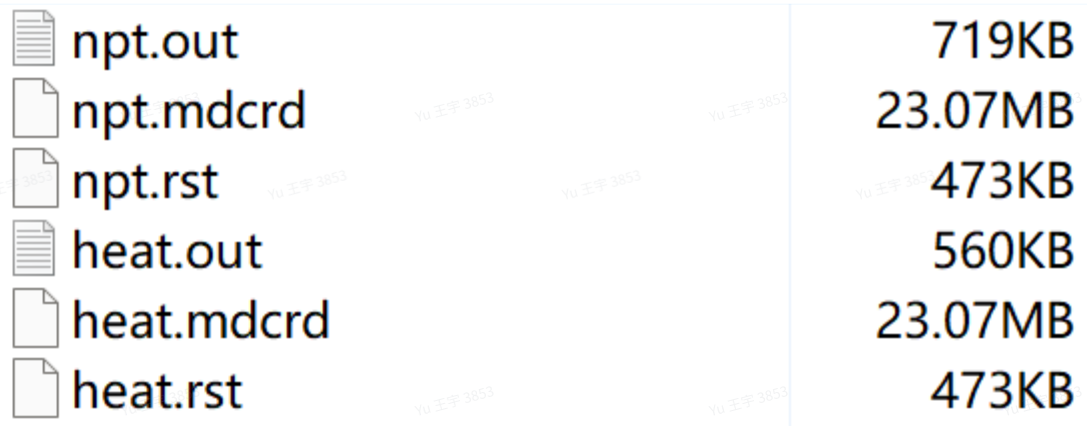
成品模拟
运行5ns,命令为:
sander -O -i md.in -p wat.prmtop -c npt.rst -x md.mdcrd -o md.out -r md.rstNTP MD without restraint
&cntrl
imin=0,
irest=0,
ntx=1,
ntb=2,7pres0=1.0,
ntp=1,
taup=2.0,
cut=10.0,
ntc=2,
ntf=2,
tempi=310.0,
temp0=310.0,
ntt=3,
gamma_ln=1.0,
nstlim=5000000,
dt=0.001,
ntpr=2500,
ntwx=2500,
ntwr=2500,
ntr=0,
iwrap=1,
&end得到以下输出文件:
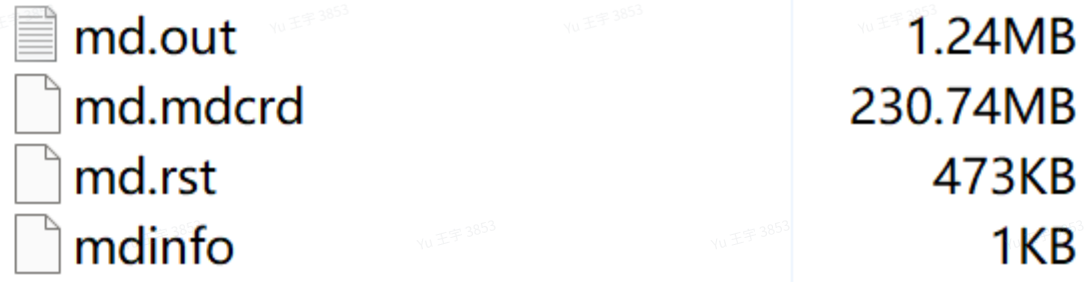
轨迹分析
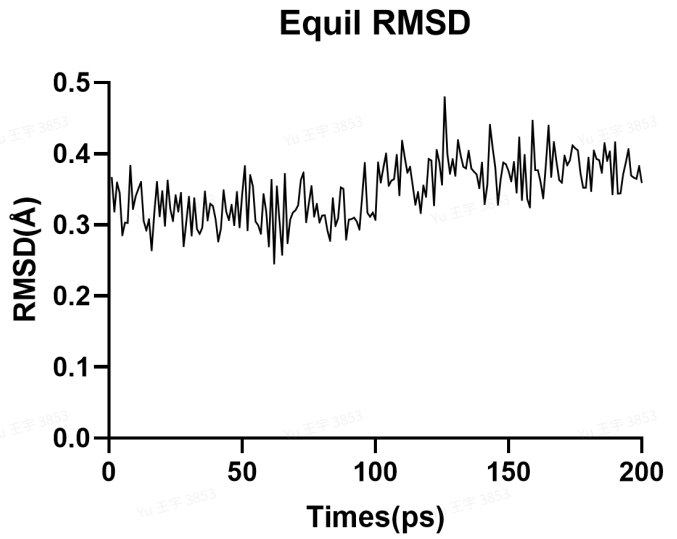
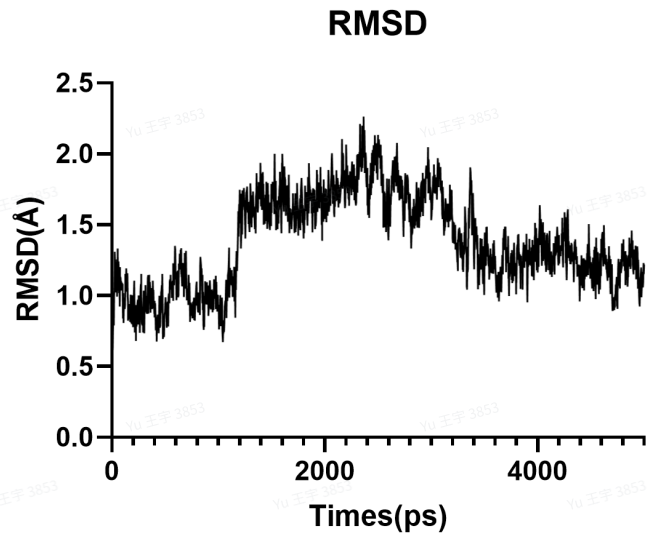
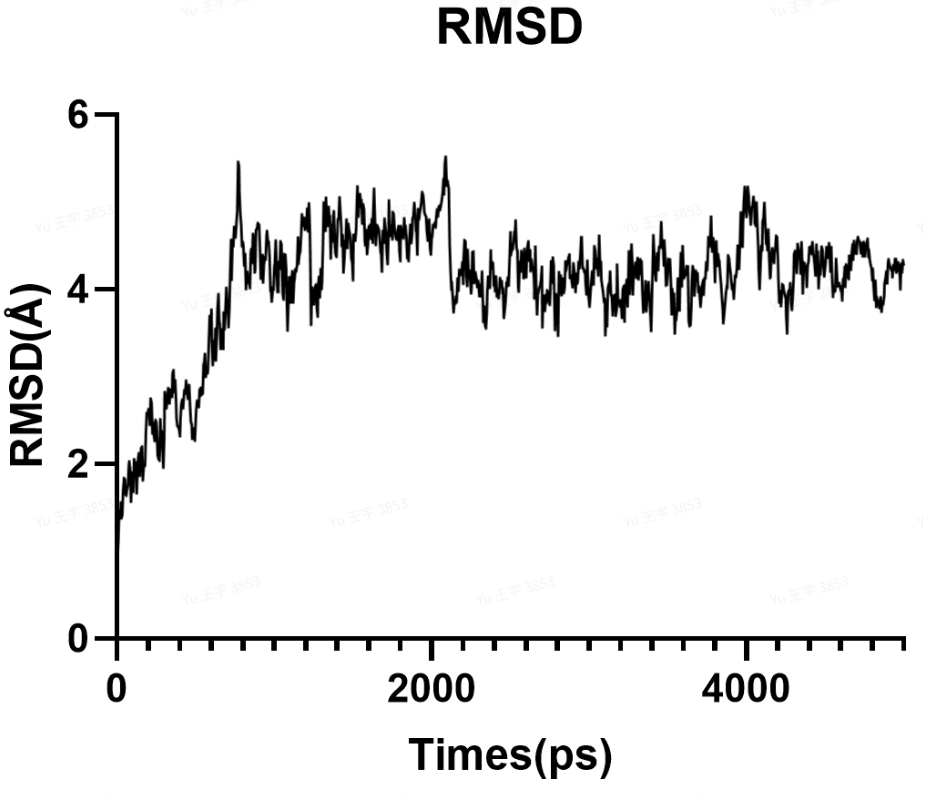
模拟时间较短,难以说明体系已达到稳定,仅供示例。
例2:非标准氨基酸的动力学体系
以chugai项目晶体7yuz为例子介绍如何构建一个含有多个非标准氨基酸的动力学体系;
7yuz的多肽部分由以上氨基酸组成,其中包含了多个非标准氨基酸,我们需要分别的构建这些非标准氨基酸。
添加封端
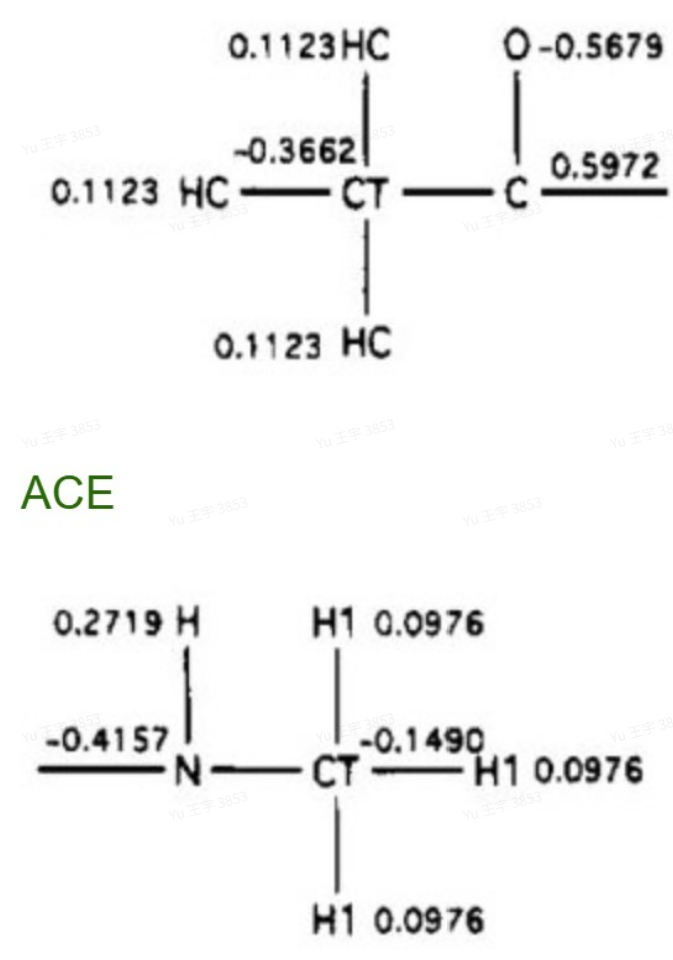
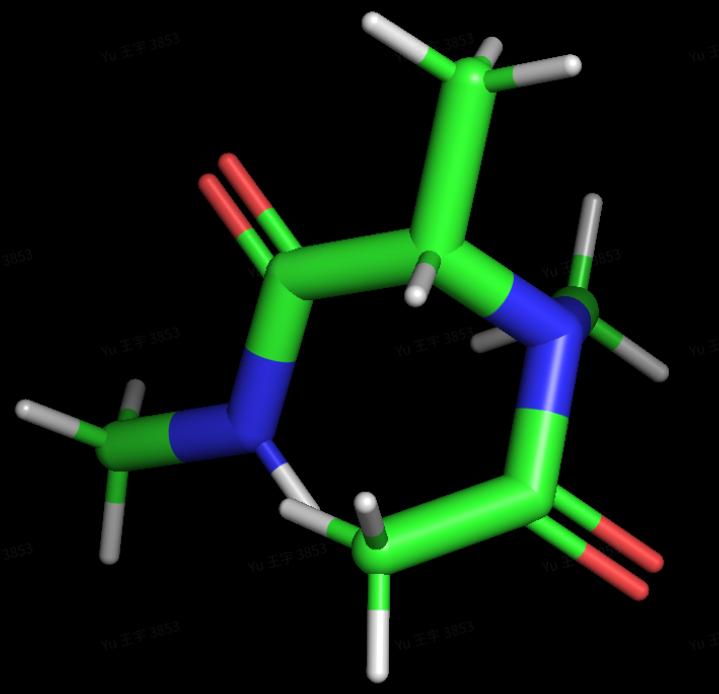
将MAA(示例)单独提取成一个pdb文件,并且为计算电荷时几何优化接近真实情况,为非标准氨基酸的C、N两端加入封端原子(连接成肽链的通常是ACE和NME);
计算静电势
此步与例2一样,不再重复;值得注意的是结果里ac文件的原子名称会被antechamber重命名,但顺序不变,可用pymol自行检查;
tleap建lib库
以MAA为例,运行以下文件MAAtleap.in即可得到MAA的lib文件;
需要注意的是输入时的MAA_fit.pdb是由以下命令得到的:
antechamber -i cap_fit.ac -fi ac -o MAA_fit.pdb -fo pdb -at amber
sed -i "s/MOL/MAA/g" MAA_fit.pdb
注意,这里得到的fit.pdb文件没有connect信息,可能会导致后面缺失氢原子的连接信息而产生warning,比较简单的办法是添加fit.pdb的所有connect信息(pymol打开然后保存connect信息即可,writie CONNECT records for all bonds)。
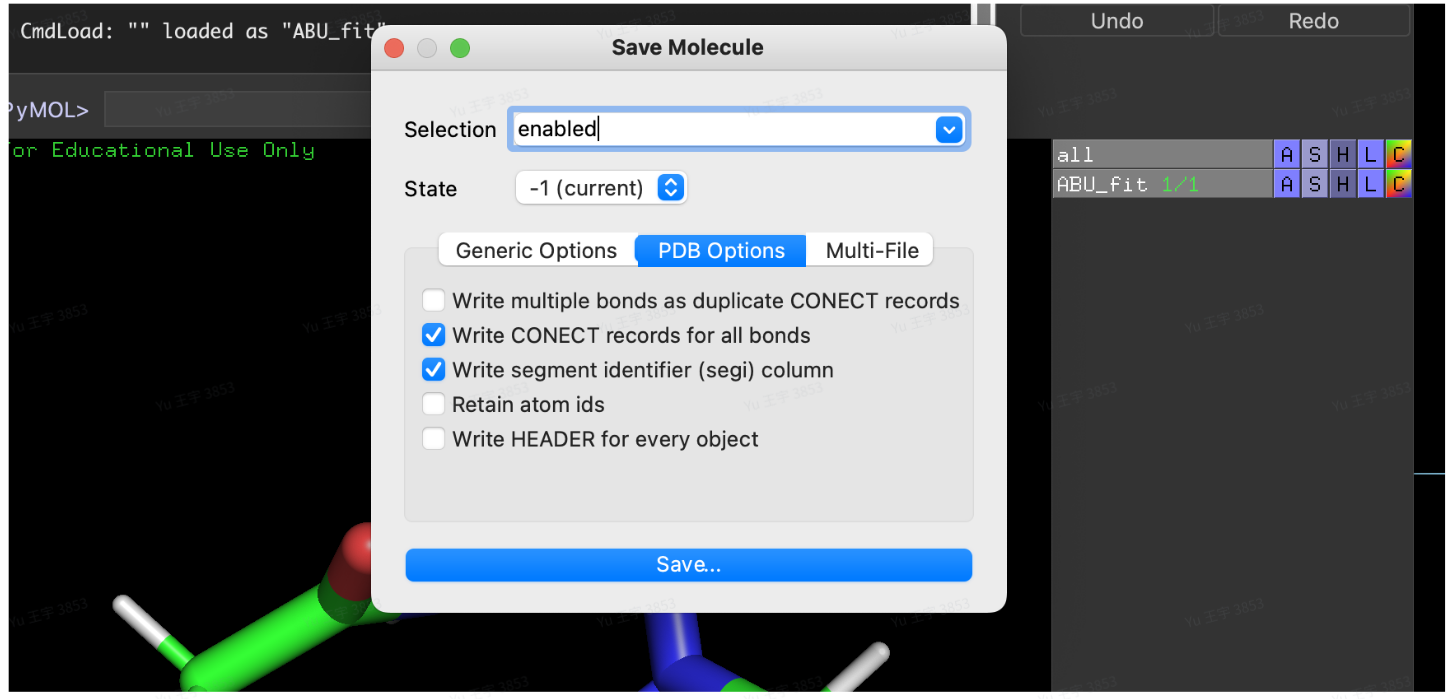
这是因为ac文件里的原子名称被antechamber重命名过,我们需要一个匹配ac文件原子名称的pdb文件作为输入。
在下面这个文件中包含了移除封端原子(这里也可通过pymol)、设定原子类型和电荷,这里都是参考cap_fit.ac文件来输入的。
source leaprc.protein.ff19SB
source leaprc.water.tip3p
source leaprc.gaff2
loadamberparams MAA.frcmod
MAA=loadpdb MAA_fit.pdb
remove MAA MAA.1.C5 # 移除封端原子
remove MAA MAA.1.O2
remove MAA MAA.1.C6
remove MAA MAA.1.H8
remove MAA MAA.1.H9
remove MAA MAA.1.H10
remove MAA MAA.1.N2
remove MAA MAA.1.C7
remove MAA MAA.1.H11
remove MAA MAA.1.H12
remove MAA MAA.1.H13
remove MAA MAA.1.H14
set MAA.1.N1 type N # 为每个原子设定类型,参考cap_fit.ac
set MAA.1.C1 type CT
set MAA.1.C2 type CT
set MAA.1.C3 type CT
set MAA.1.C4 type C
set MAA.1.O1 type O
set MAA.1.H1 type H1
set MAA.1.H2 type H1
set MAA.1.H3 type H1
set MAA.1.H4 type H1
set MAA.1.H5 type HC
set MAA.1.H6 type HC
set MAA.1.H7 type HC
set MAA.1.N1 charge -0.205339 # 为每个原子设定电荷,参考cap_fit.ac
set MAA.1.C1 charge -0.273747
set MAA.1.C2 charge 0.153348
set MAA.1.C3 charge -0.135087
set MAA.1.C4 charge 0.459098
set MAA.1.O1 charge -0.511980
set MAA.1.H1 charge 0.117931
set MAA.1.H2 charge 0.117931
set MAA.1.H3 charge 0.117931
set MAA.1.H4 charge 0.026454
set MAA.1.H5 charge 0.044487
set MAA.1.H6 charge 0.044487
set MAA.1.H7 charge 0.044487
charge MAA
set default PdbWriteCharges on
savepdb MAA MAA_fit.pdb
saveoff MAA MAA.lib
quitCHARGE 0.00 ( 0 )
Formula: H14 C7 N2 O2
ATOM 1 N1 MOL 1 -0.903 0.097 0.383 -0.205339(参考此列电荷) N
ATOM 2 C1 MOL 1 -0.890 0.188 1.845 -0.273747 CT
....
ATOM 25 H14 MOL 1 -1.216 -0.972 -2.171 0.112300 HC
BOND 1 1 2 1 N1 C1
....
BOND 24 11 25 1 C7 H14注意:CA类型原子和F类型原子不能正确的保存到lib文件,构建完lib文件后记得打开检查看是否有原子缺失type,手动补上。
把多个非标准氨基酸连接成7yuz_lig文件
得到每个非标准氨基酸的lib、frcmod文件后,我们需要根据这些文件构建一个7yuz的多肽文件。
起初可以直接把晶体结构中的多肽提取保存成7yuz_lig.pdb,此时需要做一个原子名称人工修改的操作(因为建的lib库里原子名称重排过),把7yuz_lig.pdb里非标准氨基酸的原子编号改成匹配上fit.pdb的原子编号。
改完后如下,改原子名称需要耐心,因为得使每个原子在结构上对齐(氢原子直接删除等补齐)。
ATOM   1  N1  MAA A   1     26.862  -26.551  -0.111  1.00  59.60  N
....
ATOM   100  N2  7TK A   11     23.038  -24.840  3.758  1.00  64.32  N
TER
END
构建体系
最后以下面这个in文件构建体系即可。
source leaprc.protein.ff19SB
source leaprc.water.tip3p
source leaprc.gaff2
set default PdbWriteCharges on
loadamberprep gdp.prepc
loadamberparams gdp.frcmod
loadamberparams MAA.frcmod
loadoff MAA.lib
loadamberparams SAR.frcmod
loadoff SAR.lib
loadamberparams MVA.frcmod
loadoff MVA.lib
loadamberparams FCL.frcmod
loadoff FCL.lib
loadamberparams MEA.frcmod
loadoff MEA.lib
loadamberparams 7TK.frcmod
loadoff 7TK.lib
adamberparams 7T2.frcmod
loadoff 7T2.lib
lig = loadpdb 7yuz_lig.pdb
bond lig.1.C7 lig.2.N
bond lig.1.N1 lig.11.C3
bond lig.3.N1 lig.2.C
bond lig.3.C4 lig.4.N1
bond lig.4.C2 lig.5.N1
bond lig.5.C1 lig.6.N1
bond lig.6.C2 lig.7.N1
bond lig.7.C1 lig.8.N
bond lig.8.C lig.9.N1
bond lig.9.C2 lig.10.N1
bond lig.10.C1 lig.11.N1
saveamberparm lig 7yuz_lig.prmtop 7yuz_lig.prmcrd
savepdb lig 7yuz_lig.pdb
rec1=loadpdb 7yuz_rec.pdb
gdp = loadpdb gdp.pdb
rec=combine{rec1 gdp}
saveamberparm rec 7yuz_rec.prmtop 7yuz_rec.prmcrd
com=combine {rec lig}
saveamberparm com com.prmtop com.prmcrd
savepdb com com.pdb
solvateBOX com TIP3PBOX 15 iso
addions com Cl- 0
addions com Na+ 0
charge com
saveamberparm com 7yuz_wat.prmtop 7yuz_wat.prmcrd
savepdb com 7yuz_wat.pdb
quit
例3:Linker将多肽的三个CYS连在一起
第二个例子为4mnx晶体,该多肽名为uk811,结构相对更复杂,由一个Linker将多肽的三个CYS连在
一起。
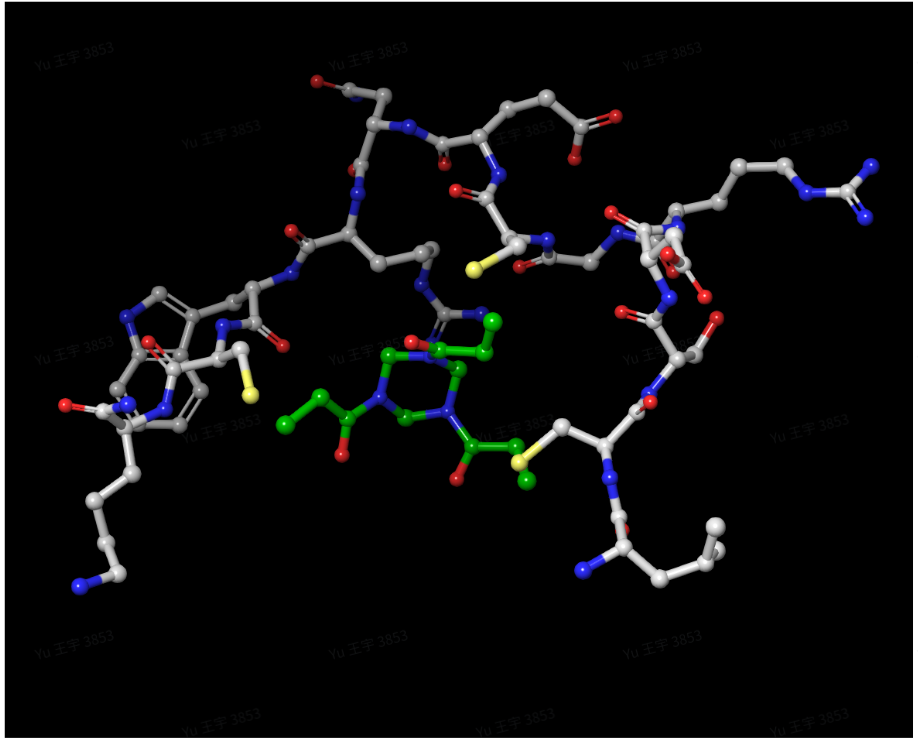
除了对PDB文件进行修改,还要事先使用计算linker分子的电荷与参数。
体系搭建大致有以下四个流程:
为Linker加上合理的封端,生成Linker的电荷;
参考Amber力场,固定封端部分原子的电荷,在Antechamber重新拟合电荷;
建立包含自定义参数的Linker lib库文件和frcmod文件;
将linker连接到uk811并保存prmtop和inpcrd文件。
计算静电势
(注:细节可参考Amber高级教程:AMBER高级教程A1:建小分子与DNA体系(包括基本电荷计算)|Jerkwin)
在计算电荷之前,我们需要为linker加上合理的封端。理论上可以使用任何形式的封顶, 但是, 重要的是要记住封端原子不会出现在实际的模拟中, 而非封端原子上的电荷必须加到正确的整数电荷上(可以理解为我们是为了生成合理的参数文件所以加封端,而在真正的模拟中用的是没有封端的原始结构)。对于蛋白质, 作为力场设计的一部分而开发的封端程序是使用ACE或NME残基。在这个例子中,linker是与CYS侧链S原子形成C-S键,不适合用常规的ACE或NME封端。
因此我们需要”发明”我们自己的封端基团。这里有很多不同的选择. 理想情况下, 人们会创建几个不同的封端基团, 并尝试所有这些来看看最终的电荷是如何变化的。在这里, 我们只提出一个可能的, 但绝不是完美的解决方案。由于linker与CYS的S原子结合, 因此使用CYS作为封端比较合理的。
为了方便后续处理以及避免CYS肽键的截断,将CYS的主链用一个甲基代替(不固定该甲基的电荷值)用Pymol等软件即可手动添加Linker的封端原子。
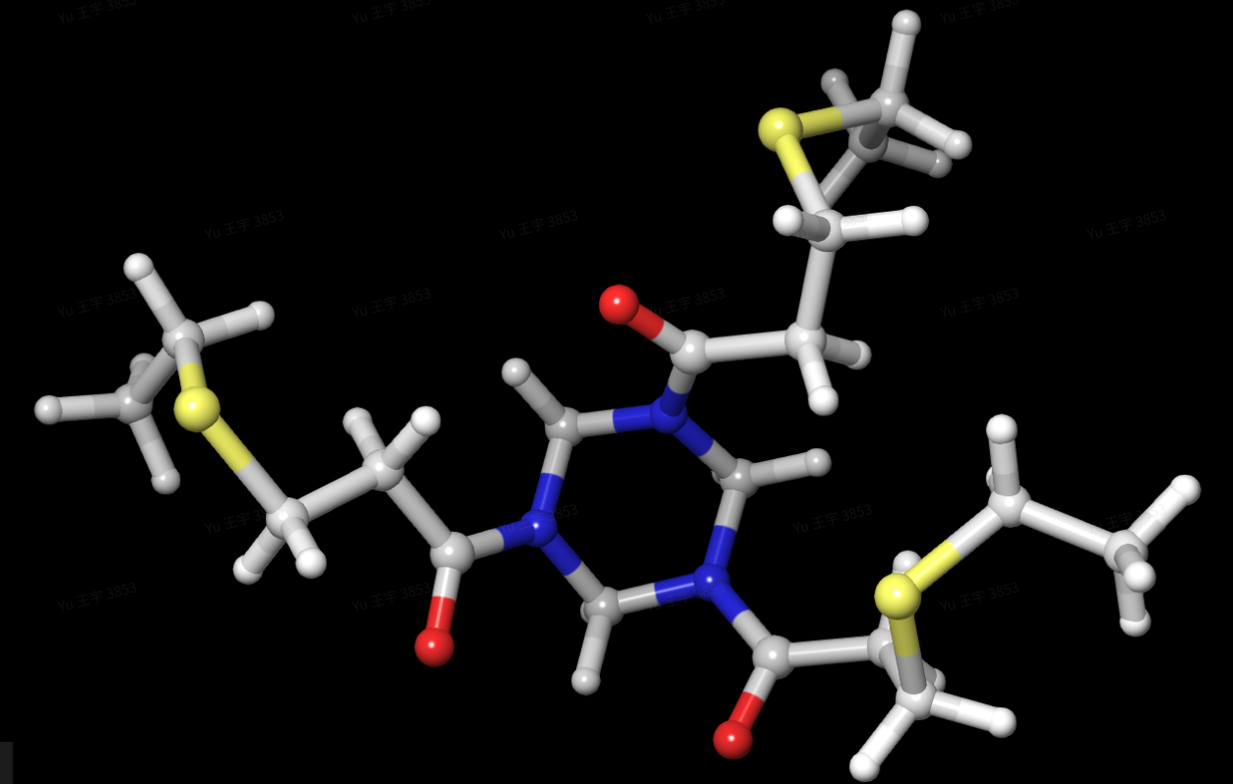
做完这一步之后就可以计算静电势了,这里使用的是常用的Gaussian软件,先进行几何优化后进行电荷计算。另一个选择是使用Gaussview. WebMO(http://www.webmo.net/)也可以用来设置和运行高斯计算。
高斯文件输入LIN.gjf、LIN_charge.gjf:
%chk=lin.chk
%mem=1000MW
%nprocshared=20
#P b3lyp/6-31G* Opt

IN

0 1
C(PDBName=CA,ResName=LIN,ResNum=1_B) 32.63100000  15.39700000  -10.78500000
C(PDBName=CB,ResName=LIN,ResNum=1_B) 31.30400000  16.02900000  -11.21000000

....

H(PDBName=H252,ResName=LIN,ResNum=1_B)  28.72700000  14.92000000  -13.73200000

1 2 1.0 28 1.0 29 1.0 30 1.0
....
27 59 1.0 60 1.0
...
60
上面这个文件前4行分别代表生成检查点文件、任务运行占用内存、使用CPU个数、优化方法,第7行为分子名称,第9行的“0 1”,0代表该分子电荷为0,1代表分子的自旋角动量。正常来说,该文件可由GaussView生成。在aussView中导入分子的PDB文件,再保存为gjf格式。保存后的文件再替换前4行的内容与名称(即与上面内容一致)。
%nproc=8
%mem=256MB
%chk=LIN.chk
#P HF/6-31G* Geom=check SCF=Tight Pop=MK IOp(6/33=2,6/41=10,6/42=17)

charge of LIN

0 1
IOp 6/33=2: 使高斯输出势能点和电位 - 不要去改动.IOp 6/41=10: 指定每个原子使用10个同心层的点.IOp 6/42=17: 指定每层中的密度点. 17 赋予每个原子2500个点. 对于较大的分子, 可能需要稍微减少点数. RESP可以用最多的ESP点数是99,999. 17的值可以减小到任何整数值.
输入文件是从优化步骤中生成的最终结构. 注意这里使用 6/41=10 和 6/42=17 是该项目为增加高斯产生的格点数. 对于大多数”标准”RESP拟合只需要IOp(6/33=2).
Gaussian软件的运行命令为:
g16 LIN.gjf
g16 LIN_charge.gjf最终得到LIN_charge.log文件,这是一个记载linker分子有关信息的log文件,将它作为 antechamber 的输入:
antechamber -i charge.log -fi gout -o cap0.ac -fo ac -c resp -nc 0 -at amber
espgen -i charge.log -o cap.esp接着就可以用respgen命令去生成resp拟合需要的输入文件:
respgen -i cap0.ac -o cap.respin1 -f resp1
respgen -i cap0.ac -o cap.respin2 -f resp2 再调用resp命令先生成一个电荷qin文件(这一步可以省略,自己新建一个qout_stage1a文件):
resp -O -i cap.respin1 -o cap.respout1 -e cap.esp -t qout_stage1a接着就要手动调整电荷值,打开cap.respin2文件:
Resp charges for organic molecule
&cntrl
nmol = 1,
ihfree = 1,
ioutopt = 1,
iqopt = 2,
qwt = 0.00100,
&end
1.0
Resp charges for organic molecule
0 60 # 这里是指总电荷与总原子数
6 0 # 原子序号以及N,N可以是负数、0、正整数
6 -99 #N为0代表自由改变该原子的电荷
16 -99 #N为负数代表不改变该原子的电荷
6 1 #N为正整数,则代表该原子的电荷与第N个原子相同,例如这行该原子与第一个原子的电荷相同
....
24 0.00000 # 约束下面24个原子的总体电荷为0
1 1 1 2 1 3 1 4 1 5 1 6 1 7 1 8 #指定基团中涉及的每个原子的分子数和原子数
1 9 1 28 1 29 1 30 1 31 1 32 1 33 1 34
1 35 1 36 1 37 1 38 1 39 1 40 1 41 1 42 linker中的封端原子我们要参考力场文件里的电荷值固定其电荷数值,因此将其改为-99,这里不包括我们用来代替主链的甲基。然后修改linker本身的分子均为0,即代表重新拟合,因为linker分子结构的对称性,对称的原子电荷应也相等,所以将也修改其N值使对称的原子电荷相等。最后是甲基、亚甲基上的氢原子,也应该属于电荷相等。
在文件的最下方约束所有封端的原子整体电荷为0,因为在参数里CYS的总体电荷为0。
接着我们修改另一个文件qout_stage1a:
0.000000 -0.079000 -0.108100 0.000000 -0.079000 -0.1081000.000000 -0.079000
....
0.000000 0.000000 0.000000 0.000000 0.000000 0.000000 0.000000 0.000000
0.000000 0.000000 0.000000 0.000000
# 原子顺序从左右到参考ac文件,0.000000为重新拟合除了封端上的CB、S、HB原子,其他的原子均调为0,代表重新拟合,封端上的原子电荷参考力场参数文件的amino19.lib文件。
手动固定完封端原子电荷后,我们重新对linker进行电荷拟合:
resp -O -i cap.respin2 -o cap.respout2 -e cap.esp -q qout_stage1a -t qout_stage2
antechamber -i charge.log -fi gout -o LIN_nofit.ac -fo ac -at amber
antechamber -i LIN_nofit.ac -fi ac -o cap_fit.ac -fo ac -c rc -cf qout_stage2 -at amber
这样我们就得到了正确拟合电荷后的ac文件,可以利用它生成一个frcmod文件:
parmchk2 -i cap_fit.ac -f ac -o LIN.frcmodparmchk2是一个用于生成分子力场参数的程序。它主要用于将分子的结构转化为分子力场所需的参数,并将其用于模拟分子的行为。
具体来说,parmchk2程序可以将分子的三维结构转化为能够被Amber力场程序所识别的拓扑结构,并生成需要的原子类型、键长、键角和二面角等参数。这些参数可以用于模拟分子在溶液中的行为、分析分子的电荷分布、计算分子间相互作用能等。
frcmod文件里包括了linker分子的键参数、角参数等,是antechamber参考已有的参数为linker生成近似参数。
xleap建库
为了删除linker中封端原子,这里直接选择在xleap建立分子参数。
xleap打开之后,输入LIN=loadpdb LIN.pdb载入linker,然后输入edit LIN,开启图形界面编辑分子。
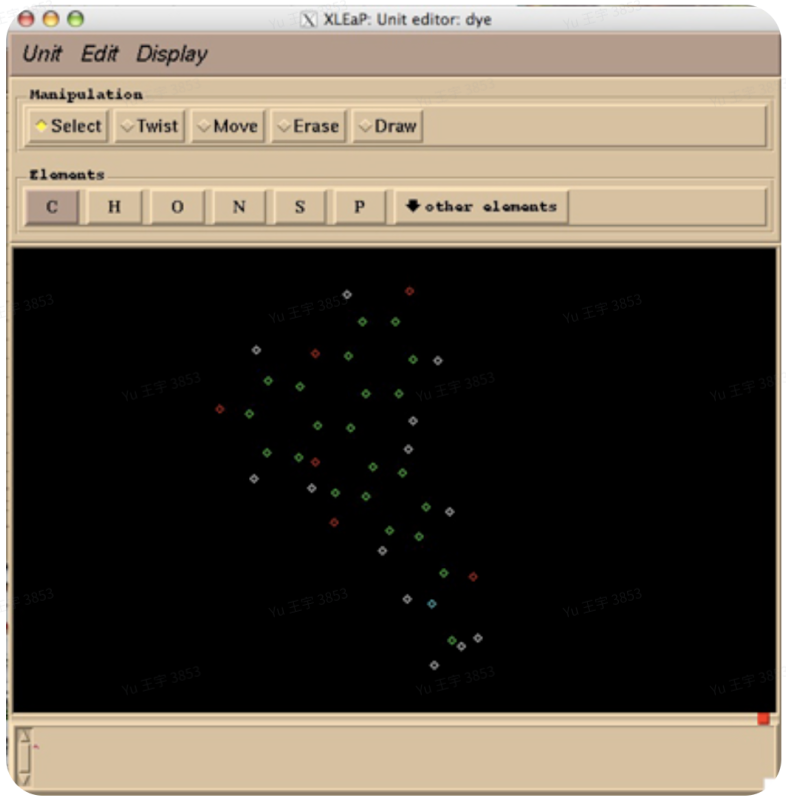
这里手动将原子连接起来(Draw模式),删除封端原子(Erase),然后选中整个分子,点击Edit>Edit selected atoms,打开原子编辑框,参考cap-fit.ac文件手动输入原子类型和原子电荷,保存。
回到最开始的xleap界面,输入saveoff LIN LIN.lib、savepdb LIN LIN_leap.pdb,保存linker的lib库和pdb文件,以便后续调用。
连接linker与uk811
使用tleap,使用以下脚本连接linker和uk811,并实现溶剂化、离子平衡。
source leaprc.protein.ff19SB
source leaprc.water.tip3p
source leaprc.gaff2
loadamberparams LIN.frcmod
loadoff LIN.lib
rec = loadpdb uk811.pdb
saveamberparm LIN LIN.prmtop LIN.prmcrd
saveamberparm rec rec.prmtop rec.prmcrd
com=combine{rec LIN}
bond com.15.C16 com.12.SG
bond com.15.C17 com.2.SG
bond com.15.C18 com.7.SG
savepdb com com.pdb
solvateBOX com TIP3PBOX 10 iso
addions com Cl- 0
charge com
saveamberparm com wat.prmtop wat.prmcrd
savepdb com wat.pdb
quit
desc com#vim residue parameter
后续模拟操作与前面类似,不再阐述。
tleap代替xleap方法
在例2中有一步骤是使用xleap模块来构建非标准氨基酸的lib文件,此步需手工进行,步骤繁琐且容易
卡顿,因此寻找用tleap模块来代替xleap模块完成lib文件构建的部分。
我们有一开始加了封端原子的LIN.pdb,从静电势计算之后开始,此时得到了LIN.frcmod(包含键长
键角参数等信息)以及LIN_cap_fit.ac文件(包含计算过的电荷的原子信息),此时我们需要建一个
LIN.lib,使得之后能够调用这个非标准氨基酸的拓扑信息。
原先在xleap中需要完成:
1、删除封端原子;
2、连接键;
3、设置原子类型;
4、设置原子电荷;
5、保存为lib文件;
在tleap中可用以下命令一一对应取代:
1、删除封端原子(remove LIN LIN.185.C1);
2、连接键(loadamberparams LIN.frcmod);
3、设置原子类型(set LIN.185.O type O);
4、设置原子电荷(set LIN.185.N charge -0.3479);
5、保存为lib文件(saveoff LIN LIN.lib );
QM/MM酶催化反应建模
TdT聚合酶含DNA时碱基亲和力建模
准备 Complex 文件
for i in `ls -d */`; do echo $i; mv $i/*.pdb $i/complex.pdb; done

grep -v "^ATOM.*DT B   1.*OP3\|^ATOM.*DT B   1.* P  \|^ATOM.*DT B   1.*OP1\|^ATOM.*DT B   1.*OP2" complex.pdb > complex_fixed.pdb

# check
grep "^ATOM.* DT B   1 " complex_fixed.pdb| wc -l
# 17
grep "^ATOM.* DT B   1 " complex.pdb|wc -l
# 21
准备 Ligand 文件
# from complex pdb
grep "^HETATM.*LIG C   1" complex_fixed.pdb > LIG.pdb

# mamba install -c conda-forge openbabel
# obabel LIG.pdb -O LIG_init.mol2 --gen3d -h

*# Proper optimization with antechamber*
# antechamber -i LIG_init.mol2 -fi mol2 -o LIG.mol2 -fo mol2 -c bcc -nc -3 -at gaff2 -rn LIG -pf y
antechamber -i LIG.pdb -fi pdb -o LIG.mol2 -fo mol2 -c bcc -nc -3 -at gaff2 -rn LIG -pf y
*#Generate parameters*
parmchk2 -i LIG.mol2 -f mol2 -o LIG.frcmod -s gaff2

# create ligand.lib file
tleap -f leap_lig.in
配置文件 leap_lig.in
# leap_lig.in
# ----------------------------------------------------
# Load the General Amber Force Field (GAFF)
source leaprc.gaff

# Load the missing parameters generated by parmchk2
loadamberparams LIG.frcmod

# Load the charged molecule (with GAFF atom types)
LIG = loadmol2 LIG.mol2

# Save the molecule as an AMBER-readable library unit
saveoff LIG LIG.lib

quit
构建体系 Build System
module load ambertools/25/openmpi4.1.4_cuda12.1

tleap -f tleap_run.in # lack tleap.in file
配置文件 tleap_run.in
# 1. Load standard force fields
source leaprc.protein.ff14SB
source leaprc.water.tip3p
# Load the standard force field for DNA (OL15/OL18)
# OL15 is a common choice, compatible with ff14SB/ff19SB
source leaprc.DNA.OL15

# 2. Load GAFF2 for small molecules/ligands
source leaprc.gaff2

# 3. Load ligand/non-natural residue parameters
loadamberparams LIG.frcmod
# loadamberprep ligand.prepc
loadoff LIG.lib

# 4. Load protein, ligand, and DNA complex structure
# The complex.pdb must contain all three components: Protein, DNA, and Ligand
com = loadpdb complex_fixed.pdb

# 5. Solvate the system with a TIP3P water box, 15 Angstrom buffer
check com
# solvateBOX com TIP3PBOX 15 iso
solvateoct com TIP3PBOX 12.0


# 6. Neutralize the system with Cl- or Na+ ions
# This command automatically determines the net charge and adds the required number of ions
# to neutralize the system. The DNA backbone (phosphate groups) will contribute a significant negative charge.
addionsrand com Na+ 0
addionsrand com Cl- 0
# You can also use 'addions com Na+ Cl- 0' to allow the use of both counterions

# 7. Save solvated and neutralized system files
saveamberparm com complex.prmtop complex.inpcrd
savepdb com complex_leap.pdb

quit
MD 运行
#!/bin/bash

# run_md_binding.sh - Amber MD Simulation for Protein-Ligand Binding Dynamics
# This script runs a modified, gentle MD protocol suitable for AlphaFold3 predicted structures.
# It assumes the system files (wat.prmtop, wat.prmcrd) and input files (*.in) are in the current directory.

# Check for required files
if [ ! -f "complex.prmtop" ] || [ ! -f "complex.inpcrd" ]; then
    echo "Error: System files complex.prmtop and complex.inpcrd not found."
    echo "Please ensure tleap preparation is complete and files are present."
    exit 1
fi

module load amber/24/openmpi4.1.4_cuda12.1

# Use pmemd if available for GPU acceleration, otherwise use sander
MD_ENGINE="sander"
if command -v pmemd.cuda &> /dev/null
then
    MD_ENGINE="pmemd.cuda"
    echo "Using GPU-accelerated engine: pmemd.cuda"
elif command -v pmemd &> /dev/null
then
    MD_ENGINE="pmemd"
    echo "Using parallel engine: pmemd"
else
    echo "Using default engine: sander"
fi

echo "--- 1. Gentle Minimization (Solvent/Ions only) ---"
$MD_ENGINE -O -i gentle_em.in -o gentle_em.out -p complex.prmtop -c complex.inpcrd -r gentle_em.rst -ref complex.inpcrd

if [ $? -ne 0 ]; then echo "Gentle Minimization failed. Exiting."; exit 1; fi

echo "--- 2. Full Minimization (All atoms) ---"
$MD_ENGINE -O -i em.in -o em.out -r em.rst -p complex.prmtop -c gentle_em.rst -ref gentle_em.rst

if [ $? -ne 0 ]; then echo "Full Minimization failed. Exiting."; exit 1; fi

echo "--- 3. NVT Heating (Restrained, 0K to 310K) ---"
$MD_ENGINE -O -i nvt.in -o nvt.out -r nvt.rst -x nvt.mdcrd -p complex.prmtop -c em.rst -ref em.rst

if [ $? -ne 0 ]; then echo "NVT Heating failed. Exiting."; exit 1; fi

echo "--- 4. NPT Equilibration (Unrestrained, 1 ns) ---"
$MD_ENGINE -O -i npt.in -o npt.out -r npt.rst -x npt.mdcrd -p complex.prmtop -c nvt.rst -ref nvt.rst

if [ $? -ne 0 ]; then echo "NPT Equilibration failed. Exiting."; exit 1; fi

echo "--- 5. Production MD (Binding Dynamics, 100 ns) ---"
$MD_ENGINE -O -i md.in -o md.out -r md.rst -x md.mdcrd -p complex.prmtop -c npt.rst

if [ $? -ne 0 ]; then echo "Production MD failed. Exiting."; exit 1; fi

echo "MD Simulation complete. Check *.out files for details."