 Xiaopeng Xu
AI 助理配置
Claude code 使用
https://github.com/anthropics/claude-code
https://deepwiki.com/anthropics/claude-code
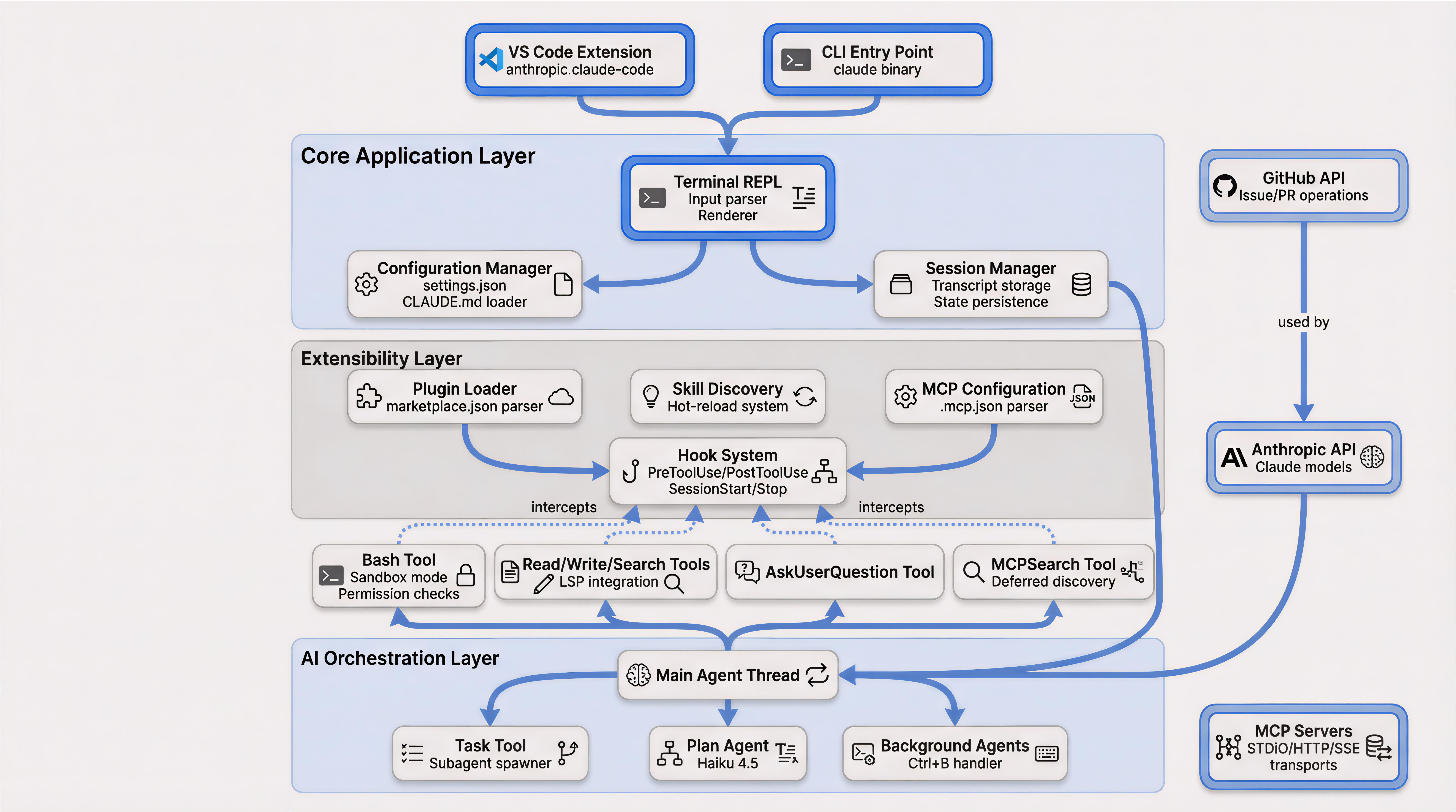
安装
# Install
curl -fsSL https://claude.ai/install.sh | bash

# Uninstall
npm uninstall -g @anthropic-ai/claude-code

# Regular usage
claude
claude --resume

# Use without frequent responds
claude  --dangerously-skip-permissions

# Use resume previous sessions
claude  --dangerously-skip-permissions --resume
常用命令
# !直接运行命令输入,结果直接进上下文,不用来回切终端
!git status
!npm test

# 双击Esc后悔药
# 代码改乱了?按两下Esc, 直接回到上一个检查点,后悔来得及

#Ctrl+R翻旧账
# 昨天的提示词忘了?按Ctrl+R秒速搜索历史对话,比翻记事本快

# @召唤文件
# 想引用某个文件?打@就行,像微信@人一样,再也不用复制粘贴
@results/file.fasta

# Remote 随时随地接力
# 网页版开始写代码,回家接着写用 claude--teleport 把云端会话"拉"到本地,无缝切换设备

# /export留下证据
# 重要对话输 /export 导出自动生成Markdown文档.写文档,复盘都超方便

# claude RD steps
/plan implement rate limiting on the /api/upload endpoint   # plan first, confirm
# ... approve plan ...
/prp-implement                                              # build w/ validation loops
/code-review --fix                                          # review + auto-apply cleanups
/security-review                                            # since it's an endpoint
/verify                                                     # run it, confirm behavior
/pr                                                         # push + open PR
Claude.md 命令
Claude.md 是一个很重要的 claude 功能,能够让 claude 对项目结构有比较好的记忆,减少每次反复开发。在开发过程中,很好的维护他,会让开发效率大大提升。
# 自动生成CLAUDE.md 项目说明书
/init
# AI scans your folders and creates a new guide with build commands and style rules

# Saving current status/ **Adding New Rules** into claude.md
"Update CLAUDE.md to include our new deployment commands."
"Update CLAUDE.md to include our new testing workflow."
# AI modifies the existing file without deleting your old instructions.

**# Maintenance**
"Refactor CLAUDE.md based on the current project structure."
# AI cleans up outdated paths or commands while keeping the core logic.

# Memory Updates 智能记忆
"记住我用bun不用npm"
# AI 会自动记在 CLAUDE.md 里。下次自动用对命令,不打断心流
配置 Zotero MCP
由于我们需要经常根据文献来开发具体的 MCP 和 skills,尤其是针对 Rosetta 系列的蛋白设计软件。这时候,就需要同时基于代码库和文献中的 methods 描述来做设计。Zotero mcp 是一个很方便的 MCP,可以直接让 claude code 来访问 Zotero 的 API,这样就能直接看文章中的内容。后面做 ModelEvolve 中,同样也可以使用起来。
# claude mcp add zotero -- zotero-mcp
claude mcp add zotero -- /home/xux/.local/bin/zotero-mcp
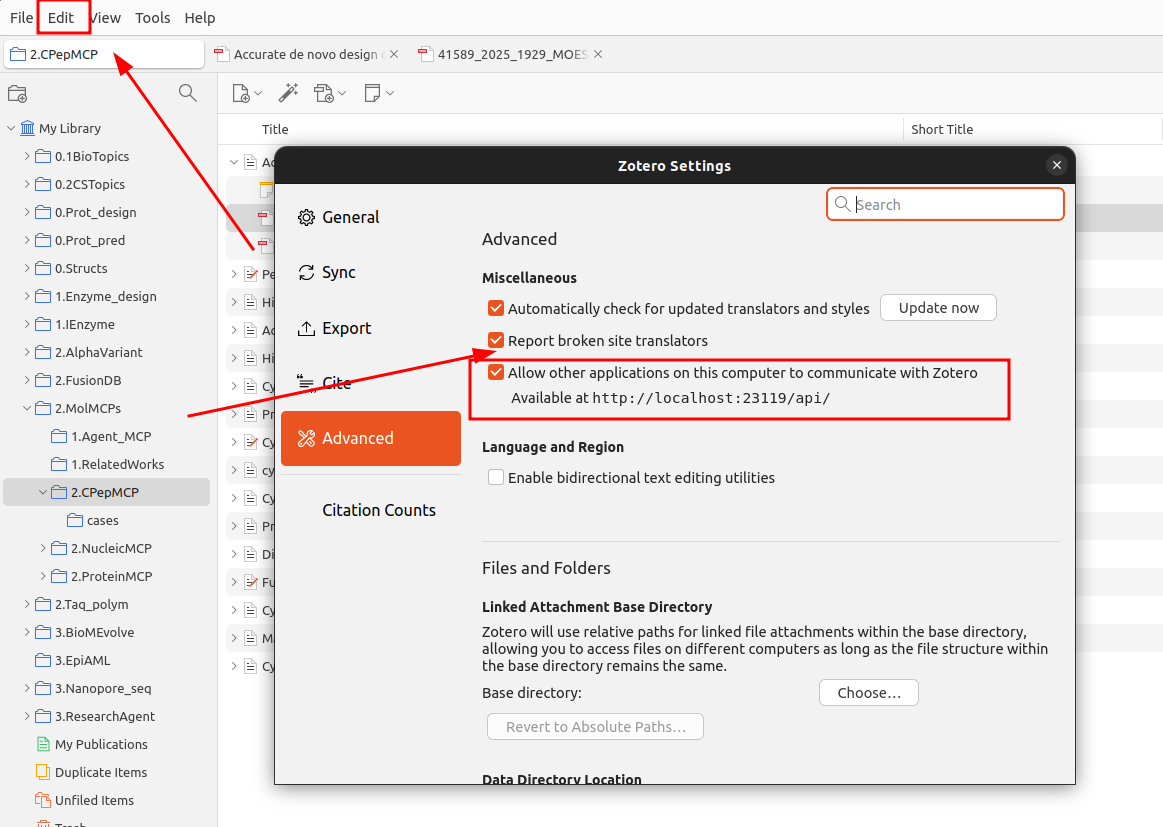
注意需要打开 zotero 的 API 才可以使用。
配置 Asana MCP
https://developers.asana.com/docs/connecting-mcp-clients-to-asanas-v2-server#cursor
首先,必须要安装好 claude code。
接下来,在 Asana 页面中,创建 Asana PAT。https://app.asana.com/0/my-apps。 参考
https://developers.asana.com/docs/personal-access-token
接下来,需要安装 asana mcp
# Start with read-only to test safely
claude mcp add --scope user asana \
  -e ASANA_ACCESS_TOKEN=<YOUR_TOKEN> \
  -e READ_ONLY_MODE=true \
  -- npx -y @roychri/mcp-server-asana

My token: <YOUR_ASANA_TOKEN>
手动在 Asana 中创建项目
之后,就可以打开 claude code,让其操作 Asana 项目了。
注意:可以将项目对应关系存储到 claude.md文件中,方便后续找对应性项目。