 Xiaopeng Xu
REINVENT 系列介绍
Reinvent 系列介绍
Reinvent 是阿斯利康开发的一系列利用 AI 技术做药物研发的工具。包括:
Reinvent:一个利用强化学习进行化学分析发现的工具,支持新的 scaffold 发现、基于 scaffold 的活性分子生成、分子优化等功能。后面会详细介绍。
DockStream:一个包装多个 docking 软件的工具包。可以单独使用做虚拟筛选,也可以和 Reinvent 一起使用,作分子生成和优化。后面会详细介绍。
Reinvent 3.0 以后对代码做了拆分,搞了很多 repository。如下。此处不作为重点内容。
Reinvent-chemistry:包含 Reinvent 中的一些化学函数,例如 token、descriptor、similarity 和格式转换等。https://github.com/MolecularAI/reinvent-chemistry
Reinvent-models:包括 Reinvent 中使用到的所有模型,如核心功能中的 GRU 模型、lib-reinvent 中的修饰模型等。https://github.com/MolecularAI/reinvent-models
Reinvent-scoring:包含 Reinvent 中的 scoring function,如 predictive_model, score_components, function 和 diversity_filters。https://github.com/MolecularAI/reinvent-scoring
相关文献
2017 Generating focused molecule libraries for drug discovery with recurrent neural networks, https://pubs.acs.org/doi/10.1021/acscentsci.7b00512. Propsed CharCNN using LSTM.
2017 Molecular De Novo Design through Deep Reinforcement Learning, https://arxiv.org/abs/1704.07555. Proposed Reinvent using GRU and RL.
2020 Memory-assisted reinforcement learning for diverse molecular de novo design, https://jcheminf.biomedcentral.com/articles/10.1186/s13321-020-00473-0. Added memory to RL.
2021 DockStream: A Docking Wrapper to Enhance De Novo Molecular Design, https://chemrxiv.org/engage/chemrxiv/article-details/6107fc3340c8bd01539a36f4. Developed a dock suite with REINVENT model, supports many docking platforms.
2021 Lib-INVENT: Reaction Based Generative Scaffold Decoration for in silico Library Design, https://chemrxiv.org/engage/chemrxiv/article-details/60c757db337d6c9c08e290d6. Presented Lib-INVENT for scaffold-based generation.
2021 Retrosynthetic Accessibility Score (RAscore) – Rapid Machine Learned Synthesizability Classification from AI Driven Retrosynthetic Planning, https://pubs.rsc.org/en/content/articlelanding/2021/SC/D0SC05401A. Proposed retrosynthetic accessibility score (RAscore).
2021 Retrosynthetic Accessibility Score (RAscore) – Rapid Machine Learned Synthesizability Classification from AI Driven Retrosynthetic Planning, https://github.com/MolecularAI/aizynthfinder. Proposed AiZynthFinder and RAscore for retrosynthesis.
2021 Chemformer: A Pre-Trained Transformer for Computational Chemistry, https://chemrxiv.org/engage/chemrxiv/article-details/60ee8a3eb95bdd06d062074b. Proposed Chemformer (or called MolBART) for synthesis and retorsynthesis prediction.
Reinvent 2.0
REINVENT 相关的 repository 有:
命令行接口
python <your_path>/input.py <config>.json # 主要看 JSON 配置文件为什么要做数据预处理?
预处理数据对训练生成模型很重要,有多个原因。
删除无效或重复的条目。
除去显然不是药物的异常化合物(太大,活性基团等)。 用这种样本来训练模型没有价值,因为输入的这种偏差将反映在生成模型中。
去除稀有的 token。 罕见的化合物可以被视为异常 (outlier)。 它们可能包含稀有的 token。 将他们排除,可以减小词汇表。 较小的词汇表意味着更快的训练速度和更少的记忆力。 除去含有稀有 token 的化合物会加速生成模型。
Spark 数据预处理
预处理中,会使用 Spark 来作数据的预处理。所以需要先会用 Spark。而 Spark 依赖于整个 Hadoop 套件的安装。虽然曾经做过,但是要安装还是挺耗费时间的。这次就先跳过数据预处理。看和总结内容,不做具体实验。
导入数据到 Spark, 并取出不合法的 SMILES,
标准化 SMILES (用到 molvs 包,SMARTS), 计算环数目、最大环的大小和最长的脂族C链长度(rdkit)。
保存预处理后的 SMILES 原文件。
对 SMILES 增加常用属性。
数据过滤, 如 6 <= 原子数 <=70, 环数目 <= 10, 最大环 < 9, 最长脂肪 C 链长度 < 5, C 原子比率 >= 0.5, token 数目 <= 91, token 和原子数的比率 <= 2.0, 去掉含 [S+] 和 [s+] 的 SMILES。
增加常用属性
chembl_annotated_df = chembl_df\
    .withColumn("num_atoms", num_atoms_udf("smiles"))\
    .withColumn("c_atom_ratio", num_c_atoms_udf("smiles") / psf.col("num_atoms"))\
    .withColumn("tokens", tokenize_udf("smiles"))\
    .withColumn("num_rings", num_rings_udf("smiles"))\
    .withColumn("size_largest_ring", size_largest_ring_udf("smiles"))\
    .withColumn("num_tokens", psf.size("tokens"))\
    .withColumn("tokens_atom_ratio", psf.col("num_tokens")/psf.col("num_atoms"))\
    .withColumn("longest_aliph_c_chain", longest_aliphatic_c_chain("smiles"))\
    .persist()
查看数据分布
# line chart
num_atoms_dist = chembl_annotated_df\
    .groupBy("num_atoms")\
    .agg(psf.count("num_atoms").alias("num"))\
    .withColumn("percent", psf.lit(100.0)*psf.col("num")/chembl_annotated_df.count())\
    .sort("num_atoms", ascending=False)\
    .toPandas()
num_atoms_dist.plot(x="num_atoms", y="percent", xlim=(0, 100), lw=3)

# histogram
c_ratio_dist = chembl_chemistry_filtered_df.sample(False, 0.1).toPandas()
c_ratio_dist.hist(column="c_atom_ratio", bins=32)
数据过滤和统计
chembl_chemistry_filtered_df = chembl_annotated_df.where("num_atoms >= 6 and num_atoms <= 70")
chembl_chemistry_filtered_df = chembl_chemistry_filtered_df.where("num_rings <= 10")
chembl_chemistry_filtered_df = chembl_chemistry_filtered_df.where("size_largest_ring < 9")
chembl_chemistry_filtered_df = chembl_chemistry_filtered_df.where("longest_aliph_c_chain < 5")
chembl_chemistry_filtered_df = chembl_chemistry_filtered_df.where("c_atom_ratio >= 0.5")
chembl_filtered_df = chembl_chemistry_filtered_df.where("num_tokens <= 91")
chembl_filtered_df = chembl_filtered_df.where("tokens_atom_ratio <= 2.0")
tokens_to_remove = token_dist[(token_dist["percent"] < 5E-2) & (token_dist["token"].str.startswith("[")) & ~(token_dist["token"].isin(["[S+]", "[s+]"]))]["token"]
query_tokens = psf.lit(False)  # import pyspark.sql.functions as psf
for token in tokens_to_remove:
    query_tokens |= psf.array_contains("tokens", token)

chembl_filtered_df = chembl_filtered_df.where(~query_tokens).select("original_smiles", "smiles")
chembl_chemistry_filtered_df.count()
DRD2 使用案例
需要考虑的几个核心问题:
如何准备一个项目(目标、数据),
如何定义一个有意义的评分函数 (scoring function),
如何监控任务运行;
如何评价运行的结果。
创建新项目
在项目开始时,我们通常从收集信息开始:
我们对靶点有什么样的了解?
我们是否有从化学空间的哪个地方开始的一些先验知识?
我们计划在这个项目中是要探索找到新的 scaffold,还是要充分利用已知的 scaffold(在已知的 scaffold 周围找到有潜力的化合物)?
我们希望在要生成的新化合物设置什么样的边界条件,例如物理化学物质,不能包含的化学片段、目标分子的大小等?
我们是否有足够的数据可以构建一个预测(QSAR)模型?或者其他有用的模型。
这些考虑因素因项目而异,没有通用的规则。 单独一次的 REINVENT 运行 (run)中,也有很多参数可以优化,但大多数时候使用默认值即可。
设定目标
以 DRD2 为例来说,假设我们与此项目的主导化学家沟通并初步勾勒出多项对我们所生成分子的约束。他们要求我们建立一个 REINVENT 模型,可以生成满足如下指标的化合物:
可能会与DRD2结合,
是多样(或多元化)的(即有不同的 scaffold),
不超过 6 个氢键供体,不超过 9 个可旋转的键
不包含某些通常认为有害的化学片段,
此外,我们有几个可进一步研发的潜在的良好的先导化合物,例如,来自以前的研究或实验测定。
一般而言,我们假设化学家愿意尝试新的化合物,并且不一定只想找到包含特定 scaffold 的解决方案。这意味着,我们正在寻找探索(exploration)场景(而不是开发,exploitation)。注意,可以强制生成匹配一个或多个子结构的分子(通过 SMILES 或 SMARTS 来定义),有关详细信息,请参阅基于 scaffold 生成示例。
此处的 DRD2 数据集超过 300,000 分子,都是公开数据,且已被注释为有活性(‘1’)或无活性(‘0’)。可在 notebooks/data 子文件夹中找到相应的数据集(已分为 train 和 test)。
基于上述信息,我们接下来的任务是定义评分函数(scoring function)。我们要将化学家认为好的分子打更高的分 reward(“score”),所以我们需要将不同的要求分解为各个 scoring function components,分配权重并将其整合到我们的评分函数中。这里有许多组件可用,我们仅举例介绍。更多的评分组件可以看其他 notebooks 和 REINVENT 中的 JSON 示例配置文件。
设置打分函数
打分函数由多个组件组成,需要对每个组件进行配置,并组装在一起使用。其中,多样性过滤器对打分也有影响,因此也在此处介绍。
活性预测模型
此处,我们是基于机器学习模型,建立一个分子的活性模型来预测分子有活性的可能性,而不是用基于 ROCS、docking 等结构组件来打分。目前 REINVENT 只支持基于 scikit learn 的预测模型。此处是一个分类模型,模型的输入是分子的 fingerprint。模型的详情如下:
使用了活性预测模型(activity prediction model, APM)。 此 APM 是通过 ExCAPE 数据库中 DRD2 的活性和非活性化合物上训练得到。
数据集中的异构化合物已经移除,通过 RDKit 转换为 cannonical SMILES表示,并删除了重复。
通过一个分层 split,将数据分为了 train 和 test 数据集,并且通过 ECFP6 fingerprint(半径3)将化合物表示为了 2048 个bit。
用 scikit learn 中的随机森林模型,训练了一个分类器来以识别活性和无活性化合物。
通过 optuna 和 5-fold 交叉验证来找到最佳超参数。所得到模型的 AUC 为 0.945。
当模型构建好后,就可以开始配置打分函数组件。 因为我们想更重视这个打分(在大量数据上建立的模型,使得我们对预测的结果很有信心),我们对此组件设置了很高的权重。 另外,由于分类模型的输出是概率值(本身就是 0 到 1 之间的值),我们不需要将模型的输出再做缩放。对其他组件,我们还需要指定分数转换的函数。
component_DRD2_prediction = {
  "component_type": "predictive_property",
  "name": "DRD2_pred_activity",
  "weight": 7,
  "model_path": os.path.join(ipynb_path, "data/drd2.pkl"),
  "smiles": [],
  "specific_parameters": {
    "scikit": "classification",
    "transformation": True,
    "descriptor_type": "ecfp_counts",
    "size": 2048,
    "radius": 3,
    "use_counts": True,
    "use_features": True
  }
}
特定类型(如此处的 predictive_property 类型)的组件可以使用多次,只要使用不同的名称即可。例如,如果有另一个模型预测化合物对人的毒性,我们也将其添加为新组件。
多样性过滤器
在这个项目中,我们想生成多样的分子结构趣。 为了迫使 agent 探索化学空间中的不同区域,我们可以定义多样性过滤器 (diversity filter)。 实际上,我们将惩罚同类 (family)的分子:如果 agent 持续生成相同 scaffold 的化合物,则“scaffold bins”将被填满。当填满后,生成的具有这种 scaffold 的分子将获得 0 的打分,以此激励 agent 来继续学习。 我们将使用如下的标准参数,但也可随时调整它们(具体的调整方法见其他的 notebook 和对应文献)。
diversity_filter = {
  "name": "IdenticalMurckoScaffold",
  "nbmax": 25,
  "minscore": 0.4,
  "minsimilarity": 0.4
}
初始化模块:用已知的“好”分子进行初始化
有时我们想为 agent 提供几个可能的“好”分子。若这些分子得分较好,则 agent 可能会学习到特征并在起始分子基础上产生更高打分的分子。 有三个参数:
SMILES:训练开始时用于打分的 SMILES 列表。
memory_size:SMILES 的分数会从高到低排序,并将保留前 memory_size 个。
sample_size:在每次运行(epoch)中,将从存储的 SMILES 中随机采样 sample_size 个,并添加到该运行中生成的那批的微笑中。
例如,下面我们加入 38 个用于初始化的 SMILES。每个分子会计算得到一个打分。“TOP-20”会存储在存储器中,在前四次运行中,每次会从它们中的抽样 5 个,直到 20 个全部已经用过。 注意,memory_size 也可设为大于或大于等于所提供 SMILES 的数目。
inception = {
  "memory_size": 20,
  "sample_size": 5,
  "smiles": [
    "OCCN1CCN(CCCN2c3ccccc3Sc3ccc(Cl)cc32)CC1",
    "C=CCN1CCC2c3cccc(OC)c3CCC21",
    "CCCN(Cc1ccc(OC)cc1)C1CCc2c(cccc2OC)C1",
    "N#Cc1ccc2[nH]c(CN3CCN(c4ccc(Cl)c(Cl)c4)CC3)cc2c1",
    "O=C(CCCN1CCN(c2ncccn2)CC1)c1ccc(F)cc1",
    "Cc1ccc2c(c1)C(N1CCN(C)CC1)=Nc1cccnc1N2",
    "COc1ccc(-c2cccc(CN3CCN(c4ncccn4)CC3)c2)cc1",
    "Oc1[nH]cc2ccc(OCCCCN3CCN(c4cccc5cccc(F)c45)CC3)c(Cl)c12",
    "CCCN1CCN(c2cccc(OC)c2)CC1",
    "O=C(Nc1cccc(SC(F)(F)F)c1)N1CCC(N2CCC(n3c(O)nc4c(F)cccc43)CC2)CC1",
    "CC1CCN(C2=Cc3cc(Cl)ccc3Cc3ccccc32)CC1",
    "CCCN1CCOC2Cc3c(O)cccc3CC21",
    "c1ccc(N2CCN(C3CCC(Nc4ncccn4)CC3)CC2)cc1",
    "O=S(=O)(NC1CCC(N2CCC(c3ccccc3OCC(F)(F)F)CC2)CC1)c1ccc(OC(F)F)cc1",
    "COc1ccccc1N1CCN(CCCCc2cc(-c3ccccc3)no2)CC1",
    "c1ccc(CCC2CCN(Cc3c[nH]c4ncccc34)CC2)cc1",
    "CC1CN(c2cccc3cc(F)ccc23)CCN1CCC1OCCc2c1sc(C(N)=O)c2Cl",
    "COc1ccccc1N1CCCN(CCCCNC(=O)c2cc3ccccc3o2)CC1",
    "O=C1CCc2ccc(OCCCCN3CCN(c4ccccc4C(F)(F)F)CC3)cc2N1",
    "CCCCCCCCCC(=O)N1c2ccc(Cl)cc2N=C(N2CCN(C)CC2)c2ccccc21",
    "O=C1N(CCN2CCC(C(F)(F)F)CC2)CCN1c1cccc(Cl)c1",
    "CN1CCc2cccc3c2C1Cc1cccc(-c2c(OS(=O)(=O)C(F)(F)F)cccc2OS(=O)(=O)C(F)(F)F)c1-3",
    "Cc1nn(C2CCN(Cc3cccc(C#N)c3)CC2)cc1-c1ccccc1",
    "COc1ccc(-c2cc3c(O)n(CCN4CCN(c5ccccc5Cl)CC4)c(O)nc-3n2)cc1",
    "OC1(c2cccc(Cl)c2Cl)CCN(Cc2c[nH]c3ccccc23)CC1",
    "FC(F)(F)c1ccc2c(c1)N(Cc1ccc(CNc3cccc(Oc4ccccc4)c3)cc1)c1ccccc1S2",
    "CCCSc1ccccc1N1CCN(CCCOc2ccc(-c3nc4ccccc4[nH]3)cc2)CC1",
    "O=S(=O)(NCCCCN1CCN(c2cccc(Cl)c2Cl)CC1)c1cc2ccccc2cn1",
    "COc1ccc(CN2CCN(CC(=O)N3c4ccccc4CC3C)CC2)cc1",
    "CC1Cc2ccccc2N1C(=O)CC1CCN(Cc2ccc(Cl)cc2)CC1",
    "CC(C)c1ccccc1N1CCN(CCCCCC(=O)NCc2ccccc2)CC1",
    "Cc1ncoc1-c1nnc(SCCCN2CCc3cc4nc(C5CC5)oc4cc3CC2)n1C",
    "O=C1CC(c2ccccc2)c2cccc(CCN3CCN(c4nsc5ccccc45)CC3)c2N1",
    "O=C1NCN(c2ccccc2)C12CCN(CCCOc1ccc(F)cc1)CC2",
    "CCON=C(CCN1CCN(c2nccs2)CC1)c1ccccc1",
    "Cc1ccc2c(-c3nnc(SCCCN4CCc5cc6nc(-c7cc(C)nn7C)oc6cc5CC4)n3C)cccc2n1",
    "CCCN(CCCCNC(=O)c1ccc(-c2ccccc2)cc1)C1Cc2cccn3ncc(c23)C1",
    "Cc1ccc(OCCNCCCOc2ccccc2)cc1"
  ]
}
分子属性
有一整套的物理化学属性,可以设置到评分组件。在这里我们仅使用氢键供体和可旋转键的数量来作为限制。注意,此处需要定义分数转换函数,以将产生的分数值转换到 0-1 范围。可以在score_transformation notebook 中查看更多详情。需要考虑根据期望的打分数值范围,定义分数转换,转换后的“好”分接近 1,“坏”份则接近于 0)。组件名称可以自由设置,主要是根据 component_type 指定其性质。specific_parameters 中是仅适用于此组件的设置(通常是 transformation,而且也可以是预测模型的 descriptor 定义等所需的设置。
component_rotatable_bonds = {
  "component_type": "num_rotatable_bonds",
  "name": "Number of rotatable bonds",
  "weight": 1,
  "model_path": None,
  "smiles": [],
  "specific_parameters": {
    "transformation_type": "step",
    "high": 9,
    "low": 0,
    "transformation": True
  }
}

component_num_hbd = {
  "component_type": "num_hbd_lipinski",
  "name": "HB-donors (Lipinski)",
  "weight": 1,
  "model_path": None,
  "smiles": [],
  "specific_parameters": {
    "transformation_type": "step",
    "high": 6,
    "low": 0,
    "transformation": True
  }
}
避免某些化学基团
一般会希望避免某些与毒性或不稳定的化学相关的化学部分。 另外,也可能已经知道某些化学基团特别好,但希望探索化学空间中的新领域。这时,可以通过设置 custom alerts ,一个 SMARTS 列表,来实现,它会大大降低匹配一个或多个基团的化合物的得分。 需要注意的是 custom alerts 会把匹配的化合物的总分降低一半,相比添加一个得分组件它的影响会大很多。 例如,分子获得 0.73 的总得分,但恰好与 custom alerts 相匹配,给 agent 的分数将是0.365。为保证有足够的影响,这种惩罚是必需的。
component_custom_alerts = {
  "component_type": "custom_alerts",
  "name": "Custom_alerts",
  "weight": 1,
  "model_path": None,
  "smiles": [
    "[*;r8]",
    "[*;r9]",
    "[*;r10]",
    "[*;r11]",
    "[*;r12]",
    "[*;r13]",
    "[*;r14]",
    "[*;r15]",
    "[*;r16]",
    "[*;r17]",
    "[#8][#8]",
    "[#6;+]",
    "[#16][#16]",
    "[#7;!n][S;!$(S(=O)=O)]",
    "[#7;!n][#7;!n]",
    "C#C",
    "C(=[O,S])[O,S]",
    "[#7;!n][C;!$(C(=[O,N])[N,O])][#16;!s]",
    "[#7;!n][C;!$(C(=[O,N])[N,O])][#7;!n]",
    "[#7;!n][C;!$(C(=[O,N])[N,O])][#8;!o]",
    "[#8;!o][C;!$(C(=[O,N])[N,O])][#16;!s]",
    "[#8;!o][C;!$(C(=[O,N])[N,O])][#8;!o]",
    "[#16;!s][C;!$(C(=[O,N])[N,O])][#16;!s]"
  ],
  "specific_parameters": None
}
组装打分函数
上面已经定义了各个组件,这步我们来组装打分函数。我们这里有两种选项,custom_sum 和 custom_product。 其数学定义的差异,可查阅文献。但实际的角度来看,custom_sum 更好一些。custom_sum 在分子在只有一个组件打分较低时,其仍能获得有相对高的总分。但 custom_product 将会对这样的分子有比较重的罚分,使学习比较困难。在已经拥有很适合的 agent 时,可以考虑使用 custom_product,但通常情况下更建议使用 custom_sum。
scoring_function = {
  "name": "custom_sum",
  "parallel": True,
  "parameters": [
    component_DRD2_prediction,
    component_num_hbd,
    component_rotatable_bonds,
    component_custom_alerts
  ]
}
注意:diversity_filter 不是打分函数的内容,会在后面的 parameter 区块中增加。
完成 JSON 配置
除上述配置外,我们还需要设置几个运行参数。 如下,可以看到配置的主体结构(目前只有版本号、run_type 和 scoring_function)我们将逐步丰富。 这里构建的 dict 最后将写入 JSON 文件,所以可以从这里看看它。
 configuration = {
  "version": 3,
  "run_type": "reinforcement_learning",
  "parameters": {
    "scoring_function": scoring_function
  }
}
添加多样性过滤器和初始化模块
在这里,我们添加了我们上面指定的多样性过滤器和初始化模块。
configuration["parameters"]["diversity_filter"] = diversity_filter
configuration["parameters"]["inception"] = inception
添加运行参数
此外,需要设置几个参数(例如使用的 Prior)。关于参数详情,可查看对应的 notebook。 最重要的参数 epochs 数目,即 n_steps。由于是示例,此处将其仅设置为 300,通常设在 500-1500 的范围之内。
configuration["parameters"]["reinforcement_learning"] = {
    "prior": os.path.join(ipynb_path, "models/random.prior.new"),
    "agent": os.path.join(ipynb_path, "models/random.prior.new"),
    "n_steps": 300,
    "sigma": 128,
    "learning_rate": 0.0001,
    "batch_size": 128,
    "reset": 0,
    "reset_score_cutoff": 0.5,
    "margin_threshold": 50
}
添加日志配置
此处将指定输出的存储位置等。 通常更改 logging_path,result_folder 和 job_name 就好了。
configuration["logging"] = {
    "sender": "http://127.0.0.1",
    "recipient": "local",
    "logging_frequency": 0,
    "logging_path": os.path.join(output_dir, "progress.log"),
    "result_folder": os.path.join(output_dir, "results"),
    "job_name": "Use-case DRD2 Demo",
    "job_id": "demo"
}
保存 JSON 文件
至此我们已完成 dict,此处将其写入输出目录中的 JSON 文件。继续之前,请先查看该文件,以了解路径是如何插入的和 dict -> JSON 是如何翻译的(例如 True 到 true 的转换)。
# write the configuration file to the disc
configuration_JSON_path = os.path.join(output_dir, "DRD2_config.json")
with open(configuration_JSON_path, 'w') as f:
    json.dump(configuration, f, indent=4, sort_keys=True)
运行 REINVENT
本地执行 REINVENT。 注意,根据 epoch 数目(steps)和评分函数组件的执行时间,这可能需要一段时间。 由于我们只指定了较小的 epoch 而且所有组件都相对较快,因此不会运行太长时间。
命令行执行:
#激活envionment.
conda activate reinvent.v3.0.

#执行 REINVENT
python <your_path> /input.py <config> .json
Notebook 中执行:
%%capture captured_err_stream --no-stderr

# execute REINVENT from the command-line
!{reinvent_env}/bin/python {reinvent_dir}/input.py {configuration_JSON_path}

# print the output to a file, just to have it for documentation
with open(os.path.join(output_dir, "run.err"), 'w') as file:
    file.write(captured_err_stream.stdout)
# prepare the output to be parsed
list_epochs = re.findall(r'INFO.*?local', captured_err_stream.stdout, re.DOTALL)
data = [epoch for idx, epoch in enumerate(list_epochs) if idx in [1, 150, 299]]
data = ["\n".join(element.splitlines()[:-1]) for element in data]

for element in data:
    print(element)
分析结果:
为了能更方便的分析结果,这里使用 tensorboard。在浏览器中,用 http://workstation.url.com:6006/ 打开即可。
# go to the root folder of the output
cd <your_path>/REINVENT_RL_demo

# make sure, you have activated the proper environment
conda activate reinvent.v3.0

# start tensorboard
tensorboard --logdir progress.log
也可以直接查看 csv 文件
!head -n 3 {output_dir}/results/scaffold_memory.csvDockstream
Dockstream 相关的 repository 有:
命令行接口
Target_preparator.py # prepare target, except for Glide which needs to be prepared with Glide GUI
Docker.py   # Docker script
Sdf2smiles.py  # convert to SMILES as input to DockStream
Benchmarking.py  # run benchmarking on several dockers
Analysis.py  # automatically analysis DockStream results
支持的输入格式
Dockstream 支持四种输入格式 Console SMILES, SMILES 文件、CSV 文件和 SDF 文件。
通常使用 SMILES 文件输入即可。特殊情况下,要增加 compound 名称,可使用 CSV 格式。若还要固定的原子坐标,可用 SDF 格式。
Console SMILES 输入
Reinvent 下的输入。
配置:
...
  "input": {
    "standardize_smiles": false,
    "type": "console"
  },
...
命令:
/python docker.py -conf <input.json> -smiles "C#CCCCn1c(Cc2cc(OC)c(OC)c(OC)c2Cl)nc2c(N)ncnc21;CCCCn1c(Cc2cc(OC)c(OC)c(OC)c2)nc2c(N)ncnc21;CCCCn1c(Cc2cc(OC)ccc2OC)nc2c(N)ncnc21SMILES 文件输入
...
  "input": {
    "standardize_smiles": False,
    "input_path": "<path_to_text_file>",
    "type": "smi"
  },
...
CSV 文件输入
支持 SMILES 和 compound 名称。字段名如配置。
...
  "input": {
    "standardize_smiles": false,
     "input_path": "<path_to_csv>",
     "type": "csv",
     "delimiter": ",",
     "columns": {
       "smiles": "SMILES",
       "names": "Names_Compounds"
     }
  },
...
SDF 文件输入
SDF 文件输入时候,会保留原有原子坐标。
...
  "input": {
    "input_path": "<path_to_sdf>",
    "type": "sdf",
    "tags": {
      "names": "CUSTOM_NAME"
    }
  },
...
Glide 使用
Dockstream 配置
先用 Maestro 预处理受体并准备 grid 【此处略过】
再预处理配体,核心是 smiles 文件和配置文件
运行 docking 并解析结果
配体预处理 Config 文件
# specify the embedding and docking JSON file as a dictionary and write it out
ed_dict = {
  "docking": {
    "header": {
      "environment": {
      }
    },
    "ligand_preparation": {
      "embedding_pools": [
        {
          "pool_id": "Ligprep",
          "type": "Ligprep",
          "parameters": {
            "use_epik": {
                "target_pH": 7.4,
                "pH_tolerance": 0.2
          },
            "force_field": "OPLS3e"
          },
          "input": {
            "standardize_smiles": False,
            "input_path": smiles_path,
            "type": "smi"
          }

        }
      ]
    },
    "docking_runs": [
        {
          "backend": "Glide",
          "run_id": "Glide_run",
        "input_pools": ["Ligprep"],
        "parameters": {
          "parallelization": {
            "number_cores": 2
          },
          "glide_flags": {  # command-line flags for Glide
            "-HOST": "localhost"
          },
          "glide_keywords": {  # keywords for "input.in" file
            "AMIDE_MODE": "trans",
            "EXPANDED_SAMPLING": "True",
            "GRIDFILE": grid_file_path,
            "NENHANCED_SAMPLING": "2",
            "POSE_OUTTYPE": "ligandlib_sd",
            "POSES_PER_LIG": "3",
            "POSTDOCK_NPOSE": "15",
            "POSTDOCKSTRAIN": "True",
            "PRECISION": "HTVS",
            "REWARD_INTRA_HBONDS": "True"
          }
        },
        "output": {
          "poses": { "poses_path": ligands_docked_path },
          "scores": { "scores_path": ligands_scores_path }
        }
      }]}}

with open(docking_path, 'w') as f:
    json.dump(ed_dict, f, indent=2)
运行代码: !{dockstream_env}/bin/python ${dockstream_path}/docker.py -conf conf_path -print_scores
show glimpse into contents of output CSV
!head -n 10 {ligands_scores_path}
其中,conf_path 指向 config 文件。和 benchmarking script 不同。
和 Reinvent 结合使用
先用 Maestro 预处理受体并准备 grid 【和上面一样,此处略过】
再预处理配体,核心是 smiles 文件和配置文件【和上面一样,此处略过】
准备 REINVENT 的配置文件 (Json 格式)
运行 REINVENT
REINVENT 的配置文件内容:
增加到 scoring_function -> parameters 中。
{
    "component_type": "dockstream",
    "name": "dockstream",
    "weight": 1,
    "model_path": "",
    "smiles": [],
    "specific_parameters": {
    "debug": false,
    "transformation": true,
    "transformation_type": "reverse_sigmoid",
    "low": -20,
    "high": -5,
    "k": 0.2,
    "configuration_path": "<absolute_path_to_DockStream_configuration>/docking.json",
    "docker_script_path": "<absolute_path_to_DockStream_source>/docker.py",
    "environment_path": "<absolute_path_to_miniconda_installation>/miniconda3/envs/DockStream/bin/python"
    }
}
需要修改三个 path 到对应的路径。
合适的转换函数
这里使用的是 reverse sigmoid 函数,来转换 DockStream 的输出到 REINVENT
的打分函数输入(需要在 0-1 之间)。
# load the dependencies and classes used
%run code/score_transformation.py

# set plotting parameters
small = 12
med = 16
large = 22
params = {"axes.titlesize": large,
          "legend.fontsize": med,
          "figure.figsize": (16, 10),
          "axes.labelsize": med,
          "axes.titlesize": med,
          "xtick.labelsize": med,
          "ytick.labelsize": med,
          "figure.titlesize": large}
plt.rcParams.update(params)
plt.style.use("seaborn-whitegrid")
sns.set_style("white")
%matplotlib inline


# set up Enums and factory
tt_enum = TransformationTypeEnum()
csp_enum = ComponentSpecificParametersEnum()
factory = TransformationFactory()

# reverse sigmoid transformation
# ---------
values_list = np.arange(-30, 20, 0.25).tolist()
specific_parameters = {csp_enum.TRANSFORMATION: True,
                       csp_enum.LOW: -20,
                       csp_enum.HIGH: -5,
                       csp_enum.K: 0.2,
                       csp_enum.TRANSFORMATION_TYPE: tt_enum.REVERSE_SIGMOID}
transform_function = factory.get_transformation_function(specific_parameters)
transformed_scores = transform_function(predictions=values_list,
                                        parameters=specific_parameters)

# render the curve
render_curve(title="Reverse Sigmoid Transformation", x=values_list, y=transformed_scores)
DockStream 的配置文件
在“正常”Dockstream运行(见上文)中支持的所有选项都支持在 REINVENT 下使用。但有几个例外。
在 REINVENT 下,只能报告每个配体的一个值(并且尚未支持 consensus 打分),所以只能用一个 pool 和一个后端(docking)。
新生成的配体不是通过文件提供,而是从 STDIN 提供,因此需要更改输入部分。
一般 REINVENT 训练中,并不想写出所有的结果,所以需要完全删除输出块。
更新后如下所示:
{
    "pool_id": "Corina_pool",
    "type": "Corina",
    "parameters": {
        "prefix_execution": "module load corina"
     },
     "input": {
         "standardize_smiles": False
     }
}
最后,我们也需要更新对接运行。 通常,我们希望看到每个 epoch 的 docked poses,可能也包括表格格式的分数和 SMILES。因此,我们可以在此处保留 output 输出块,但随着每个epoch 的生成,默认情况下会覆盖上一 epoch 的文件。 如果设置 overwrite 参数为 false,则每个连续的 output 将由数字附加,例如, 第一个 epoch 是 pose.sdf 和 scores.csv,第二个 opoch 是 0001_poss.sdf 和 0001_coces.csv,第三 epoch 是 0002_poss.sdf 和 0002_coges.csv 等。
{
  "backend": "Glide",
  "run_id": "Glide_run",
  "input_pools": ["Corina_pool"],
  "parameters": {
    "prefix_execution": "module load schrodinger/2019-4",
    "glide_flags": {
      "-NJOBS": 1,
      "-HOST": "localhost"
    },
    "glide_keywords": {
      "AMIDE_MODE": "trans",
      "EXPANDED_SAMPLING": "True",
      "GRIDFILE": "<absolute_path_to_grid_file>/grid.zip",
      "NENHANCED_SAMPLING": "2",
      "POSE_OUTTYPE": "ligandlib_sd",
      "POSES_PER_LIG": "3",
      "POSTDOCK_NPOSE": "15",
      "POSTDOCKSTRAIN": "True",
      "PRECISION": "HTVS",
      "REWARD_INTRA_HBONDS": "True"
    }
  },
  "output": {
    "poses": { "poses_path": "<absolute_path_to_poses_stem_file>/poses.sdf", "overwrite": False },
    "scores": { "scores_path": "<absolute_path_to_scores_stem_file>/scores.csv", "overwrite": False }
  }
}
Glide 的 block-keywords 和 keywords 列表
原则上,在与 Glide 连接中使用的 keywords 或 flags应该没有限制(请参阅下面的关键字的完整列表)。 但需要注意的是这块(例如约束定义)也有略微不同的语法。
    "glide_keywords": {
      "PRECISION": "HTVS",
      "[CONSTRAINT_GROUP:1]": {
        "USE_CONS": "sulfonamide:1",
        "NREQUIRED_CONS": "ALL"
      },
      "[FEATURE:1]": {
        "PATTERN1": "[N-]S(=O)=O 1,2,3,4 include"
      }
    }
会导致
PRECISION: HTVS
[CONSTRAINT_GROUP:1]
    USE_CONS   sulfonamide:1,
    NREQUIRED_CONS   ALL
[FEATURE:1]
    PATTERN1   "[N-]S(=O)=O 1,2,3,4 include"
Glide 的详细参数列表可以通过来查看 ${SCHRODINGER}/glide -k 来查看。
rDock 使用
rDock 之前有好几篇文章用过。应该比较简洁。但是软件版本比较老 2013。实际做药的人用的应该不够多。
DockStream 配置
靶点预处理
{
  "target_preparation": {
    "input_path": "~/Desktop/drug_design/DockStreamCommunity/1UYD/1UYD_apo.pdb",  # this should be an absolute path
    "fixer": {  # based on "PDBFixer"; tries to fix common problems with PDB files
      "enabled": true,
      "standardize": true,  # enables standardization of residues
      "remove_heterogens": true,  # remove hetero-entries
      "fix_missing_heavy_atoms": true,  # if possible, fix missing heavy atoms
      "fix_missing_hydrogens": true,  # add hydrogens, which are usually not present in PDB files
      "fix_missing_loops": false,  # add missing loops; CAUTION: the result is usually not sufficient
      "add_water_box": false,  # if you want to put the receptor into a box of water molecules
      "fixed_pdb_path": "~/Desktop/rDock_demo/rDock_fixed_target.pdb"  # if specified and not "None", the fixed PDB file will be stored here
    },
    },
    "runs": [
      {
        "backend": "rDock",
        "output": {
          "directory": "~/Desktop/rDock_demo"
        },
        "parameters": {
          "prefix_execution": "module load rDock"
        },
        "cavity": {
          "method": "reference_ligand",  # how to define the cavity (here, use this)
          "reference_ligand_path": "~/Desktop/drug_design/DockStreamCommunity/1UYD/PU8.pdb",  # path to reference ligand file
          "reference_ligand_format": "pdb",  # format of the reference ligand file ("pdb" or "sdf")
          "prm_file": "~/Desktop/drug_design/DockStreamCommunity/rDock/rbcavity_1UYD.prm"  # path to template prm file you want to use
        }
      }
    ]
  }
}
Docking 配置
{
  "docking": {
    "ligand_preparation": {  # the ligand preparation part, defines how to build the pool
      "embedding_pools": [
        {
          "pool_id": "RDkit_pool",
          "type": "RDkit",
          "parameters": {
            "removeHs": false,
            "coordinate_generation": {
              "method": "UFF",
              "maximum_iterations": 300
            }
          },
          "input": {
            "standardize_smiles": false,
            "input_path": "~/Desktop/drug_design/DockStreamCommunity/notebooks/../data/1UYD/ligands_smiles.txt",
            "type": "smi"
          },
          "output": {  # the conformers can be written to a file, but "output" is not required
            "conformer_path": "~/Desktop/rDock_demo/rDock_embedded_ligands.sdf",
            "format": "sdf"
          }
        }
      ]
    },
    "docking_runs": [
      {
        "backend": "rDock",  # specify the backend
        "run_id": "rDock_run",  # give any (unique) run ID
        "input_pools": ["RDkit_pool"],  # select, which pools should be used as input
        "parameters": {  # these are backend-specific parameters
          "prefix_execution": "module load rDock",
          "number_poses": 2,
          "rbdock_prm_paths": [
            "~/Desktop/rDock_demo/rbcavity_updated.prm"
          ]
        },
        "output": {
          "poses": {
            "poses_path": "~/Desktop/rDock_demo/rDock_docked_ligands.sdf"
          },
          "scores": {
            "scores_path": "~/Desktop/rDock_demo/rDock_scores.csv"
          }
        }
      }
    ]
  }
}
独立使用 rDock
https://www.rxdock.org/documentation/devel/pdf/rxdock-documentation-devel.pdf
配置反应系统信息 PRM 文件
RBT_PARAMETER_FILE_V1.00
TITLE rDock_default_cavity_reference_ligand

RECEPTOR_FILE 1UYD_apo.mol2 # <RECEPTOR_MOL2_FILE_ABSOLUTE_PATH>
RECEPTOR_FLEX 3.0

##################################################################
## CAVITY DEFINITION: REFERENCE LIGAND METHOD
##################################################################
SECTION MAPPER
    SITE_MAPPER RbtLigandSiteMapper
    REF_MOL PU8.pdb # <REFERENCE_SDF_FILE_ABSOLUTE_PATH>
    RADIUS 6.0
    SMALL_SPHERE 1.0
    MIN_VOLUME 100
    MAX_CAVITIES 1
    VOL_INCR 0.0
    GRIDSTEP 0.5
END_SECTION

#################################
#CAVITY RESTRAINT PENALTY
#################################
SECTION CAVITY
    SCORING_FUNCTION RbtCavityGridSF
    WEIGHT 1.0
END_SECTION
注意,receptor 的输入是 mol2 格式,reference ligand 的输入是 sdf 格式。必须先用 openbabel 转换格式才能正常使用。
import openbabel.openbabel as obab

target_mol2 = '~/Desktop/rDock_demo/1UYD_apo.mol2'
conv = obab.OBConversion()
conv.SetInAndOutFormats("pdb", "mol2")
buffer_molecule = obab.OBMol()
conv.ReadFile(buffer_molecule, target_pdb)
buffer_molecule.DeleteHydrogens()
buffer_molecule.AddHydrogens()
conv.WriteFile(buffer_molecule, target_mol2)
生成对接 Cavity
rbcavity -was -d -r
使用 -d 标志,生成 .grd 网格文件。 可在分子可视化软件中查看生成的 cavity。
例如,在 pymol 中的操作如下:
pymol <RECEPTOR>.mol2 <LIGAND>.sdf <GRID>.grd  # 读入受体、配体和网格文件
isomesh cavity, <GRID>.grd, 0.99 # pymol cmd 中输入,显示网格
运行 docking
rbdock -i <INPUT>.sd -o <OUTPUT> -r <PRMFILE> -p dock.prm -n 50AutoDock Vina 使用
AutoDock Vina 是被使用最广的 docking 软件。所以打算用这个。
DockStream 配置
靶点预处理
{
  "target_preparation": {
    "header": {  # general settings
      "logging": {  # logging settings (e.g. which file to write to)
        "logfile": ~/Desktop/AutoDock_Vina_demo/ADV_target_prep.log"
      }
    },
    "input_path": "~/Desktop/drug_design/DockStreamCommunity/data/1UYD/1UYD_apo.pdb",  # this should be an absolute path
    "fixer": {  # based on "PDBFixer"; tries to fix common problems with PDB files
      "enabled": true,
      "standardize": true,  # standardize residues
      "remove_heterogens": true,  # remove hetero-entries
      "fix_missing_heavy_atoms": true,  # fix missing heavy atom
      "fix_missing_hydrogens": true,  # add hydrogens, which are usually not present in PDB files
      "fix_missing_loops": false,  # add missing loops; CAUTION: the result is usually not sufficient
      "add_water_box": false,  # whether to put the receptor into a box of water molecules
      "fixed_pdb_path": "~/Desktop/AutoDock_Vina_demo/ADV_fixed_target.pdb"  # if specified and not "None", the fixed PDB file will be stored here
    },
    "runs": [  # "runs" holds a list of backend runs; at least one is required
      {
        "backend": "AutoDockVina", # one of the backends supported ("AutoDockVina", "OpenEye", ...)
        "output": {
          "receptor_path": "~/Desktop/AutoDock_Vina_demo/ADV_receptor.pdbqt"
        },
        "parameters": {
          "pH": 7.4,  # sets the protonation states (NOT used in Vina)
          "extract_box": { # to extract the coordinates of the pocket (see text)
            "reference_ligand_path": "~/Desktop/drug_design/DockStreamCommunity/notebooks/../data/1UYD/PU8.pdb",
            "reference_ligand_format": "PDB"
          }
        }
      }
    ]
  }
}
Docking 配置
需要用 RDkit, OMEGA, Corina 或 LigPrep 先做配体的预处理,然后 docking。目前看 Corina 貌似是最靠谱的,但是是商业软件。先想办法用 RDkit 免费搭建流程。
{
  "docking": {
  "header": {
    "logging": {
    "logfile": "~/Desktop/AutoDock_Vina_demo/ADV_docking.log"
    }
  },
  "ligand_preparation": { # the ligand preparation part, defines how to build the pool
    "embedding_pools": [
    {
      "pool_id": "RDkit_pool",
      "type": "RDkit",
      "parameters": {
      "removeHs": false,
      "coordinate_generation": {
        "method": "UFF",
        "maximum_iterations": 300
      }
      },
      "input": {
      "standardize_smiles": false,
      "input_path": "~/Desktop/drug_design/DockStreamCommunity/notebooks/../data/1UYD/ligands_smiles.txt",
      "type": "smi"
      },
      "output": { # the conformers can be written to a file, but "output" is not required
      "conformer_path": "~/Desktop/AutoDock_Vina_demo/ADV_embedded_ligands.sdf",
      "format": "sdf"
      }
    }
    ]
  },
  "docking_runs": [
    {
    "backend": "AutoDockVina",
    "run_id": "AutoDockVina",
    "input_pools": [
      "RDkit_pool"
    ],
    "parameters": {
      "binary_location": "~/miniconda3/envs/sgpt-env/bin",  # absolute path to the folder, where the "vina" binary can be found
      "parallelization": {
      "number_cores": 4
      },
      "seed": 42,
      "receptor_pdbqt_path": [ # paths to the receptor files
      "~/Desktop/AutoDock_Vina_demo/ADV_receptor.pdbqt"
      ],
      "number_poses": 2, # number of poses to be generated
      "search_space": { # search space (cavity definition)
      "--center_x": 3.3,
      "--center_y": 11.5,
      "--center_z": 24.8,
      "--size_x": 15,
      "--size_y": 10,
      "--size_z": 10
      }
    },
    "output": {
      "poses": {
      "poses_path": "~/Desktop/AutoDock_Vina_demo/ADV_ligands_docked.sdf"
      },
      "scores": {
      "scores_path": "~/Desktop/AutoDock_Vina_demo/ADV_scores.csv"
      }
    }
    }
  ]
  }
}
和 Reinvent 一起使用
{
    "component_type": "dockstream",
    "name": "dockstream",
    "weight": 1,
    "model_path": "",
    "smiles": [],
    "specific_parameters": {
    "transformation": true,
    "transformation_type": "reverse_sigmoid",
    "low": -12,
    "high": -8,
    "k": 0.25,
    "configuration_path": "<absolute_path_to_DockStream_configuration>/docking.json",
    "docker_script_path": "<absolute_path_to_DockStream_source>/docker.py",
    "environment_path": "<absolute_path_to_miniconda_installation>/miniconda3/envs/DockStream/bin/python"
    }
}
Docking 结果分析
使用的是 Analysis.py 接口。支持同时对多个文件进行分析。
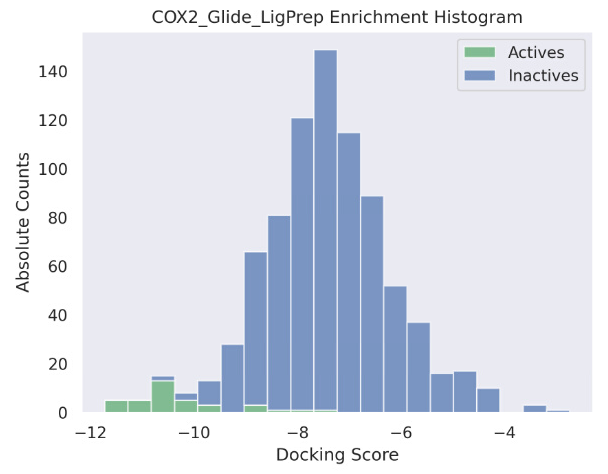
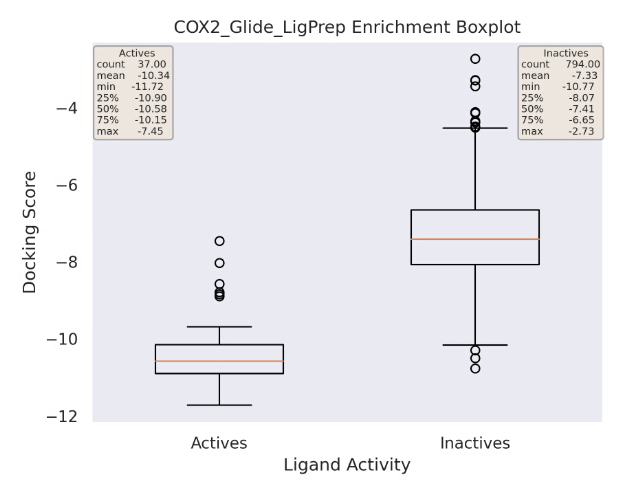
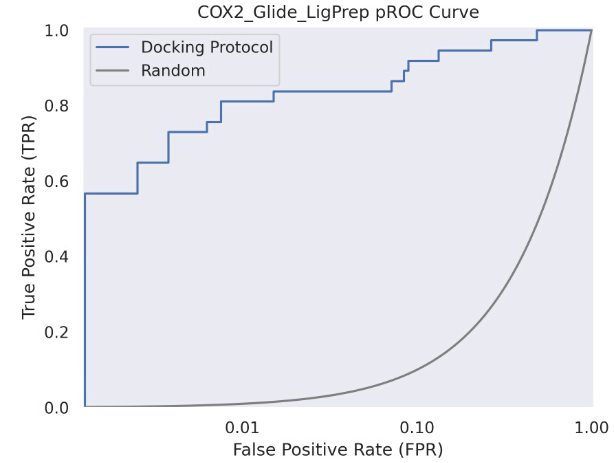
富集分析 Enrichment Analysis
配置文件
{
  "input_docking_data": {
    "data_path": "---",
    "data_metric": "---",
    "max_data_metric_best": "---",
    "data_thresholds": "---"
  },
  "input_exp_data": {
    "exp_data_path": "---",
    "exp_metric": "---",
    "max_exp_metric_best": "---",
    "exp_thresholds": "---"
  },
  "input_enrichment_data": {
    "data_path_actives": "~/Desktop/drug_design/DockStreamCommunity/notebooks/../data/Analysis_Script/Enrichment/COX2_Glide_Actives.csv",  # path to the DockStream output for the active ligands
    "data_path_inactives": "~/Desktop/drug_design/DockStreamCommunity/notebooks/../data/Analysis_Script/Enrichment/COX2_Glide_Inactives.csv",  # path to the DockStream output for the inactive ligands
    "actives_data_metric": "score",  # active ligands activity metric
    "inactives_data_metric": "score", # inactive ligands activity metric
    "max_metric_best": "False"  # denotes whether a greater value is better (ex. GOLD GoldScore)
  },
  "plot_settings": {
    "enrichment_analysis": "True",  # denotes to generate histograms, boxplots, and pROC curves only
    "pROC_overlay": "False"  # denotes whether to generate an overlay pROC curve only
  },
  "output": {
    "output_path": "~/Desktop/Analysis_demo/Enrichment_Output"  # desired output directory
  }
}
示例结果
pROC_AUC_values.json
{
  "Random": 0.434,  # corresponds to a docking protocol randomly classifies active and inactive ligands, A random classifier always has a AUC of 0.434. Any value greater than 0.434 is considered enrichment
  "COX2_Glide_LigPrep": 2.412,
  "QPCT_Glide_CTE": 0.343  # not shown
}
EF_5%_values.json
# Enrichment Factor for the top 5% ligands (EF 5%)
{
  "COX2_Glide_LigPrep": 16.22, #  Any value greater than 0 means there are active ligands that do indeed score within the top 5% ligands
  "QPCT_Glide_CTE": 0.0
}
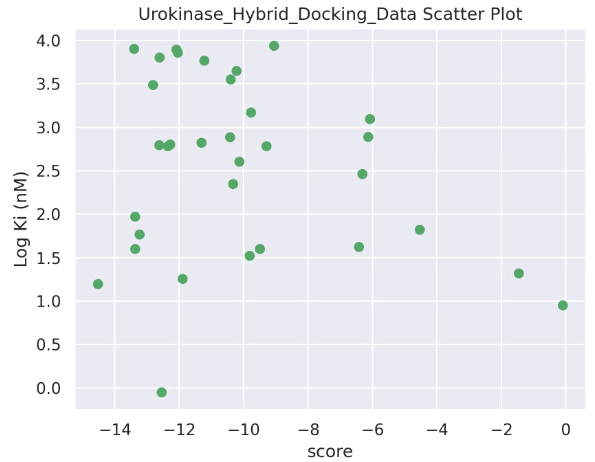
关联分析 Correlation Analysis
配置文件
{
  "input_docking_data": {
    "data_path": "~/Desktop/drug_design/DockStreamCommunity/data/Analysis_Script/Correlation/DockStream_Output/Urokinase_Hybrid_Docking_Data.csv",  # path to the docking data
    "data_metric": "score",  # docked ligands activity metric
    "max_data_metric_best": "False",  # denotes whether a greater docking score = greater predicted affinity
    "data_thresholds": "N/A"  # must be "N/A" for correlation analysis
  },
  "input_exp_data": {
    "exp_data_path": "~/Desktop/drug_design/DockStreamCommunity/notebooks/../data/Analysis_Script/Correlation/Urokinase_Exp_Data.csv",  # path to the experimental data
    "exp_metric": "Log Ki (nM)",  # experimental data activity metric
    "max_exp_metric_best": "False",
    "exp_thresholds": "N/A"
  },
  "input_enrichment_data": {
    "data_path_actives": "---",
    "data_path_inactives": "---",
    "actives_data_metric": "---",
    "inactives_data_metric": "---",
    "max_metric_best": "---"
  },
  "plot_settings": {
    "enrichment_analysis": "False",
    "pROC_overlay": "False"
  },
  "output": {
    "output_path": "~/Desktop/Analysis_demo/Correlation_Output"
  }
}
示例结果
{
  "Urokinase_Hybrid_Docking_Data.csv": {
    "coeff_determination": 0.057778420203442704, # Coefficient of Determination ("R-squared"), in range [-1, 1]
    "Spearman_coeff": -0.09245110132393133, # Spearman Correlation ("Rho"),
    "Kendall_coeff": -0.058928665383788846 # Kendall Correlation ("Tau-b")
  }
}
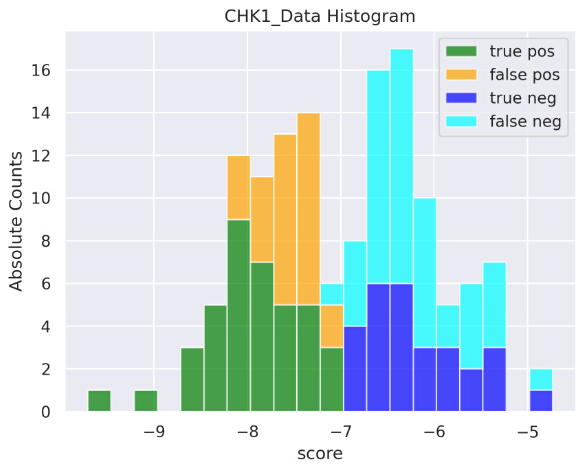
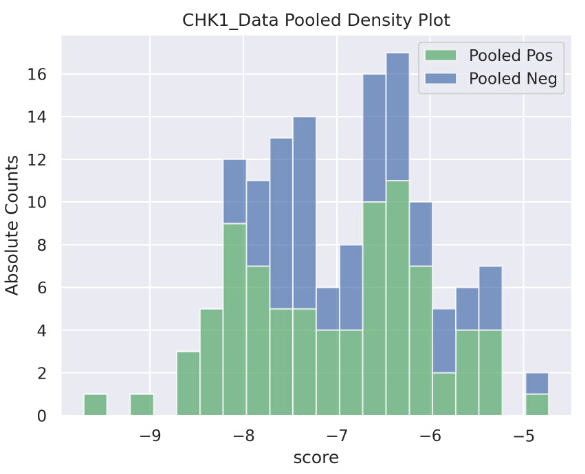
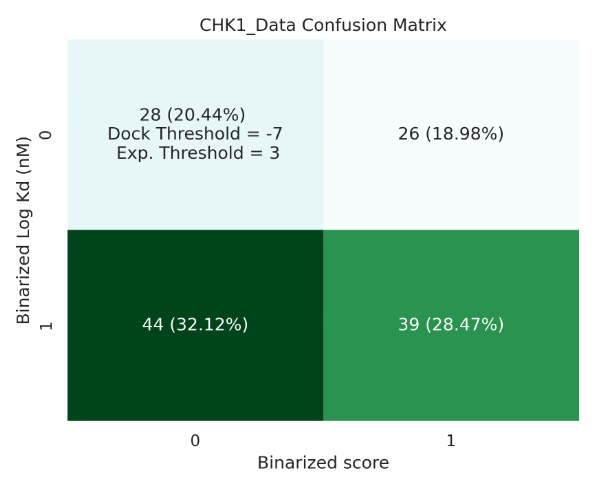
阈值分析 Thresholds Analysis
示例阈值:
Glide 对接得分:<= -7 为活性分子,> -7 为非活性分子
Log kd 值: <= 3 为实验活性分子, > 3 为非活性分子
true positive 真阳性 = 对接活性分子而且为实验活性分子(例如,对接打分 -8 和 Log Kd 为2)
配置文件
{
  "input_docking_data": {
    "data_path": "/home/xiaopeng/Desktop/drug_design/DockStreamCommunity/notebooks/../data/Analysis_Script/Thresholds/CHK1_Data.csv",  # path to the docking data folder
    "data_metric": "score",  # docked ligands activity metric
    "max_data_metric_best": "False",  # denotes whether a greater docking score = greater predicted affinity
    "data_thresholds": [-7]  # a list that holds the threshold to separate active/inactive ligands based on docking score
  },
  "input_exp_data": {
    "exp_data_path": "/home/xiaopeng/Desktop/drug_design/DockStreamCommunity/notebooks/../data/Analysis_Script/Thresholds/CHK1_Data.csv",  # path to the experimental data
    "exp_metric": "Log Kd (nM)",  # experimental data activity metric
    "max_exp_metric_best": "False",
    "exp_thresholds": [3]
  },
  "input_enrichment_data": {
    "data_path_actives": "---",
    "data_path_inactives": "---",
    "actives_data_metric": "---",
    "inactives_data_metric": "---",
    "max_metric_best": "---"
  },
  "plot_settings": {
    "enrichment_analysis": "False",
    "pROC_overlay": "False"
  },
  "output": {
    "output_path": "/home/xiaopeng/Desktop/Analysis_demo/Thresholds_Output"
  }
}
示例结果
{
  "CHK1_Data.csv": {
    "coeff_determination": 0.012665427425591957, # Coefficient of Determination ("R-squared"), in range [-1, 1]
    "Spearman_coeff": 0.0947266781245275, # Spearman Correlation ("Rho")
    "Kendall_coeff": 0.06257646699328888 # Kendall Correlation ("Tau-b")
  },
  "MCC_for_CHK1_Data.csv_(-7, 3)": -0.011353884997945918 # Matthews Correlation Coefficient (MCC), ranges in [-1,1]
}
基于 scaffold 生成
相关代码库:
https://github.com/MolecularAI/Lib-INVENT Lib-INVENT 修饰模型
AiZynthFinder 逆合成工具
相关代码库:
AutoDock 使用
MGLTools installation complete.
To run pmv, adt, vision or pythonsh scripts located at:
/home/xiaopeng/Desktop/Chem_design/ref_works/mgltools_1.5.7/bin